
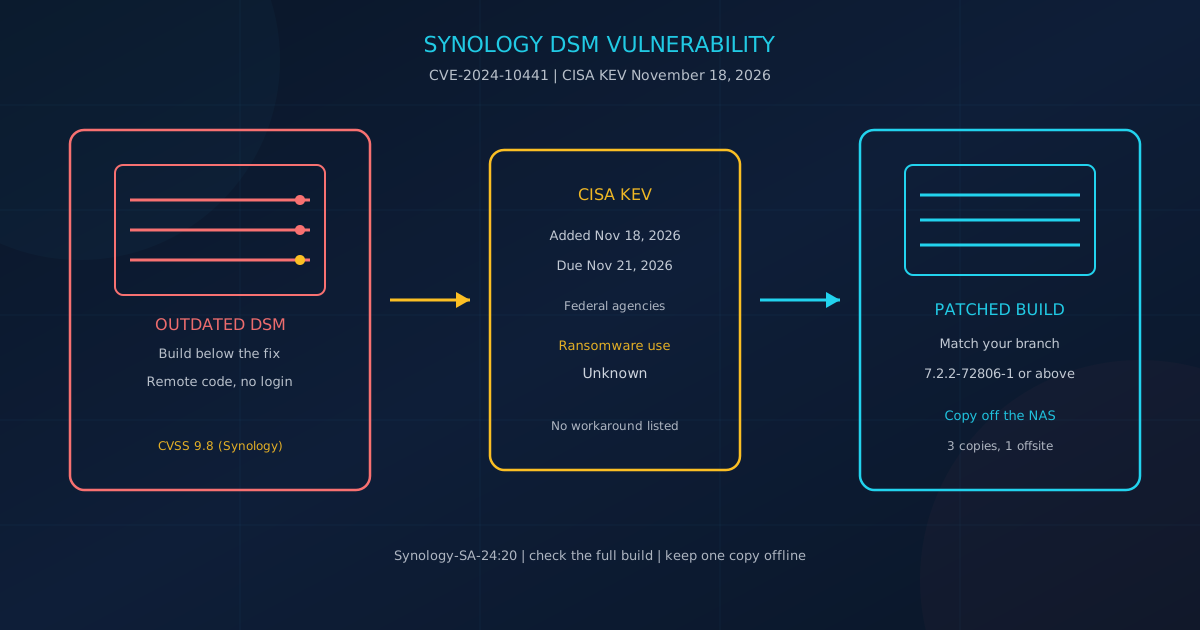
The Synology DSM vulnerability CVE-2024-10441 lets a remote attacker run code on DiskStation Manager, and the U.S. Cybersecurity and Infrastructure Security Agency (CISA) added it to the Known Exploited Vulnerabilities catalog on November 18, 2026. Synology advisory Synology-SA-24:20 calls it an improper encoding or escaping of output flaw in the system plugin daemon that allows remote attackers to execute arbitrary code via unspecified vectors. Synology rates it critical, with a CVSS 3.1 base score of 9.8. The National Vulnerability Database records that Synology score.
Read the full DSM build today and install the fixed release for that branch. The advisory lists no workaround. Private firms in Canada and the United States are not bound by the federal due date. CISA's November 18 alert still says all organizations should prioritize catalog entries.
What is the Synology DSM vulnerability?
CVE-2024-10441 is the critical item in Synology-SA-24:20, published November 5, 2024 and last updated March 28, 2025. Synology calls it an improper encoding or escaping of output flaw in the system plugin daemon that lets remote attackers execute arbitrary code via unspecified vectors. Synology's CVSS 3.1 base score is 9.8. NVD records that score and published the record on March 19, 2025. The advisory's mitigation field says None.
Synology's vector, CVSS:3.1/AV:N/AC:L/PR:N/UI:N/S:U/C:H/I:H/A:H, is a network attack with no password and no click. Only this CVE from the advisory is on the catalog. Feed version 2026.11.18 sets the due date at November 21, 2026, forensic triage to Yes, and ransomware campaign use to Unknown. NVD's CISA note of November 19, 2026 marks exploitation active and technical impact total.
On October 29, 2026, Synology said it "has identified threat actors exploiting a vulnerability patched in December 2024 to target devices running outdated versions of DSM." Those attacks "aim to encrypt data and extort ransom." The statement points to Synology-SA-24:20 and does not name this CVE or a ransomware family. The Hacker News and Security Affairs (November 19, 2026) report C3RB3R ransomware.
Which DSM versions does Synology say to update?
Update any NAS whose build is below its row in Synology-SA-24:20. The fixed releases are 7.2.2-72806-1, 7.2.1-69057-6, 7.2-64570-4, 7.1.1-42962-7, and 6.2.4-25556-8, each or above. The CVE-2024-10441 sentence names BeeStation OS before 1.1-65374 and DSM before the three 7.2-family builds. DSM 7.1 and DSM 6.2 stay on the table because the bulletin also covers the other two CVEs. Synology's October 29, 2026 statement points at that whole advisory.
| Product | Fixed release | Table severity | Named in CVE-2024-10441 |
|---|---|---|---|
| DSM 7.2.2 | 7.2.2-72806-1 or above | Critical | Yes |
| DSM 7.2.1 | 7.2.1-69057-6 or above | Critical | Yes |
| DSM 7.2 | 7.2-64570-4 or above | Critical | Yes |
| DSM 7.1 | 7.1.1-42962-7 or above | Critical | No. CVE-2024-50629 names it |
| DSM 6.2 | 6.2.4-25556-8 or above | Moderate | No. CVE-2024-10445 names it |
| BeeStation OS 1.0 and 1.1 | 1.1-65374 or above | Critical | Yes, in Synology-SA-24:23 |
Compare the full string. A 7.2.2 build without "-1" is still below 7.2.2-72806-1. Synology-SA-24:23 moves BeeStation OS to 1.1-65374 or above. If the first number is newer than 7.2.2, install any important update offered and record the build. Our IT asset inventory guide says you cannot patch a system missing from the list.
How do you check the DSM version and install the update?
Synology's version check article gives three methods. Open Control Panel, Update and Restore, DSM Update, and read Current DSM version. Or open Control Panel, Info Center, General. On the same local network, open find.synology.com and read Version. Use a local sign-in if QuickConnect is the only way you usually reach the box.
The DSM update help says updates only move forward, are irreversible, and do not affect the data. Back up first. For a major update, click Download, then Update Now. "Automatically install important updates" covers security fixes. The latest-updates option stays on the current DSM version and will not jump major versions by itself. Read the build again after restart.
If nothing is offered and the build is still below the row, use Manual DSM Update with the file for that model from Synology Download Center. If no file meets the row, keep management ports off the internet. Our patch cadence guide says to use the KEV catalog as an input to prioritization, with an internet-reachable catalog flaw in the first queue.
Why does an internet-reachable NAS need more than a patch?
Synology's NAS security article says the product is designed to be reached over the internet, then says to open public ports only for services you need. For remote DSM management, it says to use a VPN instead of exposing management ports to the internet. QuickConnect reaches the NAS over the internet without port forwarding. That is reachability. Synology does not say this CVE travels through QuickConnect. The CVE text says unspecified vectors.
That article lists default ports HTTP 5000, HTTPS 5001, and SSH 22. Forwarding them publishes the login page. CISA's catalog action says to judge each asset's internet exposure, and the November 18 alert calls this kind of flaw a frequent attack vector. Synology also says ransomware can encrypt or delete NAS files and demand a ransom. The patch does not show whether the box was already exposed, or whether a second copy exists off the NAS.
If nobody tracks DSM advisories, Cyber Unit's cybersecurity page describes vulnerability management as automatically patching operating systems and third-party applications. The managed IT page lists patching, vulnerability management, backup monitoring, and quarterly restore testing. That is a description of those pages, not a compliance claim.
Which Synology settings should you turn on this week?
Run Security Advisor after the update. Synology's security article calls it a built-in scan of the NAS and of DSM settings. The security quick start says the scan covers malware, system, account, network, and update. Then deactivate the default admin account. Synology's admin article, for DSM 6.2.4 and above, quotes this notice: the default account "admin" is vulnerable to brute-force attacks, which may lead to ransomware attacks.
- Second factor. DSM 7: Options, Personal, Security, 2-Factor Authentication. DSM 6.2: Options, Personal, Account, Enable 2-step verification.
- Auto Block. Blocks an IP after failed logins to DSM, SSH, FTP, WebDAV, and File Station. DSM 7: Control Panel, Security, Protection. DSM 6.2: Control Panel, Security, Account.
- Firewall. Control Panel, Security, Firewall. Allow trusted addresses and deny the rest. Sign in by an allowed IP, not QuickConnect.
- Ports and packages. Change 5000, 5001, and 22 if they are published. Package Center can Stop an unused package. Prefer FTPS or SFTP over FTP. Deactivate admin only after another administrator can sign in (DSM 7: Control Panel, User and Group, User, Info).
Why should the NAS not be your only backup?
Synology's backup article, updated May 8, 2026, says to follow 3-2-1: 3 copies, 2 storage mediums, 1 offsite. A snapshot on the same disks is not that offsite copy, and Synology says a drive failure can still destroy a local copy. CISA's small-business page adds encryption and offline copies. The Cyber Centre's ITSAP.00.099 (January 2026) says to store backups offline, with no link to the internet or local networks, because connected backups can be infected.
Immutable snapshots stay on the NAS. In Snapshot Replication, the protection period Synology recommends is 7 to 14 days. Once selected, "this snapshot cannot be removed by any means" until it ends. Shared folder snapshots need Btrfs, and only some models offer them or WriteOnce. CISA separately says to test a restore that can roll back at least seven days.
- Snapshot only. Fast, and still on the same disks. Not the offsite copy.
- Second NAS in the same office. A second medium, not offsite unless it sits somewhere else.
- USB that leaves. Synology says USB Copy ejects the drive when finished. It does not back up apps. Unplugged, it is a disconnected file copy.
- Hyper Backup off site. Synology documents another NAS or cloud as a different destination. Restore one file.
Our disaster recovery guide says offline backups "remain unconnected to your organizations' systems and are only connected when they are required" and "remain unaffected by many cyber threats, like ransomware." Files that exist only on the NAS are not three copies.
What should you check today?
Work down this list. The first two show whether the fixed build is installed. The patch cadence guide, citing ITSM.10.096, aims at 48 hours for an internet-facing or catalog-listed fix. CISA's federal due date is November 21, 2026. That date binds federal civilian agencies, not a private firm.
- Record the model and the full build from Control Panel or find.synology.com.
- If the build is below the row, install the fix, turn on important updates, and read the build again.
- List outside access: QuickConnect, ports 5000, 5001, or 22, or a VPN. Move open management to the VPN.
- Confirm a second administrator, then deactivate admin.
- Turn on the second factor, Auto Block, and a firewall deny for unmatched traffic.
- Stop unused packages and close router ports with nothing behind them.
- Name three copies: live files, a second medium, and one copy off-site or unplugged.
- Restore one file from that copy, far enough back to cover seven days.
- Run Security Advisor and keep the result with the build number.
If names look wrong or a note demands payment, skip the update. It restarts the NAS, and the Cyber Centre says not to power down an isolated device while you still need the evidence.
What should you do if you think the NAS was hit?
Disconnect the NAS and leave it powered on. ITSAP.00.099 (January 2026) says to take devices offline so ransomware does not spread, and not to power down once isolated, so forensic evidence is preserved. CISA's #StopRansomware Guide says to isolate impacted systems. Unplug the cable or remove Wi-Fi if you cannot take the network offline. Power down only if you cannot disconnect another way, because that destroys evidence in memory. Do not wipe or reinstall as the first move.
The Ransomware Playbook (ITSM.00.099) lists wipe and reinstall only after isolation, a police report, and credential changes. Photograph the screen and the DSM build. Do not delete the note. CISA says to examine logs. Do not change a password the backup needs. The playbook says not to change credentials required to restore one. Our first-hour checklist says to isolate, not to power off, and not to delete files or clean machines until preservation is done.
Then report. In Canada, the Cyber Centre page says to call local police in an emergency, and the form covers a business in Canada. The Canadian Anti-Fraud Centre says to report online and to contact local police. Weekday phone: 1-888-495-8501. In the United States, CISA says one report to the FBI, CISA, or the Secret Service notifies the others. The FBI IC3 is the hub for cyber-enabled crime. File even if you are unsure. CISA also says to consider local police. Our retainer guide says a provider does not replace a government report, and a government report does not replace the provider.
Paying is a separate decision, and this is not legal advice. ITSAP.00.099 says paying will not guarantee access to encrypted data. Check the unplugged copy first. If you are unsure the NAS, the copies, and the updates are covered, a free cybersecurity assessment is the next step. The assessment page calls it a free 5-minute version that "covers 22 security areas and runs entirely in your browser, with no signup required."
This article is intended for general informational purposes only and does not constitute professional security, legal, or compliance advice. Details about CVE-2024-10441 are based on Synology-SA-24:20, Synology-SA-24:23, Synology's October 29, 2026 statement, CISA's November 18, 2026 alert and Known Exploited Vulnerabilities catalog feed version 2026.11.18, the NVD CVE record, and reporting from The Hacker News and Security Affairs as of November 20, 2026. Those details may change. Organizations should consult qualified cybersecurity professionals before acting on any specific indicator of compromise or making operational changes based on this article.