
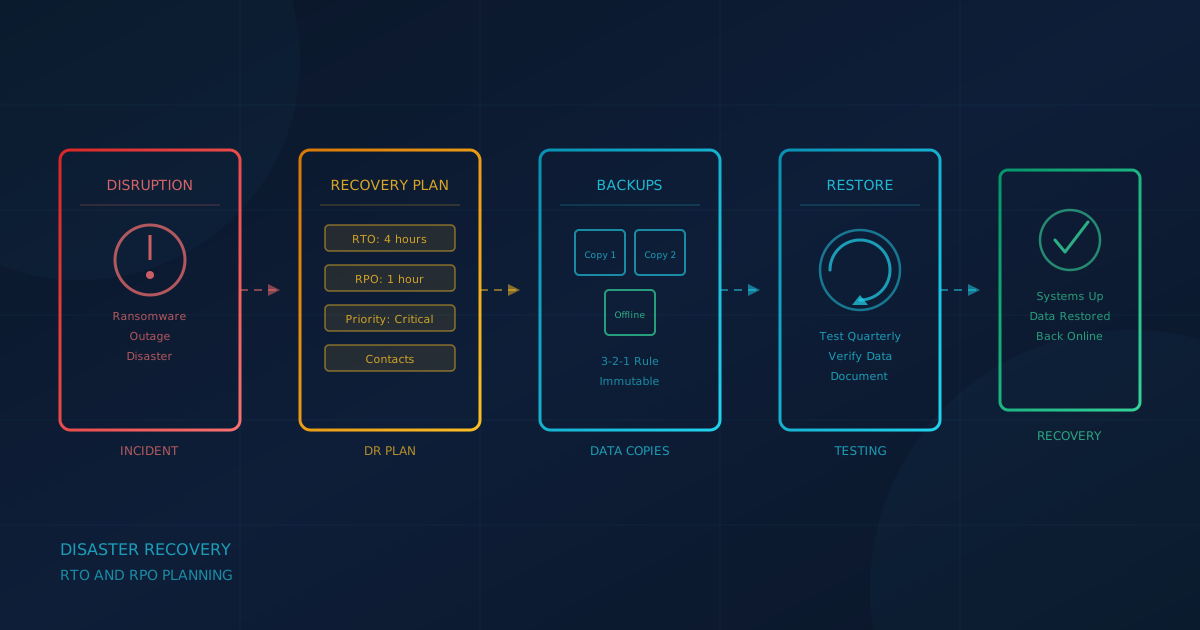
A disaster recovery plan defines how your business restores critical IT systems after an outage, cyberattack, or other disruptive event. According to NIST SP 800-34 Rev. 1, Contingency Planning Guide for Federal Information Systems, a contingency plan provides established procedures to recover information systems following a disruption. For small businesses in Canada and the United States, the core concepts apply even without a federal compliance mandate: know what you need to recover, how quickly, and how much data loss you can tolerate.
This guide explains how to build a disaster recovery plan using the recovery time objective (RTO) and recovery point objective (RPO) framework, drawing on guidance from NIST, the Canadian Centre for Cyber Security (CCCS), and CISA.
What are RTO and RPO, and why do they matter?
Recovery Time Objective (RTO) and Recovery Point Objective (RPO) are the two numbers that shape every disaster recovery decision. According to the NIST CSRC Glossary, RTO is "the overall length of time an information system's components can be in the recovery phase before negatively impacting the organization's mission or mission/business processes." In plain terms: how long can this system be down before it hurts the business?
RPO, according to the NIST CSRC Glossary, is "the point in time to which data must be recovered after an outage." In plain terms: how much data can you afford to lose? If your RPO is four hours, your backups must run at least every four hours. If your RPO is 24 hours, nightly backups may suffice.
These two values drive backup frequency, backup technology, and recovery procedures. Different systems can have different RTOs and RPOs based on their criticality to the business.
How do you identify critical systems and data?
Before setting RTO and RPO, you need an inventory of what you are protecting. The Canadian Centre for Cyber Security's backup guidance (ITSAP.40.002) recommends identifying and prioritizing business-critical data: "data that you need to function and to keep the lights on."
For most small businesses, critical systems include:
- Email and communication: Microsoft 365, Google Workspace, phone systems
- Financial systems: accounting software, payroll, invoicing
- Line-of-business applications: CRM, ERP, industry-specific tools
- File storage: shared drives, cloud storage, document management
- Customer data: databases, client records, order history
For each system, document who uses it, how often, and what happens if it is unavailable. This assessment determines the priority order for recovery.
How do you rank systems by business impact?
Not every system needs the same RTO. A public-facing e-commerce platform may need to be restored within hours. A historical archive may tolerate days of downtime. NIST SP 800-34 Rev. 1 uses the FIPS 199 security categorization (low, moderate, high impact) to prioritize recovery based on the potential effect of an outage on operations, finances, and reputation.
A simple approach for small businesses:
- Critical (RTO under 4 hours): systems where downtime stops revenue or creates safety, legal, or regulatory risk
- Important (RTO under 24 hours): systems that affect productivity but can be worked around temporarily
- Standard (RTO under 72 hours): systems that can wait while critical functions are restored first
The same framework applies to RPO. A system that captures orders every minute may need near-continuous replication. A system that changes weekly may tolerate a daily backup.
What backup approach supports your RTO and RPO?
Backup design must match the recovery objectives you set. The CCCS (ITSAP.40.002) recommends the 3-2-1 rule: three copies of your data, on two different media types, with one copy kept offsite. It also emphasizes keeping at least one backup offline: "offline backups (sometimes called cold backups) remain unconnected to your organizations' systems and are only connected when they are required. Because these offline backups are not connected, they remain unaffected by many cyber threats, like ransomware."
The CISA #StopRansomware Guide makes the same point: "Maintain offline, encrypted backups of critical data, and regularly test the availability and integrity of backups in a disaster recovery scenario... It is important that backups are maintained offline, as many ransomware variants attempt to find and subsequently delete or encrypt accessible backups to make restoration impossible unless the ransom is paid."
Immutable backups (backups that cannot be modified or deleted for a defined period) provide additional protection. Cloud providers offer immutable storage options, including Azure immutable blob storage and AWS S3 Object Lock. The key is that ransomware cannot encrypt or delete a backup it cannot reach or modify.
What about Microsoft 365 and Google Workspace data?
Cloud productivity platforms operate under a shared responsibility model. Microsoft and Google are responsible for infrastructure availability and security. We recommend treating backup and recovery from accidental deletion, ransomware, and compromised accounts as your responsibility.
According to Microsoft's shared responsibility documentation, "For all cloud deployment types, you own your data and identities. You're responsible for protecting the security of your data and identities." The Microsoft Services Agreement states: "We recommend that you regularly backup Your Content and Data that you store on the Services or store using Third-Party Apps and Services."
Google's position is similar. According to the Google Vault FAQ, "Vault isn't designed to be a backup or archive tool... Restoring data from Vault export files is hard. Vault doesn't have any automated recovery tools."
Native features like recycle bins, version history, and retention policies are not backups. They help recover from accidental deletion, but they do not protect against ransomware that encrypts files (the encryption syncs) or an attacker who empties the recycle bin. Use an independent backup solution that stores data outside the primary tenant and test restores regularly.
We covered related backup considerations in our article on backup assumptions that often fail.
How do you write the disaster recovery plan?
A written plan ensures that recovery does not depend on a single person's memory. According to NIST SP 800-34 Rev. 1, a contingency plan should include:
- Roles and responsibilities: who declares a disaster, who leads recovery, who communicates with stakeholders
- Contact information: IT provider, backup vendor, insurance carrier, key employees (with out-of-band contact methods)
- System inventory: critical systems, their RTO and RPO, and their recovery order
- Recovery procedures: step-by-step instructions for restoring each system from backup
- Alternate processing locations: where you will work if the primary site is unavailable (cloud infrastructure simplifies this for many businesses)
- Testing schedule: how often you will test the plan and who is responsible
The CCCS backup guidance (ITSAP.40.002) adds: "outlining how your recovery process will be performed including roles and responsibilities." Keep a printed copy and an offline digital copy. If ransomware encrypts your network, you need the plan to be accessible somewhere else.
How often should you test restores and run a recovery exercise?
The CCCS (ITSAP.40.002) recommends "testing the process of recovering from your backup on a routine basis or as part of your scheduled verification process." Untested backups are assumptions. Testing proves they work.
A restore test verifies that backup files are not corrupted and can be recovered to a usable state. As a practical baseline, we suggest testing restores quarterly for critical systems. A full DR exercise walks through the entire plan, simulating an outage and recovering systems in priority order. We recommend at least an annual tabletop exercise for most small businesses.
Document test results. If a restore takes longer than expected, adjust your RTO assumptions or improve the process. If data is missing, adjust backup scope. Testing reveals gaps before a real disaster does.
We discussed the importance of backup testing in our article on how to ransom-proof your backups.
How is disaster recovery different from incident response?
Disaster recovery and incident response are related but distinct. Incident response focuses on detecting, containing, and eradicating an active threat. Disaster recovery focuses on restoring systems and data to a functional state after the incident is contained.
Both are part of business continuity, but the timing differs. Incident response happens during the event: isolating infected machines, preserving evidence, stopping the spread. Disaster recovery happens after containment: rebuilding systems, restoring data, returning to normal operations. The two plans should reference each other but serve different purposes.
We covered incident response considerations in our article on incident response planning before something happens.
What roles and contacts should the plan include?
Key contacts include the DR coordinator, IT lead or managed service provider, business owner, communications lead, cyber insurance breach hotline, and legal counsel. Store contact information in multiple places: printed copies, personal phones, and an out-of-band channel that does not depend on your corporate network.
What should small businesses do today?
Building a disaster recovery plan does not require enterprise resources. Start with these steps:
- Inventory critical systems: list the applications and data your business depends on
- Set RTO and RPO for each: decide how long each can be down and how much data loss is acceptable
- Confirm backup coverage: verify that backups exist, run successfully, and include everything critical (including cloud data)
- Ensure at least one offline copy: follow the CCCS recommendation for an offline backup that ransomware cannot reach
- Document the plan: write down roles, contacts, and recovery steps
- Test a restore: recover at least one critical system to confirm the process works
Cyber Unit's managed IT services include backup monitoring, quarterly restore testing, and disaster recovery planning as part of an ongoing managed relationship. If you do not have internal IT resources to maintain and test backups, a managed provider can take that recurring work on.
A question to ask your IT lead this week
If our systems went offline tomorrow, what is the maximum downtime we could tolerate before it affects customers, and do our backups support that recovery time?
If the answer is uncertain, or if your backups have never been tested, that is the gap to address before a real incident forces the question. A 30-minute conversation about RTO and RPO now is far less expensive than improvising during a crisis.
If you are unsure where your business stands on backup readiness, disaster recovery, or the controls that prevent outages in the first place, a free cybersecurity assessment takes under 5 minutes and covers 22 security areas including backups. It runs entirely in your browser with no signup required.
This article is intended for general informational purposes only and does not constitute professional security, legal, or compliance advice. Guidance is based on NIST SP 800-34 Rev. 1, the Canadian Centre for Cyber Security's ITSAP.40.002, the CISA #StopRansomware Guide, and vendor documentation as of the date of publication and may evolve. Organizations should consult qualified IT and cybersecurity professionals before making operational changes based on this article.