
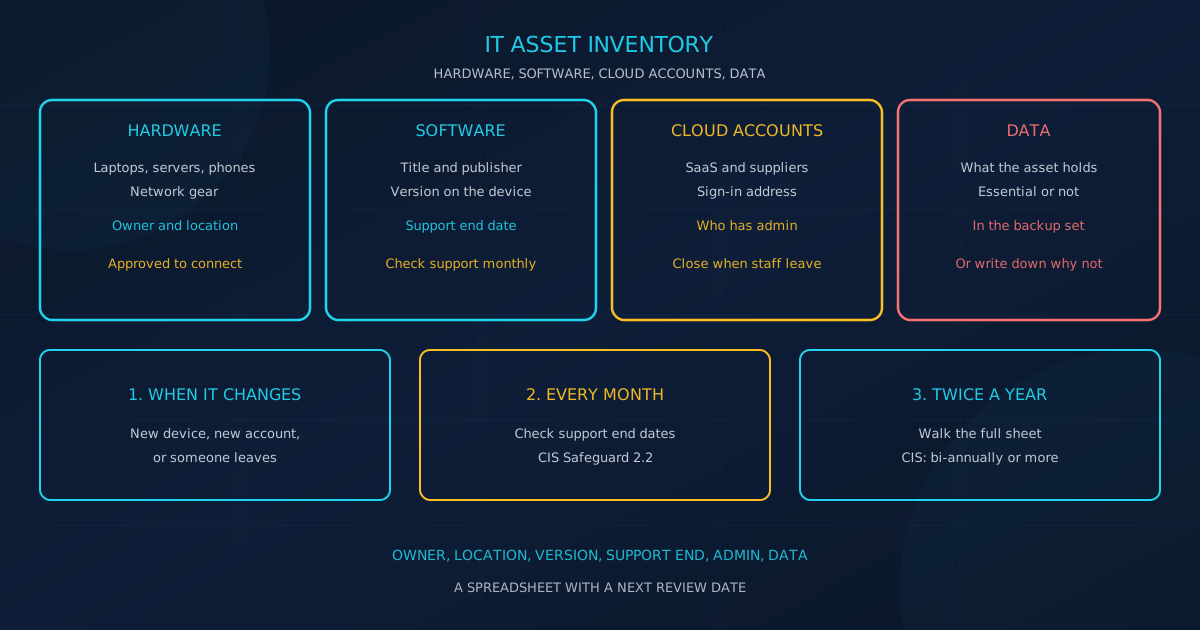
IT asset inventory is the working list of hardware, software, cloud accounts, and the data those things hold. CIS Critical Security Controls v8.1, in the August 2024 guide, defines Control 1 (Inventory and Control of Enterprise Assets) as the work of knowing "the totality of assets that need to be monitored and protected within the enterprise." A small or mid-sized business in Canada or the United States can start with a spreadsheet and one named owner. You cannot patch, back up, or describe a system that is missing from that list.
Control 2 (Inventory and Control of Software Assets) covers operating systems and applications so that "unauthorized and unmanaged software is found and prevented from installation or execution." NIST Cybersecurity Framework (CSF) 2.0, dated February 26, 2024, places the same job in the Identify function, under Asset Management (ID.AM).
Why does the list come before patching?
Because the baselines written for smaller organizations start by naming what is in scope. On the CISA Cyber Essentials page, the action for leaders under Your Systems is to maintain inventories of hardware and software assets "to know what is in play and at-risk from attack." The Canadian Centre for Cyber Security's Baseline Cyber Security Controls for Small and Medium Organizations V1.2 says to list the systems and assets in scope, and to record the reason for anything left out.
V1.2 describes those assets as "all computers, servers, network devices, mobile devices, information systems, applications, services, cloud applications, etc. that an organization uses to conduct its business." It strongly recommends counting them "whether owned, contracted, or otherwise used."
NIST CSF 2.0 splits the work into outcomes you can check:
- ID.AM-01: "Inventories of hardware managed by the organization are maintained."
- ID.AM-02: "Inventories of software, services, and systems managed by the organization are maintained."
- ID.AM-04: "Inventories of services provided by suppliers are maintained."
- ID.AM-07: "Inventories of data and corresponding metadata for designated data types are maintained."
- ID.AM-08: "Systems, hardware, software, services, and data are managed throughout their life cycles."
What should an IT asset inventory record?
Record enough to find the asset, name a person, and see if it is still supported. CIS Safeguard 1.1 in Controls v8.1 says the hardware inventory records the network address if it is static, the hardware address, the machine name, the enterprise asset owner, the department, and whether the asset is approved to connect.
The Cyber Centre's ITSM.10.004 (effective April 12, 2023) says a full record shows what you have, where it is located, and who is responsible for it. Fill these fields before you add anything else:
- Owner and department. Safeguard 1.1 names the enterprise asset owner and the department. ITSM.10.004 says the record should show "who is responsible for them."
- Location. CISA's August 17, 2020 toolkit says to "Know the physical location and user of the hardware". For a cloud account, write the sign-in address.
- Operating system and version. Safeguard 2.1 documents title, publisher, and, where appropriate, "version(s)". The Home and Pro lifecycle page calls 22H2 the final version of Windows 10.
- Warranty and end of support. ITSM.10.004 says tools can store warranty and support agreements. Safeguard 2.2 limits authorization to currently supported software and says to check support "at least monthly, or more frequently."
- Who has admin access. BC.12.1 says to "restrict administrator privileges to an as-required basis." A Windows local administrator account can install and remove software, change system settings, disable security tools, and access all files.
- Data it holds. ITSM.10.004 says to record "what data they contain". Use a short label such as customer records, payroll, email only, or none.
Safeguard 1.1 says mobile device management tools can support the phone list. Our guide explains how to enroll company phones, tablets, and laptops.
How do you find unmanaged devices and unapproved accounts?
CIS Safeguard 1.1 includes assets "regularly connected to the enterprise's network infrastructure, even if they are not under control of the enterprise." Control 2 exists so unauthorized and unmanaged software is found. CISA's Cyber Essentials page tells leaders to remove unsupported or unauthorized hardware and software, and to maintain inventories of network connections, "user accounts, vendors, business partners, etc."
- Personal devices. A home laptop or phone that opens work email is connected even if the company did not buy it. List it as not yet approved until someone decides.
- Unapproved software and SaaS. Software as a service (SaaS) is an application you sign into on the web. ITSM.10.004 says to track applications, cloud subscriptions, and SaaS subscriptions, and that only approved and secure software should be installed on work devices.
- Forgotten cloud accounts. ID.AM-02 and ID.AM-04 cover services you manage and services suppliers provide. A contractor's old project folder is still an account. BC.12.3 says to "remove accounts and/or functionality when employees no longer require these for their tasks."
In one week, ask what people use for email, files, and chat, then export directory users, any device list, and recent software charges. Safeguard 1.2 says to address unauthorized assets weekly: remove them, deny remote connection, or quarantine them.
What should you do about end-of-support software?
Microsoft states that Windows 10 reached end of support on October 14, 2025. The support article says those PCs still function, but Microsoft no longer provides technical support, software updates, or "security updates or fixes". The release page applies that date to Home, Pro, Enterprise, Education, Enterprise 2015 LTSB, and IoT Enterprise LTSB 2015.
Other Long-Term Servicing Channel releases follow different policies, so check the edition before you treat every Windows 10 PC the same. V1.2 says to replace "software and hardware that no longer receive updates because the vendor ended support (i.e. products past their end of life)." CIS Safeguard 2.2 says only currently supported software is authorized. If you must keep unsupported software, document mitigating controls and residual risk acceptance. Otherwise mark it unauthorized. CISA says to replace unsupported operating systems, applications, and hardware. On the sheet, choose upgrade, a dated exception with a named approver, or removal.
The release page calls Extended Security Updates a paid program for individuals and organizations, with the option of security updates for enrolled PCs. The support article says the consumer program can protect a device until October 12, 2027, so read the terms for the enrollment you use. Our patch management cadence guide states the limit: unsupported software never enters that queue, because there is no vendor fix.
How does the list support patching, offboarding, and backups?
V1.2 control BC.2.1 says organizations should "enable automatic patching for all software and hardware OR establish full vulnerability and patch management solutions." BC.7.1 says to back up systems that contain essential business information, and to be able to restore them. BC.12.3 says to remove accounts and functionality when people no longer need them.
- Patching. Monthly, sort by support end and by approved or not. Past-support rows are upgraded, excepted, or removed. Supported rows show a current version or a note that updates are automatic. Our scan guide notes that NIST's SP 800-115 describes scanning as a way to identify hosts and their attributes, such as operating systems and open ports. A scan can catch a missing device. It does not name the owner or the data.
- Offboarding. The sheet is the list of devices to collect and accounts to close, including a SaaS row one team added. V1.2 says to revoke accounts when employees leave. Do that in that week, not at the next twice-yearly review.
- Backups. Mark whether each system with essential business information is backed up. V1.2 says to decide what is essential, to be able to restore it, and to consider offline copies at a secure offsite location or write down why not.
- Questionnaires. Read the cyber insurance form you received and answer from the sheet. The renewal article says "Answering the questionnaire accurately requires more than memory." It also says: "Before your renewal meeting, assemble these artifacts so you can answer each question with confidence". If the sheet cannot support an answer, go find the fact.
If the list is longer than the team can keep current, Cyber Unit's managed IT services include IT asset management: hardware inventory, warranty tracking, lifecycle management, and refresh planning. On the cybersecurity services page, vulnerability management is described as automatically patching operating systems and third-party applications, with patch scheduling and update monitoring.
How often should you review the list?
CIS Safeguard 1.1 says to "Review and update the inventory of all enterprise assets bi-annually, or more frequently." Safeguard 2.1 sets that same bi-annual mark for the software inventory. Safeguard 2.2 says to review the software list to verify support "at least monthly, or more frequently." ITSM.10.004 says any new asset brought into the infrastructure "should be immediately added to the inventory."
- The week something changes. New laptop, new signup, replacement, or departure. ITSM.10.004 says outdated or obsolete assets create vulnerabilities that threat actors can exploit, so do not wait for the calendar review.
- Once a month. Sort by support end date and by anything not approved. That is Safeguard 2.2.
- Twice a year. Walk rows against current staff, devices at the office and at home, and admin names. That is the bi-annual review in Safeguards 1.1 and 2.1. Sooner if you add a site or change providers.
Which columns belong on a starter spreadsheet?
Use one row per asset and the fields already named above. NIST CSF 2.0 ID.AM-05 says "Assets are prioritized based on classification, criticality, resources, and impact on the mission," so add a plain priority column. High means the row holds essential business information.
A starter header row:
- Asset name
- Type (hardware, software, cloud account, or data set)
- Owner and department
- Location or sign-in address
- Hostname, serial number, or account ID
- Operating system or software version
- Publisher or vendor
- Approved (yes or no)
- Admin accounts
- Data it holds
- Warranty end or support end
- In the backup set (yes, no, or not applicable)
- Priority (high, normal)
- Last reviewed date
- Exception note and expiry, if support has ended and the asset stays
Add a status from ITSM.10.004: in use, in storage, checked out, available, or retired. A retired laptop that still holds customer files is not done.
What can you finish in 30 days?
Thirty days is enough for a first sheet with owners and a next review date. ITSM.10.004 (effective April 12, 2023) calls this work "an ongoing process and not a one-time project." Name one person on day one. A provider may fill versions, but someone in the business owns the list.
- Days 1 to 7: List desktops, laptops, phones with work email, servers, firewalls, switches, and printers, including personal devices that connect. Record owner, location, and whether the company owns each one.
- Days 8 to 14: Add the operating system and version, then cloud and SaaS accounts people name and software charges show. Record publisher, sign-in address, and admin.
- Days 15 to 21: Label the data, look up support dates (start with Windows 10 still in use after October 14, 2025), list admin accounts, and remove accounts for people who left.
- Days 22 to 30: Mark backups and choose upgrade, exception, or removal for anything past support. Schedule the monthly check and the twice-yearly walk. Read any cyber insurance questionnaire beside the sheet.
If you want a first read on the basics, this free 5-minute version covers 22 security areas and runs entirely in your browser, with no signup required.
This article is intended for general informational purposes only and does not constitute professional security, legal, insurance, or compliance advice. Control names and wording are drawn from CIS Critical Security Controls v8.1 (August 2024 guide and the CIS Controls Navigator), the Canadian Centre for Cyber Security Baseline Cyber Security Controls for Small and Medium Organizations V1.2, CCCS publication ITSM.10.004 (effective April 12, 2023), NIST Cybersecurity Framework 2.0 (February 26, 2024), CISA Cyber Essentials and the August 17, 2020 Cyber Essentials Toolkit chapter on systems, and Microsoft's Windows 10 support, lifecycle, and release pages as checked for this article. Recommended practices are not a promise of any particular security outcome. Organizations should consult qualified cybersecurity professionals before changing how they track or retire technology.