
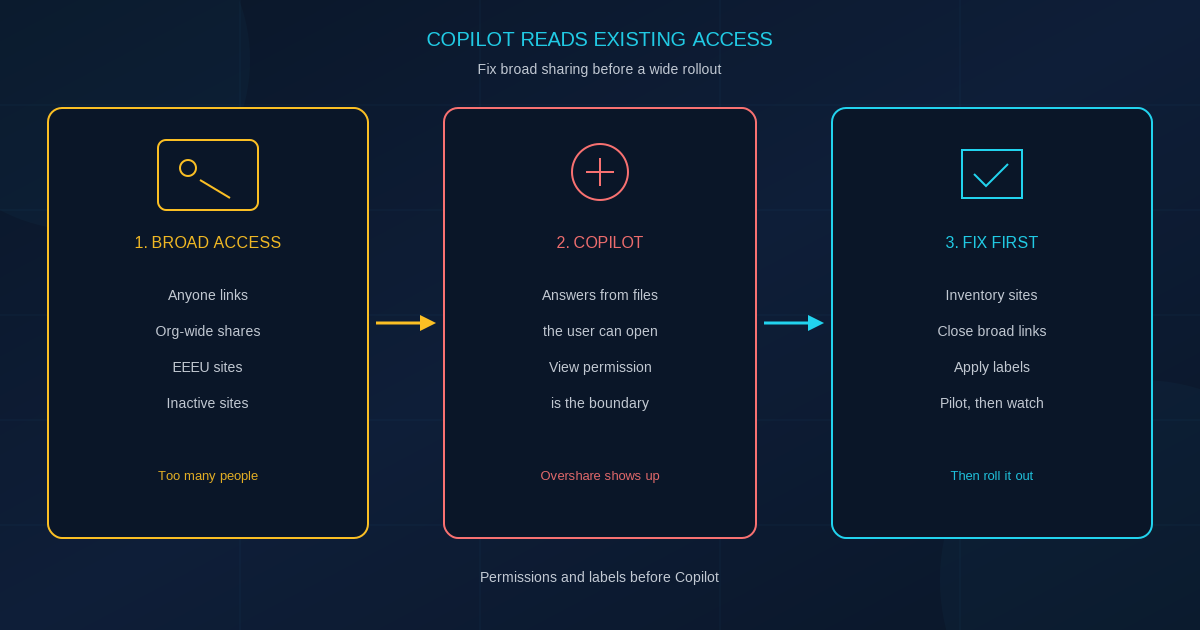
Microsoft 365 Copilot security starts with a permission fact: Copilot answers from data the signed-in person can already open. Microsoft's page Data, Privacy, and Security for Microsoft Copilot states that Copilot "only surfaces organizational data to which individual users have at least view permissions." The companion page on data protection and auditing says: "If content is already overshared, Copilot can surface it to anyone who has access." For a small or mid-sized business in Canada or the United States, the work before a wide rollout is permissions and labelling hygiene.
Microsoft's documentation titles that privacy page for Microsoft Copilot. The steps below follow those pages, the Cyber Centre's December 2025 generative AI note, and NIST's AI Risk Management Framework.
What does Microsoft 365 Copilot security depend on?
Microsoft 365 Copilot security follows the access the signed-in person already has. Microsoft's Data, Privacy, and Security page states that Copilot "only surfaces organizational data to which individual users have at least view permissions." The data protection page says "Permissions come first" and that Copilot "only summarizes or references content that the user is already authorized to access." If content is already overshared, that page says Copilot can surface it to anyone who has access.
Copilot "accesses content and context through Microsoft Graph" and can ground answers in "user documents, emails, calendar, chats, meetings, and contacts." Semantic Index "honors the user identity-based access boundary so that the grounding process only accesses content that the current user is authorized to access." Shared channels count: "This includes permissions you give to users outside your organization through inter-tenant collaboration solutions, such as shared channels in Microsoft Teams."
Copilot "was added as a covered workload in the data residency commitments in Microsoft Product Terms on March 1, 2024," and "Customers outside the EU may have their queries processed in the US, EU, or other regions." "The responses that generative AI produces aren't guaranteed to be 100% factual." Users "should still use their judgment when reviewing the output before sending them to others."
Which SharePoint sharing habits show up in Copilot answers?
Broad links and wide site access are the habits Microsoft tells administrators to find first. The get-ready guide for Copilot with SharePoint Advanced Management says that, by default, SharePoint sets sharing settings to the most permissive option. Its Everyone except external users (EEEU) report lists the top 100 sites shared with the entire organization in the past 28 days. Sharing-link reports for those 28 days list the most "Anyone" links, "People in the organization" links, and "Specific people" links.
Microsoft's sharing settings article says Anyone links let "anyone who has the link" open files "without authenticating," and that forwarded Anyone links "work internally or externally, but you can't track who has access to shared items or who has accessed shared items." Our anyone-with-the-link guide quotes Microsoft: people using an Anyone link "don't have to authenticate, and their access can't be audited." The Microsoft 365 security checklist says anonymous sharing should be restricted or turned off for most businesses.
"People in the organization" is the internal version. The sharing settings article says that if those links are forwarded, "they work for anyone in the organization." The EEEU report is Microsoft's name for content shared with the whole organization except external users. People who can open that file sit inside the view-permission boundary Copilot uses. The Copilot controls page says: "Remove organization-wide site access as needed."
The get-ready guide lists "inactive or ownerless sites" and "ownerless, inactive, or unreviewed sites." The controls page says to archive or delete them. Archived sites stay inaccessible until reactivated, and "Copilot isn't trained on archived content." Guest access follows the same sites: the sharing setting "applies to all site types, including sites connected to Microsoft 365 groups and teams," and "Groups and Teams guest sharing settings also affect connected SharePoint sites."
Microsoft's Restricted SharePoint Search page uses fictional Contoso Electronics: a budgeting site "might be open to some users who aren't allowed to see it, such as Alex," and "When Alex asks Copilot for some budgeting information, Copilot gets information from the budgeting site."
What should a small business fix before rolling Copilot out?
Clean up access before you assign Copilot widely. Microsoft's get-ready guide says to run a Content Management Assessment, then: "Rerun the assessment every 30 days to track your progress and address any new issues." Work in this order: inventory, broad links, permissions, labels, a reviewed pilot, user guidance, and monitoring.
1. Inventory the sites
Open Advanced Management and select Start assessment. Microsoft says that hub finds potentially overshared content and inactive or ownerless sites. Read the site permissions baseline and the per-user site list, and note the owner. If the menu is missing, open Policies, then Sharing.
2. Find the broad links
Pull the EEEU report (the top 100 sites shared with the entire organization in the past 28 days) and the sharing-links reports for Anyone, People in the organization, and Specific people links in that window.
3. Fix the permissions
Set the organization sharing level. Anyone allows unauthenticated links. "Only people in your organization" turns external sharing off. OneDrive "can be more restrictive than the SharePoint setting, but not more permissive." Restricted Access Control limits a site to an Entra security group or a Microsoft 365 group: "Users who aren't part of the specified group can't access the site or its contents, even if they had prior access through permissions or a link." Restricted Content Discovery can "prevent content from appearing in Copilot or agentic experiences and in organization-wide search queries" while "leaving site permissions unchanged."
Restricted SharePoint Search is an allow list of "up to 100 SharePoint sites." Microsoft says it "isn't a security boundary and doesn't change any permissions on SharePoint sites," and "Starting July 31, 2026, new enablement is blocked." Recently opened sites, and sites shared in Teams or Outlook, can still appear off that list.
4. Label files, then pilot
Label payroll, customer lists, and board files first. NIST AI 600-1 (July 2024), action GV-1.2-002, says to evaluate generative AI "both prior to deployment and on an ongoing basis." Pilot with people whose sites you have reviewed. Tell them that "Copilot and agentic responses use existing SharePoint permissions," and have them read the citations.
5. Guide users, then monitor
Tell staff that answers come from files they can already open, and that a summary can be wrong. Our AI security checklist says to inventory the AI tools in use, "including the obvious ones" such as ChatGPT, Claude, and Copilot. Purview Audit then records who used Copilot, when, and which files the response used. "Audit records don't contain the text of prompts or responses." eDiscovery for that text is described with an A3/E3/G3 license. Activity explorer in Data Security Posture Management for AI is described with an A5/E5/G5 license. Our access reviews guide calls an access review a scheduled check of every account with access to your systems: who holds it, what it is for, and whether it is still needed. Conditional Access controls who can sign in to the Microsoft 365 tenant and under what conditions.
How do sensitivity labels change a Copilot summary?
A label limits what Copilot may quote from a file the person can already open. Microsoft's data protection page says content encrypted by a sensitivity label or by Azure Rights Management needs both VIEW and EXTRACT before Copilot summarizes it. If the user has VIEW but not EXTRACT, "Copilot doesn't summarize the content, but it can return a link so the user can open it outside Copilot."
Copilot and agents "don't currently recognize sensitivity labels that protect Teams meetings and chats." On files, "the label with the highest priority is shown" when several apply, and new content inherits it "where label inheritance is supported." A DLP policy "can keep Copilot from summarizing labeled files and emails." The controls page places "Microsoft Purview Data Loss Prevention for Microsoft Copilot and agents," which can prevent processing of certain sensitive files, on an A5/E5/G5 license. An A3/E3/G3 license on that page covers labels that ask the user to apply protection. Match the family the tenant has.
How does Copilot belong in an AI usage policy?
Write Copilot into the policy that covers every other generative AI tool, and add the permission rule Microsoft states for this product. In December 2025, the Canadian Centre for Cyber Security said in ITSAP.00.041 that an organization should "establish a plan that identifies policies on how AI should be used and the content that is allowed to be generated." NIST's AI Risk Management Framework 1.0 (January 2023) says trustworthy AI characteristics "are integrated into organizational policies, processes, procedures, and practices."
ITSAP.00.041 says: "Avoid providing PII or sensitive corporate data as part of the queries or prompts." It also says: "Sharing data trains AI models to then be potentially exploited or sold." Microsoft states: "Prompts, responses, and data accessed through Microsoft Graph aren't used to train foundation LLMs, including those used by Microsoft Copilot." Put both lines in the policy. NIST AI 600-1 (July 2024), action GV-1.4-002, says: "Establish transparent acceptable use policies for GAI that address illegal use or applications of GAI."
Our AI usage policy guide says to name what employees may not share: "customer data, financial records, authentication credentials, proprietary code, and anything subject to regulatory protection." Our shadow IT guide quotes NIST SP 800-215 on "cloud applications that are not authorized by the enterprise IT management." Whether a privacy statute adds a duty is a question for counsel.
When should a small IT team do this work, and when should it ask for help?
A SharePoint Administrator can change sharing settings without a new product. Microsoft's SharePoint Advanced Management prerequisites say the advanced reports arrive when at least one user has a Microsoft Copilot license, or with the SharePoint Advanced Management Plan 1 add-on, or with Microsoft 365 E7. Foundational reports on the controls page are described with an A3/E3/G3 license. The Data Loss Prevention block on Copilot processing is described with an A5/E5/G5 license.
- Do it this week if a SharePoint Administrator can read the site list, set the sharing level, and name an owner for each sensitive site.
- Use the reports if the prerequisites match. Named base licenses are Office 365 E3, E5, or A5; Microsoft 365 E1, E3, E5, or A5; and Microsoft 365 GCC, GCC-High, or DoD. One assigned Microsoft Copilot license is one path to SharePoint Advanced Management. Restricted site creation still needs the Plan 1 add-on.
- Check the license if Advanced Management is missing. Microsoft 365 Business Basic, Business Standard, and Business Premium are not named on that base-license list.
- Ask for help if nobody holds SharePoint Administrator, the site list runs for many pages, or owners are blank.
If nobody on staff lives in the SharePoint admin center, Cyber Unit's managed IT services include Microsoft 365 and Google Workspace administration. The cybersecurity services page says email security works with Microsoft 365 and Google Workspace, and that the team configures security settings and multi-factor authentication to harden the cloud environment.
When you want a plain starting point for the controls around this rollout, take the free cybersecurity assessment. A cyber security assessment helps you understand where your business stands. This free 5-minute version covers 22 security areas and runs entirely in your browser, with no signup required.
This article is intended for general informational purposes only and does not constitute professional security, legal, or compliance advice. Details about Microsoft Copilot, SharePoint sharing, sensitivity labels, and related Microsoft 365 controls are based on Microsoft Learn, Canadian Centre for Cyber Security ITSAP.00.041 (December 2025), and NIST AI 100-1 (January 2023) and NIST AI 600-1 (July 2024) as of the date of publication and may change when those pages are updated. Organizations should consult qualified cybersecurity professionals before changing sharing settings, labels, or access in a production tenant.