
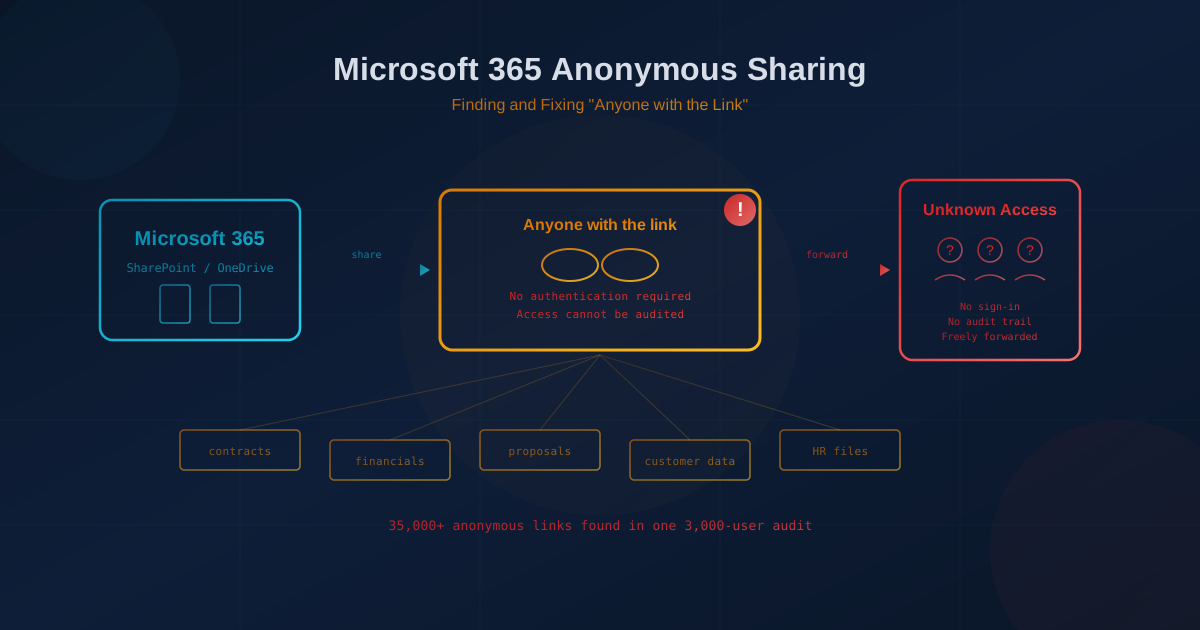
Microsoft 365 "anyone with the link" sharing lets users create links that work without signing in. According to Microsoft's documentation, "Anyone links give access to the item to anyone who has the link. People using an Anyone link don't have to authenticate, and their access can't be audited." If someone forwards that link, intentionally or by accident, the new recipient can open the file without ever identifying themselves. For small and mid-sized businesses handling customer data, contracts, or financials, this is a quiet exposure that often goes unnoticed until something goes wrong.
The scale of the problem is larger than most owners expect. During a routine sharing audit at a roughly 3,000-user Microsoft 365 environment, one IT provider found more than 35,000 active anonymous links in OneDrive alone.
What does "anyone with the link" actually mean in Microsoft 365?
An "anyone with the link" sharing option creates what Microsoft calls an anonymous link. The person opening the file does not need a Microsoft account, does not need to be in your directory, and does not appear in your audit logs. Microsoft describes it as "a transferable, revocable secret key": transferable because it can be forwarded to anyone, and revocable only if you remember to delete it. The link works until someone removes it or it expires, if an expiration was set at all.
Microsoft's best practices guide notes that "by default, Anyone links for a file allow people to edit the file, and Anyone links for a folder allow people to edit and view files, and upload new files to the folder." A carelessly shared folder link can allow an outsider to upload content into your environment.
Why does Microsoft 365 allow anonymous sharing if it is risky?
Anonymous sharing exists for legitimate convenience. Sometimes you need to send a document to someone who does not have a Microsoft account, or you want to distribute a public asset without forcing everyone to sign in. The feature itself is not the problem. Microsoft's guidance warns: "If a user forgets to change the link type while sharing a sensitive document, they might accidentally create a sharing link that doesn't require authentication."
How do anonymous links stay active long after they are created?
Unless your administrator has enforced a link expiration policy, an anonymous link has no built-in end date. A proposal shared with a prospect in 2022 could still be accessible in 2026 if nobody remembers to revoke it. Microsoft's documentation confirms that you can require all "Anyone" links to expire within a specific number of days and can restrict them to view-only permission.
What is the real business risk of anonymous sharing?
The exposure divides into two categories: accidental and malicious. On the accidental side, an employee shares a folder with "anyone with the link" intending to send it to one person, but the link gets forwarded, posted in a chat, or saved in someone else's notes. Anyone who stumbles across it can access every file in that folder, including files added after the link was created. On the malicious side, a disgruntled employee or a compromised inbox could leak the link deliberately, and there would be no record of who accessed it.
For businesses in Canada, this can create problems under PIPEDA if the shared content includes personal information. The Office of the Privacy Commissioner defines a breach of security safeguards as "the loss of, unauthorized access to or unauthorized disclosure of personal information." If an anonymous link leads to unauthorized access to personal information, organizations may be required to report it and notify affected individuals.
How can I find out how many anonymous links exist in my organization?
Microsoft provides built-in reporting for SharePoint sites through the SharePoint Admin Center and through SharePoint Advanced Management. These reports show which sites have created the most "Anyone" links in the last 28 days. For OneDrive accounts, similar data is available via PowerShell. The important point is that the information exists; many businesses simply never look for it.
A practical first step is to ask your IT lead or managed service provider to run a sharing audit covering SharePoint sites and OneDrive accounts. The results often surprise owners who assumed their team was sharing carefully. This kind of periodic check is the same principle behind access reviews: confirming that the access your business granted in the past is still correct today.
What changes reduce anonymous sharing risk without blocking legitimate use?
Microsoft's best practices for unauthenticated sharing recommend several controls, all configurable in the SharePoint Admin Center:
- Change the default link type to "Only people in your organization" or "Specific people." Users who genuinely need anonymous sharing can still select it, but they must do so deliberately.
- Require expiration for all "Anyone" links. A 7-day, 14-day, or 30-day expiration means forgotten links stop working automatically.
- Restrict "Anyone" link permissions to view-only. This prevents outsiders from editing or uploading files even if they have the link.
- Consider disabling "Anyone" links entirely for sensitive sites. Individual sites and OneDrive accounts can have stricter settings than the organization default.
None of these changes require new software. They are configuration settings inside the Microsoft 365 admin console. Our Microsoft 365 security checklist covers the other tenant settings worth reviewing at the same time.
Should we disable anonymous sharing completely?
For many small and mid-sized businesses, the answer is yes. If your team rarely needs to share files with people who cannot sign in, disabling "Anyone" links removes the risk entirely. Users who need to share externally can still use "Specific people" links, which require the recipient to authenticate and appear in audit logs.
The trade-off is a small amount of friction when sharing with external parties. For most professional services firms, contractors, healthcare practices, and financial businesses, that friction is worth the protection.
What should I ask my IT lead or provider this week?
Start with one question: "How many active 'anyone with the link' sharing links exist across our SharePoint and OneDrive right now, and when was the last time we checked?" If the answer is "we don't know," that is the gap to close first. From there, review the default link type, the expiration policy, and whether any sites containing customer data still allow anonymous sharing. If this audit reveals that former employees still have access, a review of your offboarding process may be overdue.
If you are not sure where your organization's sharing settings stand, our free cybersecurity assessment covers 22 security areas including email security, password management, backups, and file system security. It takes under five minutes and highlights the areas that need attention first.
This article is intended for general informational purposes only and does not constitute professional security, legal, or compliance advice. Information about Microsoft 365 sharing features is based on Microsoft's public documentation as of October 2026 and may change as Microsoft updates its products. Organizations should consult qualified IT professionals and review their own configurations before making operational changes based on this article.