
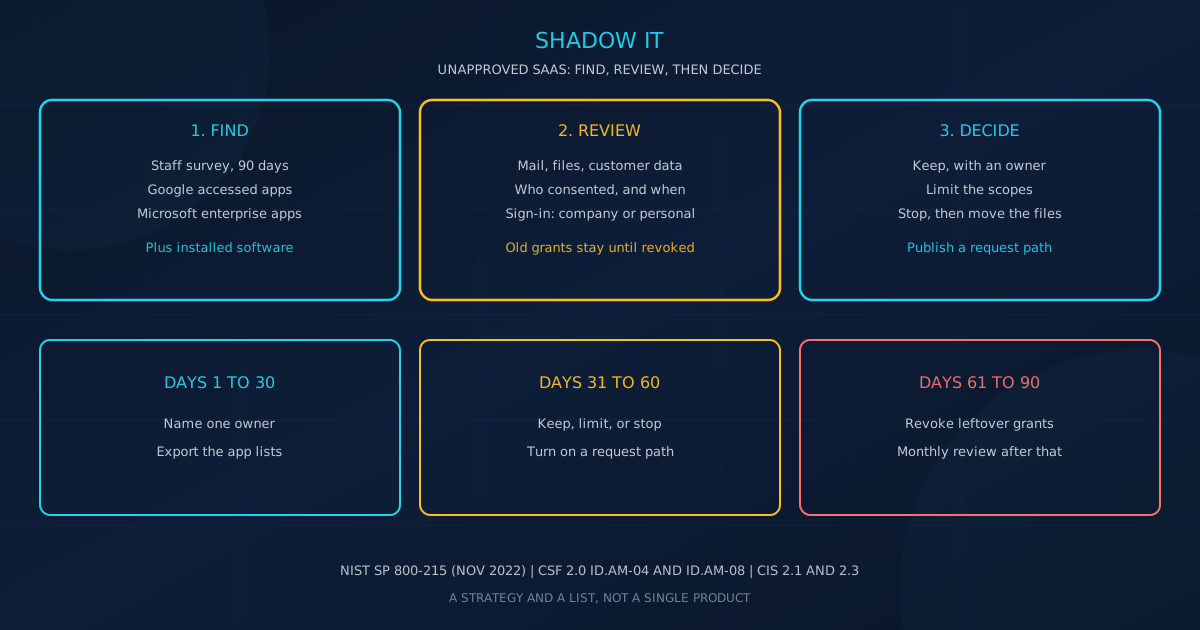
Shadow IT for small business is the use of cloud apps the company has not authorized. In November 2022, NIST Special Publication 800-215, Guide to a Secure Enterprise Network Landscape, put it this way: "Shadow IT is the practice of some users using cloud applications that are not authorized by the enterprise IT management from home or the office using enterprise desktops." NIST's example is unapproved SaaS for file sharing, social media, collaboration, and web conferencing. The same pattern shows up at firms in Canada and the United States.
On February 26, 2024, NIST published Cybersecurity Framework (CSF) 2.0 as NIST CSWP 29. Subcategory ID.AM-04 says: "Inventories of services provided by suppliers are maintained." The CSF 2.0 reference tool includes third-party software-as-a-service in that inventory. CSWP 29 says the examples are not a baseline of required actions to address cybersecurity risks.
What is shadow IT for small business?
Shadow IT for small business is unofficial technology people use to finish the work. NIST SP 800-215 (November 2022) defines it as cloud applications enterprise IT has not authorized, used from home or the office on enterprise desktops. The CSF 2.0 reference tool, example ID.AM-08 Ex3, says to "Identify unofficial uses of technology to meet mission objectives (i.e., shadow IT)." The use is unofficial. In that example, the reason is the job, not an attack on the company.
It is not a product you buy, and it is not a claim that staff cannot be trusted. CSWP 29 calls the examples notional steps, not a required baseline. A hard block without a request path backfires. Our note on least privilege says: "Removing admin rights without a clear way to handle legitimate requests creates frustration and shadow IT workarounds."
Count AI tools and browser add-ons. Our shadow AI note defines that pattern as "the use of AI tools and services by employees without explicit organizational approval or oversight." Our browser extension article says: "Employees install extensions on their work browsers for productivity, convenience, or just personal preference."
Why do unapproved SaaS apps put business data at risk?
An unapproved app often gets in through a consent screen, not a break-in. Microsoft's user-consent guidance says that, by default, a user can consent to let an app access that user's mailbox, but cannot consent to unfettered access to read and write all files in the organization. Microsoft's consent overview adds that tenant-wide admin consent is a sensitive operation, "potentially allowing the application's publisher access to significant portions of the organization's data."
Google documents the same kind of access. Its page on which apps access Google Workspace data lists high-risk OAuth scopes for Gmail, Drive, and Chat, including scopes that send mail, read mail, and delete Chat messages. If you mark a service Restricted, "any previously installed apps that you haven't trusted stop working, and tokens are revoked."
In ITSM.10.089 (effective September 24, 2021), the Canadian Centre for Cyber Security says that even with cloud or managed services, "your organization is still legally responsible and accountable for securing its data." In a SaaS model, that publication says the provider hardens the operating systems and applications. Which statute applies is a question for counsel.
Once an app will hold customer files, treat the publisher as a supplier. Our guide to vendor risk management calls that "checking an IT or software supplier before that supplier holds your data or can reach your systems." Our IT asset inventory guide puts the forgotten login on the same sheet: "Unapproved SaaS and a forgotten cloud login belong on the same list."
How do you find unapproved apps without a new product?
Start with inventories NIST and CIS already name. NIST CSF 2.0 (February 26, 2024) subcategory ID.AM-02 keeps inventories of software, services, and systems managed by the organization. ID.AM-04 covers supplier services. The reference tool's example includes "third-party infrastructure-as-a-service (IaaS), platform-as-a-service (PaaS), and software-as-a-service (SaaS) offerings." CIS Controls v8.1 Safeguard 2.1 records title, publisher, initial install or use date, and business purpose, and says to review the inventory bi-annually or more often.
Collect four sources in the first month:
- Staff. Ask which sites people opened with a work email in the last 90 days, including free tools.
- Google Workspace. Under Security, Access and data control, API controls, open Accessed apps. Google shows user counts and requested services, such as Gmail, Calendar, or Drive. Details typically appear 24 to 48 hours after authorization. Download the CSV.
- Microsoft 365. Microsoft's review page says to open Entra ID, Enterprise apps, All applications, then Permissions. Admin consent is organization-wide. User consent is what a person granted. You need Cloud Application Administrator or Application Administrator.
- Installed programs. Safeguard 2.1 will not show a website-only app. Keep that list beside the SaaS list.
What should Microsoft 365 and Google Workspace admins change?
Change who may approve a new connection, and leave a way to ask. Microsoft says that by default "all users are allowed to consent to applications for permissions that don't require administrator consent," and it recommends user consent only for apps from a verified publisher. On Google's API controls page, Trusted "Can access all Google services (both restricted and unrestricted)," Limited can access only unrestricted services, and Blocked cannot access any Google service.
Microsoft, in this order:
- Export Enterprise apps and both Permissions tabs before you change a policy.
- Turn on the admin consent workflow so users get an Approval required window and reviewers are notified.
- Then limit consent to verified publishers and to permissions you classify as low impact. Microsoft says you must classify permissions before that choice works.
- The policy edit is not a cleanup. Microsoft states: "Any updates to user consent settings only affect future consent operations for applications. Existing consent grants remain unchanged."
- Revoke old user grants with Microsoft Graph or PowerShell. Microsoft says the User consent tab in the portal cannot revoke them, and a revoke does not block a new consent unless the policy does.
Google, in this order:
- Download Accessed apps and Configured apps before you change Gmail, Drive, or Chat.
- Mark apps you will keep as Trusted, or as Specific Google data for named scopes, including the sign-in scopes the app needs.
- Only then set one high-risk service to Restricted. Untrusted apps stop working and tokens are revoked. Do one service at a time.
- Do not stop at the store list. Google's Marketplace allowlist page, last updated November 10, 2026, says: "The excludelist doesn't prevent users from installing apps from outside the Marketplace."
What does a 30/60/90-day shadow IT plan look like?
Use 30 days to list, 60 days to decide, and 90 days to remove what you will not keep. In December 2025, CISA Cybersecurity Performance Goals 2.0 goal 3.P called for review, testing, and approval before new software is installed or deployed, and an approved list with versions when technically feasible. CIS Safeguard 2.3 says unauthorized software is removed or documented as an exception, and reviewed monthly or more often. Goal 3.P is voluntary and covers installed software.
Days 1 to 30. One owner. Pull the Google CSV, Microsoft Enterprise apps, installed software, and the staff answers into the checklist below. CISA's small-business software page says to maintain an up-to-date inventory of authorized devices and applications.
Days 31 to 60. For rows that can see mail, files, or customer records, choose keep, limit, or stop. Stop means revoke, then say where the files should live. Publish a three-line request: what the tool does, what data it needs, and who approves. CISA says staff should check with IT before new apps go on company devices. NIST's supplier example says to update the inventory when a new external service is going to be used.
Days 61 to 90. Remove unauthorized installed software or write the exception (CIS 2.3). Revoke grants marked stop, including people who have left. Our inventory guide notes that the Cyber Centre baseline says to revoke accounts when employees leave. Remind yourself monthly for Safeguard 2.3 and twice a year for Safeguard 2.1.
What belongs on a shadow IT checklist?
Copy these rows into a spreadsheet and fill them from the 30-day exports. CISA says to remove or replace what is outdated or unauthorized, and to require a check with IT before new apps go on company devices. CIS Safeguard 2.1 asks for a title, a publisher, an initial install or use date, and a business purpose. The later rows add sign-in method, data reached, and whether you can revoke.
- Named owner for the sheet, and a backup person.
- App name and publisher, as the console shows them, not the nickname staff use.
- Business purpose in one sentence. If nobody can write it, the decision is stop or unknown.
- Date first seen, and the source: staff answer, Google CSV, Microsoft Enterprise apps, or installed software.
- Data reached, sign-in method (company password, Google, Microsoft, or personal), and whether admin consent or Trusted status already exists.
- Decision: keep, limit, stop, or unknown. CIS Safeguard 2.2 says an exception for unsupported software the business still needs should detail mitigating controls and residual risk acceptance. Add a review date.
- Revocation date, or a note that the console cannot revoke a personal login.
- Next review: monthly while anything is still unauthorized, and at least twice a year for the full inventory.
What should you do yourself, and when should a provider help?
Do the first export yourself when a trusted admin can open Microsoft Entra or the Google Admin console and the list fits in an afternoon. CISA's small-business page already says staff should check with IT before installing new apps, which only works if someone is that contact. Bring in help when nobody holds the admin role, when people leave without a revocation step, or when Permissions shows mailbox-wide or all-files access and you cannot tell what a revoke will break.
A device allow list is a different job. In April 2024, ITSAP.10.095 described an allow list for programs that run on systems, including executable programs, software libraries, and configuration files, plus an inventory of versions on each host. It says to start in observation mode. That does not list a SaaS site opened in a browser.
Cyber Unit's managed IT services include Microsoft 365 and Google Workspace administration, IT asset management, and access revocation when people join or leave. The cybersecurity services page states: "We analyze your entire IT environment (systems, applications, access controls, and third-party risks)."
Which mistakes leave unapproved apps in place?
The misses are a block with no request path, and a policy change that leaves old grants behind. Microsoft says consent-setting updates affect only future grants, and that existing grants remain. Google's Marketplace page, updated November 10, 2026, says an excludelist does not stop apps from outside the Marketplace. CIS Safeguard 2.3 still expects a monthly look at unauthorized software after the first cleanup.
- No request path. The least-privilege guide says a hard block creates shadow IT workarounds. Use the admin consent workflow, and the same three-line request for every other tool.
- Treating the job as misconduct. The CSF example is unofficial use to meet mission objectives.
If you want a plain view of where the business stands before you change consent settings, take the free cybersecurity assessment. A cyber security assessment helps you understand where your business stands. This free 5-minute version covers 22 security areas and runs entirely in your browser, with no signup required.
This article is intended for general informational purposes only and does not constitute professional security, legal, or compliance advice. Descriptions of NIST, CISA, CIS, the Canadian Centre for Cyber Security, Microsoft, and Google are based on public documentation as of November 22, 2026, and product settings can change. Organizations should consult qualified cybersecurity professionals before changing consent settings or blocking applications the business relies on.