
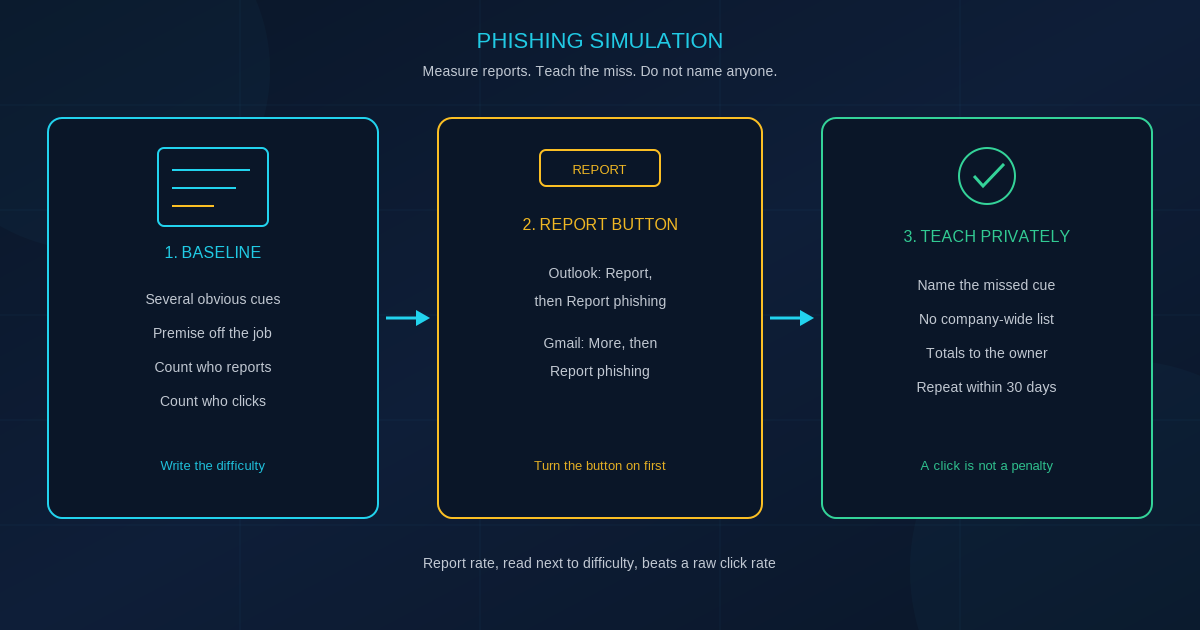
A phishing simulation for small business is a practice email your company sends to its own staff so you can see who reports it and who clicks. It measures and improves reporting. It is not a trap for catching or shaming people. In the 2025 Data Breach Investigations Report, Verizon wrote that "we see the human involvement in breaches at 60% this year," and that continued training on how to report phishing "seems to have a compounding positive effect regardless of whether the individual actually clicked on the phishing email."
Our small-business cybersecurity checklist uses that report when it says the human element played a role in 60% of breaches. Owners in Canada and the United States can teach the report button, count the reports, and read the click number beside how hard the message was.
What is a phishing simulation for small business?
A phishing simulation for small business is a message you send so you can record a report and a click. In September 2024, NIST published SP 800-50 Rev. 1, Building a Cybersecurity and Privacy Learning Program. It describes an all-user exercise: a tricky email, sent to see whether people spot the attempt or click a link or open an attachment.
The Cyber Centre's Baseline Cyber Security Controls V1.2 states BC.6.1: "Organizations should invest in cyber security awareness and training for their employees," including "Identification of malicious emails and links." NIST says awareness should run on an ongoing basis through the year. ITSAP.10.093 (September 2024) lists "identifying and handling phishing attempts" and "reporting incidents," and it says to consider exercises such as learning to spot phishing emails.
How often should a small business repeat the exercise?
Nothing cited here sets a monthly quota for a private firm. CISA's October 2023 guide, Phishing Guidance: Stopping the Attack Cycle at Phase One, says to "Regularly educate users" and names "the importance of reporting instances of opening suspicious emails, links, attachments, or other potential lures." Its small-business section says to "review phishing training material annually." Verizon's 2025 report compared staff with training within 30 days and staff without it.
The NSA, the FBI, and MS-ISAC co-authored that October 2023 guide. Verizon wrote that people with more recent training "reported the phishing emails at a significantly higher rate," "about 21% against a base rate of 5%, a four times relative increase," while click-rate impact "was way less prominent, with only 5% relative impact on each training." ITSM.10.089 says to "frequently review your IT security awareness programs and activities." CISA's annual line reviews the material. It does not show that one simulation a year changes reporting. A workable calendar is a baseline after the staff note, a second exercise inside 30 days of a short lesson, and a quarterly exercise with the difficulty written down.
How do you set difficulty, and what do you count?
Count the report rate first, and read the click rate beside how hard the message was. NIST TN 2276, the Phish Scale User Guide (November 2023), says click rates and reporting rates "do not provide a complete picture," because some messages are harder to detect than others.
The guide states that emails with few cues and a strong premise alignment "are more difficult for a human to detect as a phish" than emails with more cues and a weak alignment. Very difficult emails "might understandably result in high click rates." A least-difficult email with a high click rate "may indicate that modified or additional training is needed."
NIST SP 800-50 Rev. 1 says to "Begin by determining the current click rates for a specific group of users or by work roles." One metric example is the "Percentage of participants who changed a behavior in the workplace (e.g., reported a suspected phishing email)," measured as the "Number of participants who received a phishing test email and reported it appropriately." The 2025 DBIR says: "If preventing all clicking by employees is an impossibility, at least let them understand that their reporting can help the organization contain threats quicker." It calls the strategy "incentivizing your employees to report," with reports "as automated as possible."
- Report rate: reports divided by recipients.
- Click rate: clicks or opened attachments, divided by the same group.
- Difficulty note: many cues or few, and whether the story matches the job. TN 2276 calls that match premise alignment.
If the tool stamps the report, keep the time from delivery to report. Neither source sets a minute target. Start with several visible mistakes and a story off the person's job. A later accounts-payable note can be quiet. Our vendor payment fraud guide says those emails "often have neither" typos nor suspicious links: "they are well-written, contextually accurate, and ask for a routine action."
TN 2276 states: "The NIST Phish Scale is free to use for academic purposes. For any commercial use, companies will need to reach out to our partnership office for a license."
How do staff report a message in Microsoft 365 or Gmail?
Turn on one report action before the first send. CISA's October 2023 guide encourages organizations to "use reporting features that are built into Microsoft Outlook and other cloud email platforms." NIST SP 800-50 Rev. 1 notes a button on the platform's menu for the same reason. Without it, you collect hallway comments instead of a rate.
Microsoft's page Report phishing and suspicious emails in Outlook for admins says a person selects the message, selects Report, then "Report phishing or Report junk." Admins "configure user reported messages to go to a specified reporting mailbox, to Microsoft, or both." A message reported as phishing is deleted. The button appears when user reporting is on and the built-in Report button is selected.
Gmail's help page Avoid and report phishing emails says, on a computer: open the message, click More next to Reply, and click Report phishing. That page does not describe an admin setting that copies the built-in report into a company mailbox. Do not promise an internal copy until your admin confirms one in current Google documentation. The staff sentence is: "In Outlook, choose Report, then Report phishing. In Gmail on a computer, choose More, then Report phishing."
What should happen after a click, and what do you tell staff first?
Tell staff before the first message, and treat a click as a lesson. NIST SP 800-50 Rev. 1 says it is important to tell employees "that the organization is conducting phishing exercises on a random basis and that the results will be used to guide future learning activities." It adds: "These activities should not be punitive, nor should any employee be called out for their response."
NIST says to include the legal team in the design and review, so the bait does not use a legitimate brand that draws email or calls to that organization.
- Practice emails arrive at unannounced times.
- Report with the button. Do not reply, and do not click to check.
- A click brings a short, private explanation. It is not a disciplinary event, and names are not posted.
- A real payment-detail change is still confirmed on a number you already have.
Our acceptable use policy guide says staff "will not be punished for reporting it in good faith," and that privacy rules on employee monitoring vary by province in Canada and by state in the United States. A click log is about a person. The owner keeps it. Leadership sees totals only. After a click, name the missed cue and point to the button. A public list of names breaks the rule against calling anyone out.
Which mistakes make the program fail?
The failures are a lure written to embarrass, a penalty for a click, and one annual test with no repeat. In September 2024, NIST said employees "may not like being tricked," and that exercises should not be punitive or call anyone out.
A fake firing notice, or a real bank's name used only to humiliate, fails that test. CISA still wants an annual review of training material for small businesses. That review is not a reason to stop after one send.
- Clicks only. An easy message with fewer clicks can hide a team that never reports.
- No difficulty note. TN 2276 says a very difficult email can draw a high click rate for understandable reasons. Equal scoring pushes the next lure toward a trick.
- A dead button. If Report phishing is off, people learn to worry, not to report.
- Drill instead of controls. CISA says "Activating a strong MFA is the best way that small businesses can protect their internet facing business accounts from phishing related threats." Our Microsoft 365 checklist says "Plain MFA codes can still be phished." Our MFA note says a compromised mailbox "can reset passwords for everything else." DMARC "helps prevent attackers from spoofing your domain."
What does a 90-day rollout look like, and who should run it?
Use 90 days for a baseline, a repeat inside 30 days of a reporting lesson, and one harder check. Keep names out of the leadership note. CISA's October 2023 guide encourages small businesses to "implement commercial phishing awareness training programs." ITSAP.10.093 says you may need third-party providers "if your organization does not have the resources to provide in-house training." Run the list below if you have an owner. Hand off the calendar if you do not.
- Days 1 to 7: Name an owner. Send the note: exercises happen on a random basis, results guide learning, and a click is not punitive.
- Days 1 to 7: Ask HR or counsel to read the note. Do not publish names. Do not impersonate a real brand without that review.
- Days 1 to 10: Confirm Outlook's Report, then Report phishing, and where those reports go. In Gmail, confirm More, then Report phishing. Do not promise an internal copy you have not documented.
- Days 11 to 30: Send an easier baseline: several obvious cues, premise off the job. Record report rate, click rate, and the difficulty note by group.
- Within two days of a click: Private lesson, missed cue, button. No company-wide list.
- Days 31 to 60: A short reminder, then a second exercise inside 30 days of that reminder. Compare report rates.
- Days 61 to 90: One harder note for people who move money, such as a clean payment-detail request. Still no penalty. Share totals only.
- Day 90: Keep a quarterly check, or move scheduling to a managed program. Write the choice down.
Stay in house only when someone will review each lure, the button works, and results stay aggregate. Otherwise, move the schedule.
Cyber Unit's security awareness training includes managed phishing simulations with immediate feedback for anyone who clicks.
For a first look at training and the controls around it, take the free quick security assessment.
This article is intended for general informational purposes only and does not constitute professional security, legal, or compliance advice. Descriptions of phishing exercises, report buttons, and training cadence are drawn from public guidance from CISA (October 2023), NIST SP 800-50 Rev. 1 (September 2024), NIST TN 2276 (November 2023), the Canadian Centre for Cyber Security, and Verizon's 2025 Data Breach Investigations Report, as those sources read on the date of publication. Product steps change. Confirm the current Microsoft and Google documentation before you change a tenant. Organizations should consult qualified cybersecurity and legal professionals before making operational changes based on this article.