
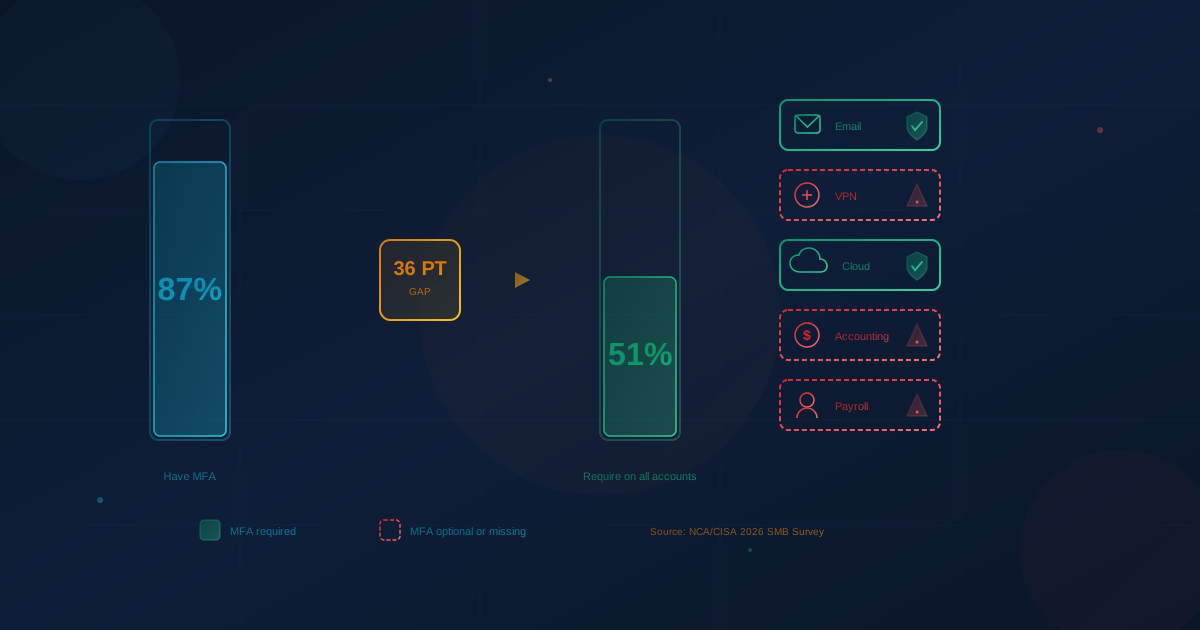
Most small businesses have multi-factor authentication. Fewer actually require it everywhere it matters. According to coverage of the 2026 Small Business Cybersecurity Awareness and Practices Survey from the National Cybersecurity Alliance and CISA, 86.8% of small and mid-sized businesses have implemented MFA, but only 51.1% require it on all key business accounts. That gap between having a tool and fully using it leaves attackers a path around the control.
The pattern repeats across security controls. The same survey of 1,000 SMB leaders found 88.4% of SMBs have backups, but only 61.4% have tested them. The tools exist. The enforcement does not.
Why Does Partial MFA Coverage Create Risk?
Partial MFA coverage creates risk because attackers only need one unprotected account to gain a foothold. According to SecureWorld's coverage of the NCA/CISA survey, 35.7% of SMBs require MFA on only "some" accounts. That leaves a significant blind spot that attackers can exploit to move laterally once inside. If email is protected but the VPN or accounting software is not, a stolen credential for the unprotected system can become full network access.
According to BizTech, citing Sophos's State of Ransomware 2025 survey, 30% of small business ransomware attacks involved a stolen credential as the root cause. MFA on the right accounts would have added friction that many attackers cannot easily bypass.
The distinction matters for business owners: having MFA is not the same as enforcing MFA. A tool sitting unused in a dashboard is not a control. A control requires enforcement, coverage, and verification.
Which Accounts Need MFA First?
The accounts that need MFA first are those that control access to other accounts or hold sensitive data. In practice, that means prioritizing in this order: email and identity providers, remote access (VPN), accounting and payroll systems, cloud storage and file sharing, and any administrative or privileged accounts. A compromised email account can reset passwords for everything else, so it is the single highest-priority target for MFA enforcement.
For most small businesses, the critical list includes:
- Email (Microsoft 365, Google Workspace): Controls password resets and often serves as the identity provider for other apps
- VPN or remote desktop access: Provides direct network entry from outside the office
- Accounting and payroll software (QuickBooks, Xero, payroll portals): Contains financial data and can initiate payments
- Cloud storage (SharePoint, Google Drive, Dropbox): Holds sensitive files that can be exfiltrated or encrypted
- Domain registrar and DNS: Can be used to hijack your website and email
- Banking and merchant services: Direct financial access
Any account that can reset other passwords, move money, or access customer data should require MFA. If you are unsure which accounts fall into that category, start with email and work outward.
What Does the Confidence Gap Mean for SMBs?
According to VMBlog's coverage, the NCA/CISA survey found that 86.3% of SMB leaders express medium to very high confidence in their ability to manage cyber risk, even though 72.3% say risk has increased or stayed the same and 56.1% cannot confirm a clean security record over the past 12 months. That gap between confidence and actual readiness is one of the report's most consequential findings. Businesses believe they are protected, but the tools are not fully operationalized.
This is not a criticism. Small businesses have limited time and resources, and security tools that require manual enforcement are easy to neglect. The problem is that partial adoption creates a false sense of security. When a breach occurs, the assumption is usually that something exotic happened. In reality, it was often a forgotten account, an exception that never got closed, or a setting that defaulted to optional instead of required.
The survey also found that organizations that have experienced a cyber incident often report stronger practices afterward, including broader MFA use, tested backups, and documented incident response plans. That suggests many businesses strengthen defenses only after something goes wrong. The goal is to reach that level of rigor without paying the tuition of a breach first.
How Do I Check If MFA Is Enforced Across My Business?
To check MFA enforcement, you need to audit each system individually. Start with your primary email and identity platform (Microsoft 365 or Google Workspace), where an admin console report can show per-user MFA status. Then review each business application that handles sensitive data or provides remote access. Document which accounts have MFA required, which have it optional, and which have no MFA capability at all.
In Microsoft 365, administrators can view MFA status under Azure Active Directory (now Entra ID) > Users > Per-user MFA, or use the Microsoft 365 admin center's security recommendations. In Google Workspace, administrators can check Admin Console > Security > 2-Step Verification to see enrollment rates and enforcement status by organizational unit.
For VPN, accounting software, and cloud services, the process varies. Some vendors provide MFA settings in their admin panels. Others require integration with your identity provider (single sign-on with enforced MFA). If your IT provider or MSP manages these systems, ask them to produce documentation showing which accounts have MFA required. If they cannot produce that documentation, that is itself a finding.
Questions to ask during an MFA audit:
- Which accounts have MFA enabled but not required?
- Are there service accounts, shared accounts, or legacy accounts exempt from MFA?
- Does your VPN or remote access tool support MFA, and is it enforced?
- Are administrative accounts held to a stricter standard (such as phishing-resistant hardware keys)?
- Is there a policy that requires MFA on new accounts by default?
What Should SMBs Do to Close the Gap?
Closing the gap requires moving from optional to required. That is an administrative decision, not a technical one. The technology already exists in most business tools. The change is enforcing it universally and removing exceptions that were granted for convenience. Start with email and identity, then expand outward to VPN, accounting, and cloud storage within a defined timeline.
Practical steps for the next 30 days:
- Inventory all business accounts that hold sensitive data or provide remote access
- Document current MFA status for each: required, optional, or unavailable
- Identify exceptions (service accounts, legacy systems, shared logins) and evaluate whether each exception is necessary
- Set a date to enforce MFA on email and identity first, then expand to other critical systems
- Communicate the change to staff before enforcement, so they can set up authenticator apps in advance
- Monitor enrollment and follow up with anyone who has not completed setup by the deadline
If you use a managed IT provider, ask them to run the audit and provide a written report. If they cannot demonstrate MFA coverage across your environment, that is a conversation worth having. For guidance on what to expect from a provider, see our article on evaluating managed IT and cybersecurity providers.
How Does This Connect to Backup Testing?
The MFA enforcement gap is part of a broader pattern. According to SecureWorld's analysis of the NCA/CISA survey, 88.4% of SMBs have backups, but only 61.4% have tested them. That means over a quarter of businesses with backups have never verified that a restore actually works. In a ransomware scenario, those businesses may discover their backup is incomplete, corrupted, or inaccessible only after they need it.
The lesson is the same: having a tool is not the same as using it correctly. Backups that are never tested are backups that may not exist when you need them. MFA that is optional on half your accounts is MFA that attackers can route around. The security value comes from enforcement and verification, not from the checkbox in a purchasing decision.
We covered backup assumptions in detail in our article on backup and recovery assumptions that often fail. The same principles apply to MFA: assume nothing works until you have verified it.
What Question Should You Ask Your IT Provider?
Ask your IT provider or internal IT team: "Can you show me a report of which accounts have MFA required, which have it optional, and which have none?" If they can produce that report quickly, you have visibility. If they cannot, you have a gap to close before you can assess your actual exposure.
If you want to understand where your organization stands more broadly, including MFA coverage, backup status, and other controls that insurers and attackers both check, take our free cybersecurity assessment. It takes about five minutes and identifies gaps across your environment, not just authentication. Canadian businesses can also use Cybersecurity Canada for a more comprehensive evaluation aligned with the CCCS baseline controls.
This article is intended for general informational purposes only and does not constitute professional security, legal, or compliance advice. Statistics cited are from the 2026 Small Business Cybersecurity Awareness and Practices Survey published by the National Cybersecurity Alliance in partnership with CISA. Organizations should consult qualified cybersecurity professionals before making operational changes based on this article.