
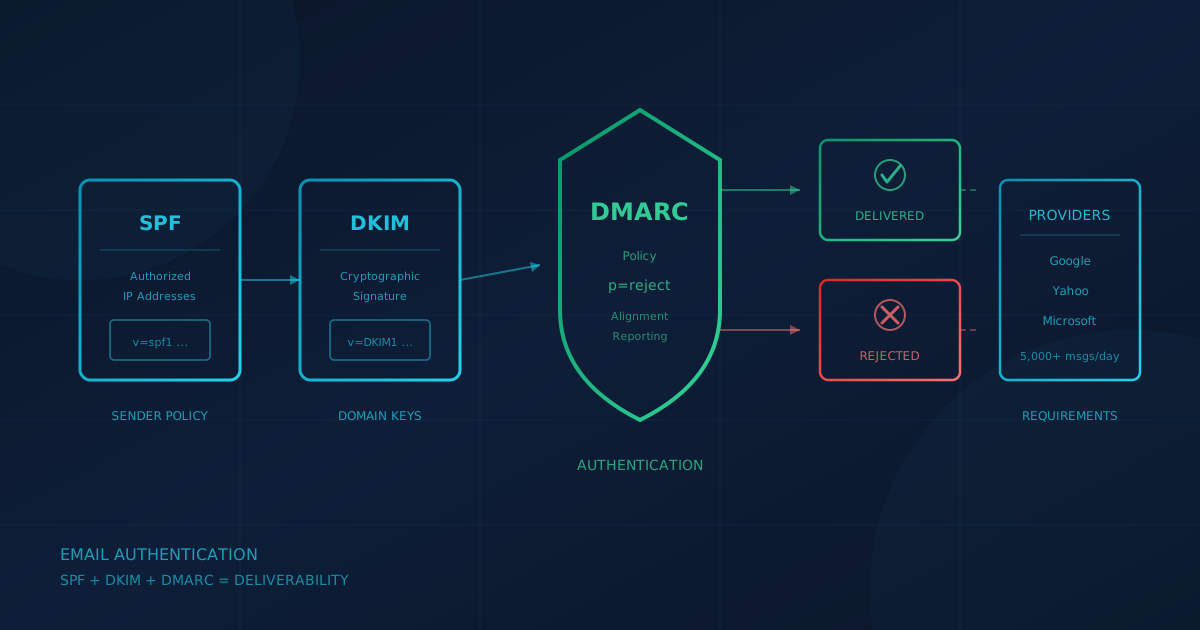
DMARC for small business is now a commercial requirement, not an optional security measure. Starting February 1, 2024, Google requires bulk senders (5,000 or more messages per day to Gmail accounts) to publish a DMARC record and align SPF or DKIM with the From address. Yahoo began enforcement in February 2024, rolled out gradually through the first half of the year, requiring bulk senders to implement SPF and DKIM and publish a DMARC policy of at least p=none with From alignment. Microsoft followed on May 5, 2025, enforcing SPF, DKIM, and DMARC for domains sending more than 5,000 messages per day to Outlook.com, Hotmail, and Live.com. If your domain fails these checks, your invoices, newsletters, and transactional emails may land in spam or be rejected outright.
What are SPF, DKIM, and DMARC?
SPF, DKIM, and DMARC are three email authentication protocols that work together to verify the sender of an email message. According to the Canadian Centre for Cyber Security's Implementation guidance: email domain protection (ITSP.40.065 v1.1), all three protocols must be implemented and configured to reject inauthentic messages for complete protection.
- SPF (Sender Policy Framework) lets you specify which IP addresses are authorized to send email on behalf of your domain. The receiving server checks your SPF record to verify the message came from an authorized source.
- DKIM (DomainKeys Identified Mail) adds a cryptographic signature to outgoing messages. The receiving server uses your published public key to verify the signature and confirm the message was not altered in transit.
- DMARC (Domain-based Message Authentication, Reporting, and Conformance) ties SPF and DKIM together. It requires that either SPF or DKIM passes and that the authenticated domain aligns with the visible From address. DMARC also tells receiving servers what to do when a message fails (none, quarantine, or reject) and provides a reporting mechanism so you can see who is sending mail as your domain.
The DMARC standard is formally defined in IETF RFC 7489, published in March 2015. The Canadian Centre for Cyber Security guidance notes that SPF and DKIM alone share a limitation: both rely on domain names that are hidden from the user and can differ from the domain displayed in the From field. DMARC addresses this by enforcing alignment between the authenticated domain and the visible sender address.
Why do major mailbox providers now require DMARC?
Google, Yahoo, and Microsoft have all implemented sender requirements because email spoofing and phishing remain pervasive problems. According to Google's Email sender guidelines, these requirements "help protect recipients from malicious messages, such as spoofing and phishing messages" and "help protect you and your organization from being impersonated."
The enforcement timeline for bulk senders (5,000+ messages per day):
- Google Gmail: February 1, 2024. Senders must have SPF and DKIM, and must publish a DMARC record (minimum p=none) with either SPF or DKIM aligned to the From address.
- Yahoo: February 2024, rolled out gradually through the first half of 2024. Bulk senders must implement SPF and DKIM and publish a DMARC policy of at least p=none with From alignment. Yahoo does not publish a fixed volume threshold.
- Microsoft Outlook.com: May 5, 2025. According to the Outlook.com Postmaster, domains sending 5,000 or more messages per day must pass SPF, pass DKIM, and pass DMARC validation with alignment. Non-compliant messages are sent to the junk folder, and will subsequently be rejected.
The 5,000 message threshold may sound high for a small business, but it accumulates quickly: marketing newsletters, automated invoices, appointment reminders, password resets, and shipping notifications all count. If your business uses email marketing or sends automated transactional emails, you may already be above the threshold without realizing it.
How does lack of DMARC enable invoice and payment fraud?
When your domain lacks DMARC enforcement, attackers can send emails that appear to come from your company. This is the foundation of vendor payment fraud, where a criminal impersonates a supplier and requests updated banking details. If your domain has no DMARC policy or only p=none, the spoofed email may pass through the recipient's spam filters because there is no instruction to reject it.
According to CISA's Binding Operational Directive 18-01, "setting a DMARC policy of reject provides the strongest protection against spoofed email, ensuring that unauthenticated messages are rejected at the mail server, even before delivery." Without DMARC enforcement, your customers and vendors have no way to distinguish legitimate emails from fraudulent ones that use your domain name.
The Canadian Centre for Cyber Security guidance states: "By implementing this guidance, you can prevent threat actors from successfully representing themselves as your organization by using your email domains."
What is the path from p=none to p=reject?
DMARC deployment follows a deliberate progression. The CCCS guidance recommends this sequence:
- Deploy with p=none. Start by publishing a DMARC record with a policy of none and a reporting address. This does not affect mail delivery but begins collecting data on who is sending email as your domain.
- Analyze reports. DMARC aggregate reports show which IP addresses are sending mail using your domain, whether they pass SPF and DKIM, and whether they align with your From address. Use these reports to identify legitimate senders (your mail server, marketing platform, CRM, invoicing software) and any misconfigurations.
- Configure all legitimate senders. Ensure every authorized sender is included in your SPF record and is signing with DKIM using your domain. Third-party services often require you to add their servers to your SPF record or publish a CNAME for their DKIM key.
- Move to p=quarantine. Once legitimate senders are passing DMARC, change your policy to quarantine. Messages that fail will be delivered to spam instead of the inbox. Monitor for any legitimate mail that was missed.
- Move to p=reject. After confirming that all legitimate mail passes DMARC, set your policy to reject. Messages that fail are rejected outright and never delivered. This is the target state recommended by both CISA and the Canadian Centre for Cyber Security.
A typical DMARC record at the final stage looks like this: v=DMARC1; p=reject; pct=100; rua=mailto:dmarc@yourdomain.com
What breaks when you implement DMARC?
The most common breakage comes from third-party services that send email on your behalf but are not properly configured. Common examples include:
- Marketing platforms (Mailchimp, HubSpot, Constant Contact) that send newsletters using your From address
- CRM systems (Salesforce, Zoho) that send automated follow-ups
- Invoicing and accounting software (QuickBooks, FreshBooks, Xero) that emails invoices
- Support ticketing systems (Zendesk, Freshdesk) that reply to customers as your domain
- E-commerce platforms (Shopify, WooCommerce) that send order confirmations and shipping updates
For each of these services, you need to either add their sending IP addresses to your SPF record (often via an include statement) or configure them to sign with DKIM using your domain. Most reputable services provide documentation for DMARC alignment. If a vendor cannot support DKIM signing with your domain, consider having them send from a subdomain you control (e.g., mail.yourdomain.com) so you can maintain a strict policy on your primary domain.
The CCCS guidance recommends starting with p=none specifically because it lets you identify these misconfigurations through DMARC reports before they cause delivery failures.
How do you check if your domain has DMARC?
You can check your domain's DMARC record using a DNS lookup tool or command line. The record is published at _dmarc.yourdomain.com as a TXT record. For example:
dig TXT _dmarc.yourdomain.com
If no record is returned, your domain has no DMARC policy. If a record exists, check the p= value: p=none means monitoring only, p=quarantine means failed messages go to spam, and p=reject means failed messages are blocked.
Many free online tools (search "DMARC checker") will analyze your SPF, DKIM, and DMARC records and identify common misconfigurations. Your email provider or IT provider should be able to run these checks and explain the results.
What should Canadian and US business owners take from this?
DMARC is no longer a nice-to-have security measure. It is a deliverability requirement from the major mailbox providers that handle most consumer and business email. The small business cybersecurity checklist includes email authentication protocols as a baseline control.
A useful question to ask your IT provider or managed service provider this week: "Is DMARC configured for our domain, and what is the policy set to? Are all our third-party senders (marketing platform, invoicing software, CRM) aligned?"
If the answer is "we don't have DMARC" or "it's set to p=none," the gap is already there. Your legitimate business emails may be landing in spam, and attackers can send convincing phishing emails that appear to come from your domain.
If you are unsure where your business stands on email security and related controls, a free cybersecurity assessment can help identify gaps. The assessment takes under 5 minutes, covers 22 security areas, and requires no signup.
This article is intended for general informational purposes only and does not constitute professional security, legal, or compliance advice. Email authentication requirements are based on publicly available documentation from Google, Yahoo, Microsoft, CISA, and the Canadian Centre for Cyber Security as of the date of publication and may change. Organizations should consult qualified IT professionals to implement SPF, DKIM, and DMARC for their specific domain and email infrastructure.