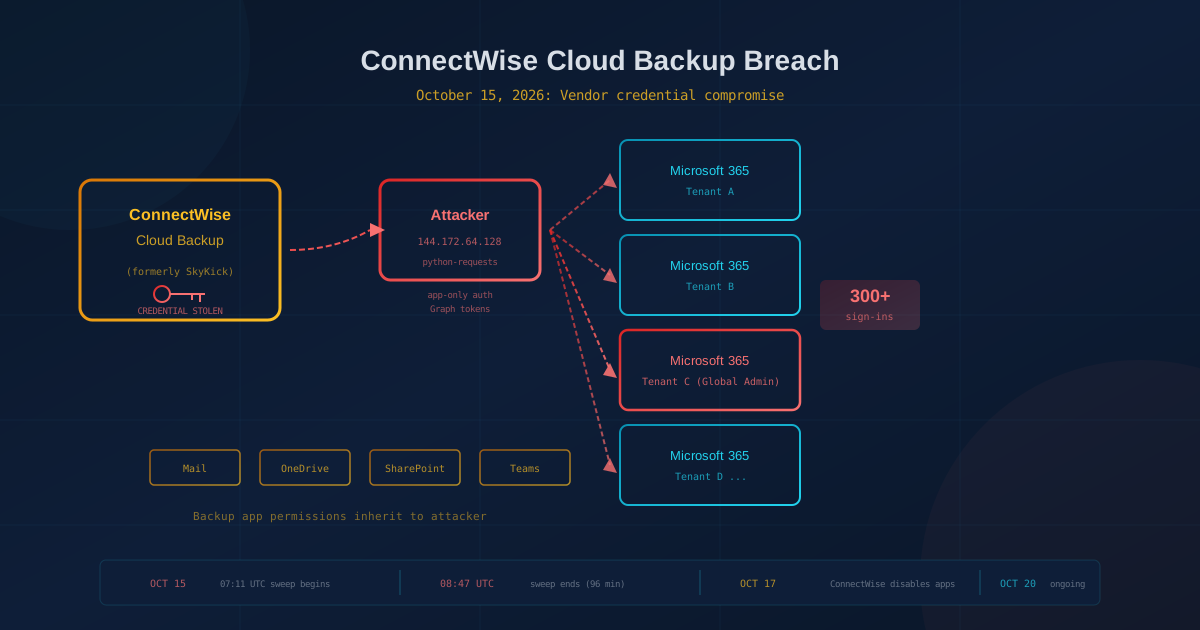
A ConnectWise Cloud Backup breach gave attackers access to Microsoft 365 customer tenants on October 15, 2026, after a vendor-held application credential was compromised. No user was phished, and MFA was not bypassed in the traditional sense: the attacker authenticated directly as the backup application itself, requesting Microsoft Graph tokens from tenants. Huntress confirmed unauthorized sign-ins in 162 tenants as of 19:00 UTC on October 16. Sophos X-Ops reported the sweep lasted about 96 minutes on October 15. ConnectWise disabled the affected application identities on October 17 and says services remain suspended as of October 20 while remediation continues.
This matters to small and mid-sized businesses in Canada and the US because it exposes a risk most never consider: the third-party applications connected to Microsoft 365 or Google Workspace for backup, email security, CRM integrations, and AI tools. Those applications hold standing access to your data. If an attacker compromises the vendor, they inherit whatever permissions your tenant already granted, without needing to steal anyone's password or trick anyone into approving an MFA prompt.
What happened in the ConnectWise Cloud Backup incident?
On October 15, 2026, attackers used a compromised application credential belonging to ConnectWise Cloud Backup (formerly SkyKick) to sign in as the application and request Microsoft Graph access tokens from customer tenants. Huntress reported the sign-ins originated from IP address 144.172.64[.]128 and occurred between 06:13 and 08:34 UTC. Sophos X-Ops observed the activity from 07:11 to 08:47 UTC. Both sources describe scripted activity that worked through tenants in sorted GUID order. Sophos observed requests spaced one to six minutes apart.
Key facts from the published research:
- Attack window: Approximately 96 minutes on October 15, 2026, according to Sophos X-Ops.
- Affected tenants (confirmed): Huntress confirmed 162 tenants with unauthorized sign-ins as of 19:00 UTC on October 16. In a later update, Huntress reported sign-in activity in almost 1,000 tenants, with over 300 successful sign-ins.
- Method: The attacker authenticated with a client assertion, which is a credential held in the vendor's own tenant. No user password was involved, and no MFA prompt was triggered.
- Scope: The sweep included tenants with no active backup subscription, suggesting the attacker had a list of all tenants that had ever consented to the application.
- Post-exploitation (two tenants): Huntress has now reported this pattern in two tenants: the ConnectWise Cloud Management for Microsoft Teams application granted itself Global Administrator privileges and added credentials to other applications. In the first tenant Huntress described, the credentials were added to two other applications including a Huntress application. The second tenant showed the same behavior around 03:45 UTC on October 15, approximately 2.5 hours before the 06:13 sweep began. Huntress has not tied the two phases to the same operator.
ConnectWise has not disclosed how the credential was obtained. Both Huntress and Sophos state it is unclear what the attacker did with the tokens after obtaining them. Microsoft Graph does not log all read operations, so directory reads and data access may have occurred without leaving an audit trail.
Why did MFA not stop this attack?
MFA protects user sign-ins, but this was not a user sign-in. The attacker authenticated as the application itself, using what Microsoft calls app-only authentication. When you or your IT provider first enabled ConnectWise Cloud Backup, someone consented to the application in your tenant. That consent granted the vendor's application identity permission to sign in and access data on behalf of the tenant. The credential for that sign-in lives in the vendor's environment, not yours.
This is the same OAuth model we described in our coverage of the Vercel breach, where a compromised third-party AI tool's OAuth token exposed hundreds of organizations. The pattern is identical: a vendor holds a key to your environment. If the vendor's key is stolen, the attacker walks in as the vendor. No password prompt, no MFA challenge, no user involved at all.
The distinction matters for how you think about risk. Asking "Do we have MFA enabled?" is the right question for user accounts. The right question for third-party applications is: "What vendors hold standing access to our Microsoft 365 tenant, and what could they do if their credential were compromised?"
Who is actually at risk?
The direct risk applies to any organization that has ever consented to ConnectWise Cloud Backup or related SkyKick applications. The sweep Sophos observed included tenants with no active backup subscription, which means a tenant you forgot about or stopped using is still exposed if the consent was never removed.
The indirect risk extends further. Managed service providers (MSPs) use these tools to back up their clients' Microsoft 365 environments. If your IT provider used ConnectWise Cloud Backup on your behalf, your tenant may have consented to the application even if you never heard of it. ConnectWise's guidance tells partners to review both their own tenant and every customer tenant they manage.
This is the same supply-chain dynamic we covered in the AhsayCBS backup server attack earlier this month: a tool your provider uses becomes a path into your environment when that tool is compromised.
What permissions did the compromised application have?
ConnectWise Cloud Backup requires broad permissions to do its job: reading mailboxes, OneDrive, SharePoint, Teams, and directory data so it can back them up, and writing to those locations so it can restore them. An attacker holding tokens for the application inherits the same access. Huntress summarized the concern: "An attacker holding those tokens can read the same mailboxes, files, and directory data the backup service can."
In the two tenants where Huntress has reported post-exploitation activity, a ConnectWise application (Cloud Management for Microsoft Teams) granted itself Global Administrator privileges. From that position, an attacker can add credentials to other applications, create new applications, reset passwords, and modify Conditional Access policies. In the first tenant Huntress documented, credentials were added to two other applications, including a Huntress security tool.
Sophos stated that in the tenants they reviewed, they found no evidence the application created new secrets, applications, consents, or role assignments. The discrepancy highlights that the impact varied by tenant, and that the absence of evidence in one tenant does not rule out activity in another.
What should you check in your Microsoft 365 tenant?
Even if you do not see the specific indicators published by ConnectWise and Huntress, the exercise of reviewing enterprise applications in your tenant is valuable. This is the same discipline we recommend in our access reviews guide: understand who and what can reach your data, and remove what you no longer need.
Step 1: Check whether the affected applications exist in your tenant
In the Microsoft Entra admin center, go to Identity, then Applications, then Enterprise applications. Search for the following Application IDs:
- ConnectWise Cloud Backup:
506e08f9-6e9a-4da4-942b-a099a03644ae - ConnectWise Cloud Management:
2399d300-6fca-4e6a-a686-399fefe75b83 - ConnectWise Cloud Management (MS Teams):
24205314-2b89-4e07-a2a4-579e898a5640 - ConnectWise Cloud Management (Exchange Online):
b78f6a77-d4e5-46fb-87e5-d1648bd02519 - ConnectWise Cloud Management (SharePoint Online):
b2b55f5b-7758-4719-8d8f-88ae172e6bdb - ConnectWise Cloud Management (MS Graph):
0de14c77-b9b0-4137-9360-34878a929827 - ConnectWise Cloud Management (Partner Center):
412dcf96-176d-4b3a-a1b0-4981ad66971e
In older tenants, these may appear under their former name, SkyKick Cloud Manager. If any of these applications exist in your tenant, disable them. Do not delete them: deleting removes the service principal and makes investigation harder. Go to Properties and set "Enabled for users to sign-in" to No.
Step 2: Review service principal sign-in logs
In the Entra admin center, go to Monitoring, then Sign-in logs, and select the Service principal sign-ins tab (not the default User sign-ins tab). Filter by the application IDs above and look for sign-ins from October 13 onward. ConnectWise published these IP addresses as indicators of suspicious activity:
144.172.64[.]128(primary)144.172.64[.]99144.172.64[.]60
Huntress reports only the first IP produced application sign-ins in its telemetry; the second was associated with password spray activity from October 10 to 14, and the third with a few failed logins on October 18. A sign-in from any of these addresses should be treated as suspicious. However, a clean result does not rule out access: Microsoft does not log all read operations through Graph, and the attacker may have rotated infrastructure.
Step 3: Check for unauthorized changes
Review the Entra audit log for activity by the ConnectWise or SkyKick application identities since October 13. Look for:
- New credentials (client secrets or certificates) added to any application.
- Directory role assignments, especially Global Administrator or Exchange Administrator.
- New consent grants or changes to existing permissions.
- New application registrations you did not create.
Also check Exchange for mailbox forwarding rules, inbox rules, and transport rules added during the window. Token theft and session hijacking are adjacent risks: if an attacker established persistence through credentials or rules, resetting the vendor application alone will not remove that access.
One question to ask your IT provider this week
If someone else manages your Microsoft 365 environment, call or email them with this question: "Do you use or have you ever used ConnectWise Cloud Backup or SkyKick to back up our Microsoft 365 data? If so, have you disabled the affected applications and reviewed our tenant for the indicators ConnectWise and Huntress published?"
A provider who can answer with specifics (which applications, what they found in the sign-in logs, what changes they made) is operating at a professional standard. A provider who has not heard of the incident or cannot answer the question is a gap worth closing. Our guide to evaluating a managed IT provider covers the broader set of questions that reveal whether your provider is equipped to respond to events like this.
The bigger pattern: standing access is the risk
This incident is a textbook example of why the applications connected to your Microsoft 365 or Google Workspace tenant deserve as much scrutiny as the users who log in. Backup tools, email security products, CRM integrations, AI assistants, and meeting recorders all hold OAuth grants that persist for months or years. If any of those vendors is compromised, the attacker inherits your data, not theirs.
The controls that limit this risk are not exotic:
- Audit connected applications regularly. Review enterprise applications in Entra at least quarterly. Remove consent for anything you no longer use.
- Restrict who can grant consent. In Entra, require admin approval before users can consent to new third-party applications.
- Prefer vendors that publish a security posture. A mature SaaS vendor will have a trust page, SOC 2 report, and incident response process. A vendor that cannot answer questions about how they protect their own credentials is a supply-chain risk.
- Include application credentials in incident response. When a vendor is compromised, disabling the application is step one. Reviewing what the application could have done, and whether it established persistence, is step two.
If you are not sure how many third-party applications have access to your Microsoft 365 tenant, that uncertainty is itself the finding. Start with our free quick security assessment, which covers 22 security areas in under five minutes and highlights where to focus first.
This article is intended for general informational purposes only and does not constitute professional security, legal, or compliance advice. Details about the ConnectWise Cloud Backup incident are based on public reporting from Huntress, Sophos X-Ops, and ConnectWise as of October 20, 2026, and may evolve as investigations continue. Tenant counts and timelines reflect what each source reported at the time of their publication. Organizations should consult qualified cybersecurity professionals before acting on any specific indicator of compromise or making operational changes based on this article.