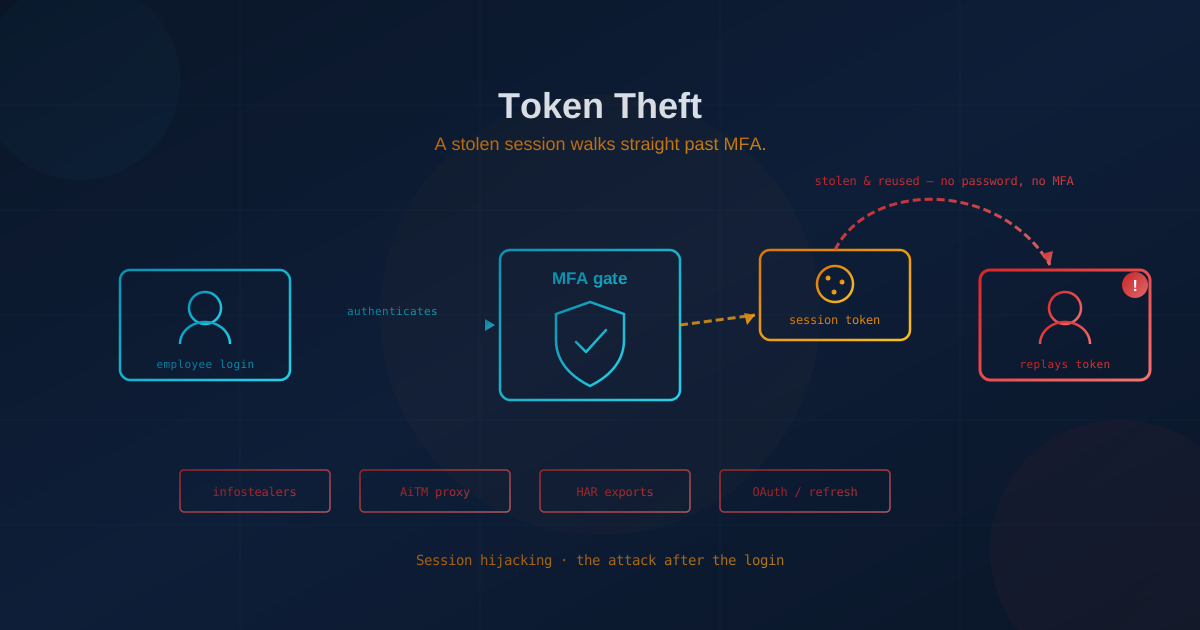
Token theft lets attackers bypass MFA by stealing the session cookie or access token that proves you already logged in. To stop it: bind sessions to devices using Microsoft's token protection or Google's Device Bound Session Credentials, move privileged accounts to phishing-resistant authentication like hardware security keys, shorten session lifetimes, use conditional access policies that re-check device and location mid-session, and audit OAuth apps connected to your tenant. The U.S. Cybersecurity and Infrastructure Security Agency (CISA) and the Canadian Centre for Cyber Security both recommend these measures for defending against token-based account takeover.
What is token theft and how does it bypass MFA?
Token theft is stealing the session cookie or access token that a service issues after you successfully log in and complete MFA. This token proves you already authenticated, so attackers who steal it can access your account without knowing your password or triggering another MFA prompt. Infostealers, phishing proxies, and compromised files are the main routes attackers use. Prevention requires binding tokens to devices, shortening session lifetimes, and using phishing-resistant authentication like hardware security keys.
Picture checking into a hotel. At the front desk you show your ID, maybe a credit card, and the clerk confirms you are who you say you are. Once that check passes, you're handed a room key, and from that moment on, nobody asks for your ID again. The key opens the door. Whoever holds it is treated as you.
That is almost exactly how logging in to a modern business system works, and it is why token theft has quietly become one of the most dangerous attacks facing organizations today. When an employee signs in to Microsoft 365 or Google Workspace and clears the multi-factor authentication (MFA) prompt, the service hands their device the digital equivalent of a room key: a session token. Steal that token and you don't need the password, and you're never asked to prove who you are. The door simply opens.
Most business owners still picture a breach as someone guessing a password and getting stopped by MFA. Token theft skips all of that. It doesn't pick the lock or forge an ID at the front desk. It copies the key of a guest who already checked in. It is the quiet, unglamorous technique behind a large share of the ransomware and business email compromise cases making headlines, and it deserves to be understood on its own terms rather than as a footnote to phishing.
What is token theft?
Token theft is the act of stealing the digital "proof of login" that a service issues after you successfully authenticate, so an attacker can reuse it to access your account without ever entering your password or completing MFA. When you log in to Microsoft 365, Google Workspace, or almost any modern web application, the service hands your browser a small credential (a session cookie or access token) that says "this person already proved who they are." Your browser presents it on every subsequent request so you're not re-prompted all day.
That token is a bearer credential: the room key from our hotel. Whoever holds it is treated as the authenticated user, no questions asked. Steal the token and you inherit the session: password unknown, MFA already satisfied. The distinction that matters for business leaders is simple. A stolen password is like a copied ID that still has to satisfy the front desk. A stolen token is the room key itself, and a room key never asks who is holding it.
How do attackers steal tokens?
Attackers steal tokens through four main routes: malware on the device, real-time phishing proxies, exported session files, and abuse of long-lived OAuth or refresh tokens. None of them require cracking a password, and most leave the victim's login working normally.
Infostealer malware
Infostealers are lightweight malware (often delivered through a fake software download, a cracked application, or a malicious ad) whose entire job is to copy the secrets sitting in your browser: saved passwords, autofill data, and, critically, active session cookies. The user usually notices nothing. Researchers at DeepStrike estimated that infostealer logs exposed roughly 1.8 billion credentials across 5.8 million infected devices in 2025, and SpyCloud's 2026 Identity Exposure Report described recapturing 8.6 billion stolen cookies and session artifacts. Those cookies are the tokens. This is why a single infected home laptop used for work can hand an attacker a live session into your corporate tenant. We cover the broader category in our overview of what malware is and how to protect against it.
Adversary-in-the-middle phishing
Instead of a fake login page, adversary-in-the-middle (AiTM) kits place an invisible proxy between the employee and the real website. The victim sees the genuine Microsoft or Google page, enters the real password, and approves the real MFA prompt (everything works) while the proxy quietly captures the session token the moment it's issued. This is the mechanism behind the subscription phishing platforms we detailed in Phishing-as-a-Service and the Microsoft 365 token theft the FBI warned about in our piece on the Kali365 phishing kit.
Exported session files
Tokens don't only live in browsers. Support tools, diagnostic exports, and browser developer utilities can capture web sessions in HAR files, which contain live cookies. In October 2023, attackers accessed Okta's support system using session tokens lifted from HAR files that customers had uploaded for troubleshooting, bypassing MFA entirely because the tokens represented already-authenticated sessions. Any file, log, or screenshot that captures a raw token is a token waiting to be stolen.
OAuth and refresh token abuse
When an employee connects a third-party app to Microsoft 365 or Google Workspace, that app receives its own long-lived token to act on the user's behalf. Steal or over-permission that token and an attacker gets durable access that survives password changes. This is exactly what happened in the Vercel breach, where one over-privileged OAuth grant to a third-party AI tool exposed hundreds of organizations. Refresh tokens are especially valuable: in most default configurations they persist for weeks or months and can survive a password reset and even MFA re-enrollment.
Why token theft is now the defining risk
Token theft has become the defining account-takeover risk because it neutralizes the two controls most businesses rely on (passwords and MFA) while remaining cheap, scalable, and hard to detect. Every other layer assumes the login is the checkpoint. Token theft moves the attack to after the checkpoint, where far fewer defenses are watching.
The economics reinforce it. Stolen tokens and cookies are sold in bulk on criminal marketplaces, often bundled with everything else an infostealer scraped from a device, so buying working access to a company can cost less than a business software subscription. Speed compounds the problem: Verizon's 2025 Data Breach Investigations Report found a large share of ransomware victims had their domains appear in infostealer logs beforehand, frequently only days before the intrusion. Credentials and tokens harvested on Monday can become a ransomware event by the end of the week.
It also scales without skill. The same shift we described in our analysis of why MFA alone won't save you applies here: real-time proxies and stealer kits are now packaged as point-and-click services, so an attacker no longer needs to understand cryptography to steal a session. They just need a subscription.
Why MFA doesn't stop token theft
MFA is the front-desk ID check. It happens once, at the moment of login, and it works. Token theft ignores it entirely by stealing the room key handed out afterward, and the key never asks for ID again. From the system's perspective, the attacker never logs in at all; they simply resume a session that was already trusted. The MFA prompt already happened, correctly, for the real user, and replaying a stolen token does not trigger a new one.
This is not an argument against MFA. MFA remains essential and stops a huge volume of simpler attacks. But it is an argument against treating MFA as the finish line. The reasonable questions for a business leader shift from "do we have MFA?" to "what happens after login, and how long does a stolen session stay useful?"
How do you know if your business is exposed?
Most organizations are more exposed than they assume, because token theft targets the ordinary tools every business already uses. These are the questions worth putting to your IT lead or managed provider:
- How long do our sessions and refresh tokens last? Default lifetimes in Microsoft 365 and Google Workspace can keep a stolen session usable for days or weeks. Shorter lifetimes shrink the attacker's window.
- Are personal and unmanaged devices allowed into company accounts? An infostealer on a home laptop is one of the most common sources of stolen work tokens.
- Do we review the OAuth apps connected to our tenant? Every third-party integration holds a token. Most companies have never audited the list.
- Can we see and revoke active sessions? If an account is compromised, resetting the password does nothing to a stolen token; you have to revoke the session explicitly.
- Would we notice a valid session used from an unexpected country or device? Token replay is detectable, but only if someone is watching for it.
What actually reduces token theft risk?
No single control eliminates token theft, but a layered set of measures makes stolen tokens far harder to obtain and far less useful once stolen. The goal is defense in depth around the session itself, not just the login.
- Bind sessions to the device. This is the equivalent of a room key that only works in the hand of the guest it was issued to. Copy it and it's inert. Google's Device Bound Session Credentials (DBSC) cryptographically tie a session to hardware on the machine (the TPM or Secure Enclave) so an exfiltrated cookie is useless elsewhere; it reached general availability on Windows in Chrome 146 in 2026, with macOS support following. Microsoft's equivalents include token protection in Microsoft Entra and the device-bound Primary Refresh Token used for Entra single sign-on. Google Workspace also offers session-binding controls for admins. Ask whether your platforms support these and turn them on.
- Move privileged accounts to phishing-resistant authentication. Hardware security keys and passkeys (FIDO2/WebAuthn) block the AiTM proxies that steal tokens in the first place, because authentication is bound to the real domain. Start with admins, finance, and executives. See our guide on phishing-resistant authentication.
- Shorten session and token lifetimes. Give the room key a checkout time. A stolen token that expires in an hour is far less valuable than one that lasts a month. Tighten idle and absolute session limits, especially for high-privilege roles.
- Use conditional access and continuous evaluation. Policies that re-check device compliance, location, and risk signals mid-session can catch a token being replayed from an unfamiliar device or country. This is the practical expression of a zero-trust approach: a successful login is not permanent proof of trust.
- Defend the endpoint against infostealers. Because so many tokens are stolen by malware, modern endpoint protection, restricting software installs, and keeping personal devices out of business accounts all cut the supply at the source.
- Audit and limit OAuth grants. Review the third-party apps connected to your Microsoft 365 or Google tenant, remove what you don't recognize, and restrict which apps users can authorize.
- Make session revocation part of incident response. This is deactivating the key at the front desk, not just changing the guest's ID. If an account is compromised, revoke active sessions and refresh tokens; don't stop at a password reset, because a reset password does nothing to a key that's already been copied. Bake this into your plan; our article on incident response planning covers why the steps need to exist before you need them.
If you're not sure where your organization stands on any of these, a free quick security assessment is a straightforward way to find the obvious gaps before an attacker does.
The durable lesson
Token theft is the natural next move in a long arms race. When passwords protected accounts, attackers stole passwords. When MFA protected the login, attackers stopped attacking the login and started stealing the session that comes after it. The lesson isn't that authentication has failed; it's that the checkpoint moved, and defenses have to move with it.
For a business, that means widening the question from "can someone log in as my employee?" to "if someone copies the room key, how quickly does it stop working, and would we even notice it being used down the hall?" A strong front desk was never all of hotel security, and a strong login was never all of yours. The organizations that treat a successful login as the beginning of trust rather than the end of it are the ones that will keep stolen tokens from turning into stolen businesses.
This article is intended for general informational purposes only and does not constitute professional security, legal, or compliance advice. Statistics on infostealer activity, credential exposure, and session theft are based on public reporting from security researchers and vendors as of the date of publication and may evolve. Organizations should consult qualified cybersecurity professionals before making operational changes based on this article.