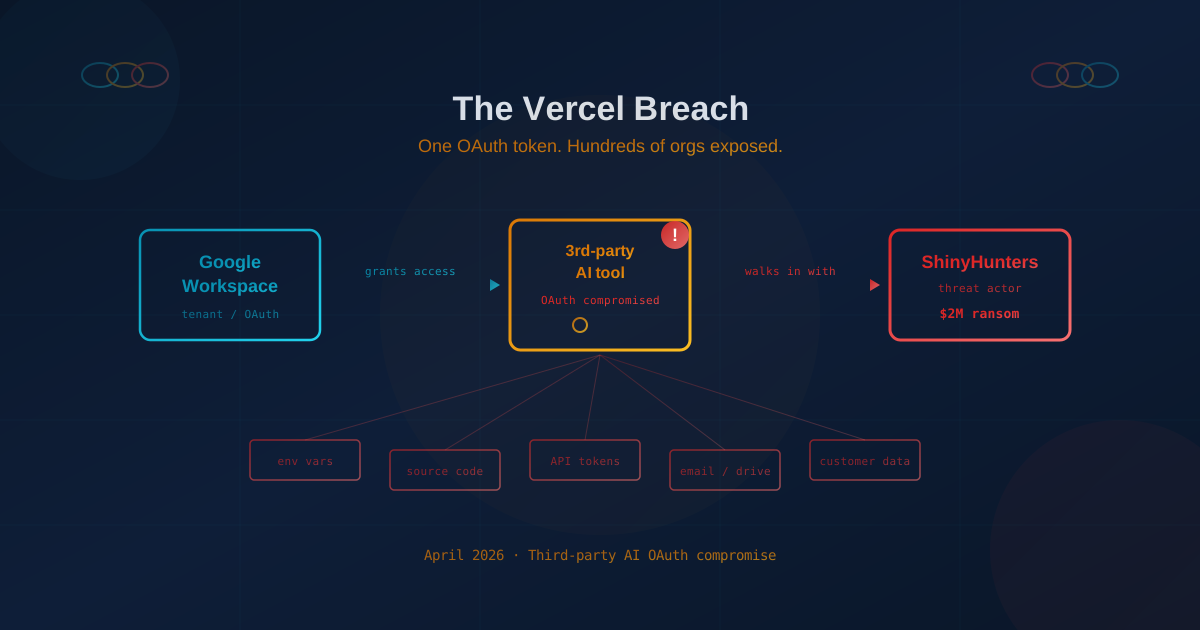
On April 20, 2026, cloud platform Vercel confirmed it had been breached by the threat actor ShinyHunters, with attackers demanding roughly $2 million in exchange for stolen data. The attack didn't start with a clever zero-day or a phishing email. It started with a third-party AI tool that had been granted access to Vercel's Google Workspace — and whose OAuth app had been compromised.
In Vercel's own words, the incident "originated from a small, third-party AI tool whose Google Workspace OAuth app was the subject of a broader compromise, potentially affecting its hundreds of users across many organizations." Translation for business owners: a tiny vendor that a single developer connected to the company's Google tenant became the front door for a full-blown breach.
Vercel is a sophisticated, cloud-native company. If this can happen to them, it can happen to any business running on Google Workspace, Microsoft 365, or any modern SaaS platform. For small and mid-sized businesses, the lessons are unusually direct — and the detection steps are things a business owner can actually do today.
What Actually Happened at Vercel
The publicly available facts, drawn from Vercel's own security bulletin and early reporting by the security community, paint a clear picture:
- A Vercel employee installed or connected a third-party AI tool to the company's Google Workspace environment.
- That tool was a relatively small product with "hundreds of users across many organizations" — not a major SaaS vendor with a security team of its own.
- The tool's Google Workspace OAuth application was compromised. Once the attackers controlled that OAuth app, they inherited every permission the tool had been granted by every customer that had installed it.
- Vercel was one of those customers. Whatever the tool could read, write, or act on inside Vercel's tenant, the attackers could too.
- ShinyHunters claim to have exfiltrated internal data and are now attempting to extort Vercel for roughly $2 million.
This is not a software supply chain attack in the traditional sense (like the one we wrote about in our coverage of the axios npm compromise). Nothing malicious was injected into Vercel's code. Instead, this is what security professionals are starting to call an identity supply chain attack — the attacker didn't need to break into Vercel at all, because Vercel had already handed a working key to a third party, and that third party got compromised.
Why Google Workspace and Microsoft 365 OAuth Apps Are Such a Juicy Target
When an employee clicks "Sign in with Google" or "Connect to Microsoft 365" on a new AI tool, a dialog appears asking for permissions: read your email, access your Drive, read your contacts, send mail as you, access calendar, and so on. Most people click "Allow" without reading the list. That single click creates an OAuth grant — a long-lived token the tool can use to act inside your tenant, often without re-prompting the user.
A few things make these grants dangerous:
- They persist. Unlike a password, an OAuth grant isn't rotated when the employee changes their password or enables multi-factor authentication. It keeps working until someone explicitly revokes it.
- They bypass MFA. Once issued, the token is the credential. An attacker who steals the token doesn't need the user's password or MFA code.
- They can be extraordinarily broad. "Read all files in Drive" or "send email as any user" are legitimate scopes many AI tools request.
- They are approved once and forgotten. As Mohan Kumar, CEO of Aira Security, put it in reporting on this incident: "AI tools with OAuth scopes nobody's tracking… someone approved them in a minute and nothing has been touched since. That is the attack surface."
This is the modern form of the third-party vendor risk problem, and it is not specific to Google. Microsoft 365 tenants have the same concept under "Enterprise Applications" and "App Registrations." Slack, Okta, Dropbox, Notion, HubSpot — every major SaaS platform has an OAuth app ecosystem, and every one of them can be abused the same way.
Why Small and Mid-Sized Businesses Are Especially Exposed
Enterprises are not the only ones at risk here. In some ways, small and mid-sized businesses are more exposed than large enterprises, for reasons we've explored in why cybercriminals target small businesses and "too small to be targeted" — the most expensive business lie.
- No one is auditing OAuth apps. Most SMBs do not have a security team reviewing which third-party apps employees connect to their tenant. The Workspace or 365 admin console is a blind spot most business owners have never opened.
- AI adoption is a race right now. Teams are under pressure to "use more AI," and the path of least resistance is to connect whatever tool looks useful directly to email, calendars, and files. We covered this dynamic in our piece on shadow AI and what business leaders should know.
- Approvals are usually self-service. Unless an admin has specifically restricted it, any employee can grant a third-party app access to their own mailbox, Drive, or calendar — and in some configurations, to the whole organization.
- The blast radius is the whole business. An SMB's Google Workspace or Microsoft 365 tenant typically holds payroll discussions, contracts, customer lists, invoices, source material, and the email threads needed to reset most other accounts. A single compromised OAuth grant can expose the entire operating record of the company.
This is the same lesson we keep coming back to in our coverage of SaaS security for small businesses in the AI era: your security perimeter is no longer your office network. It is every vendor and every tool you have connected to the platforms that run your business.
How to Detect If Your Organization Is Affected — In Plain English
Vercel published a specific Indicator of Compromise (IoC) that any Google Workspace administrator can check for directly. You do not need to be technical to do this. If you have admin access to your company's Workspace — or if you can call your IT person and ask them to do it — here is the walkthrough.
Step 1: Open the Google Workspace admin console
Go to admin.google.com and sign in with an account that has admin privileges. If you are not sure who has admin rights, the most common answer is "whoever originally set up the company Gmail."
Step 2: Navigate to the third-party app list
In the admin console menu, click through:
- Security
- Access and data control
- API controls
- Manage third-party app access (sometimes labeled "Manage App Access")
You will see a list of every third-party application that has been granted access to your organization's Google accounts. For many SMBs, this is the first time anyone has looked at this list. Expect to be surprised by how many apps are there.
Step 3: Search for the specific Indicator of Compromise
Vercel published the following OAuth App ID associated with the breach:
110671459871-30f1spbu0hptbs60cb4vsmv79i7bbvqj.apps.googleusercontent.comUse the search field in "Manage third-party app access" to look for that client ID, or for any app whose details reference it. If you find it in your tenant, the app should be treated as compromised and removed immediately. Any employee account that had it connected should be reviewed for unusual activity.
Step 4: Review every other AI tool in that list
Even if you don't find that specific app, the exercise is valuable. Look at every third-party app in your Workspace and ask:
- Do we still use this tool? If not, remove it.
- Who originally approved it, and for what purpose?
- What scopes (permissions) does it have? Pay special attention to anything that says "read all email," "read and write Drive files," "send mail as," or "manage users."
- Is the vendor a serious company with a published security posture, or is it a small tool that appeared in someone's LinkedIn feed six months ago?
Step 5: If your business runs on Vercel, take the extra steps
If your company's website or web app is hosted on Vercel, the security community's recommended actions — based on Vercel's own bulletin — include:
- Rotate any environment variables that were not marked as "sensitive." Non-sensitive env vars may have been visible and should be treated as exposed. This includes any API keys, database URLs, or tokens stored in plain form.
- Check your Vercel activity logs for deployments, project changes, or access events you don't recognize.
- Turn on the "sensitive environment variable" feature going forward, so future secrets are encrypted at rest and masked in the UI.
- Rotate anything that was downstream of those keys — for example, if a leaked API key could authenticate to Stripe, Twilio, or a database, rotate credentials there too.
The Microsoft 365 Version of the Same Check
If your business runs on Microsoft 365 instead of Google Workspace, the equivalent review lives in the Microsoft Entra admin center (formerly Azure AD):
- Sign in at entra.microsoft.com as a Global Admin or Application Administrator.
- Go to Identity → Applications → Enterprise applications.
- Review the list of applications, paying attention to anything labeled as an AI assistant, meeting recorder, email summarizer, or productivity tool.
- Click into each app and review Permissions. Look for broad scopes like Mail.ReadWrite, Files.ReadWrite.All, Sites.FullControl.All, or Directory.ReadWrite.All.
- Consider enabling admin consent workflow so employees can no longer unilaterally grant new third-party apps access to the tenant.
If you have never done this review, the first pass will likely take longer than you expect. That is itself a useful finding.
The Real Lesson: Unrestricted Access Is a Business Decision
It is tempting to treat the Vercel incident as a story about a single developer making a mistake. The more useful framing is that the mistake was available to be made in the first place. An employee was able to grant a small, unvetted vendor unrestricted access to a production business tenant, and nothing in the environment flagged it, slowed it down, or required a second set of eyes.
That is a policy and governance question, not a technical one. For small businesses, the practical response looks something like this:
- Treat OAuth approvals like vendor contracts. Connecting an AI tool to your Google Workspace or Microsoft 365 tenant is, in effect, signing a data-sharing agreement with that vendor. It deserves the same level of thought.
- Restrict who can grant third-party access. In both Google Workspace and Microsoft 365, you can require admin approval before a third-party app can be connected to company data. Turn that on. This is one of the most impactful controls an SMB can enable, and it costs nothing.
- Maintain an approved tool list. This is one of the core pieces of an AI usage policy, which every SMB adopting AI should have in writing.
- Audit connected apps on a schedule. Quarterly is a reasonable cadence for most SMBs. Remove anything no longer in use. This is the same discipline we recommend for employee onboarding and offboarding — tokens and grants outlive the employee who requested them.
- Prefer vendors that publish a security posture. A mature SaaS vendor will have a trust page, a SOC 2 report, and a published incident response process. A "small AI tool with hundreds of users" typically has none of these.
- Mark secrets as sensitive everywhere you can. Whether it's Vercel's "sensitive environment variable" flag, AWS Secrets Manager, or Microsoft Key Vault, use the features that are there.
This is the same underlying principle we've written about in why SMBs should care about zero-trust and how to reduce your attack surface: every implicit trust relationship is a potential breach path, and modern businesses have far more of them than they realize.
What This Means for the AI-Era SMB
The Vercel breach is going to be remembered as one of the defining examples of what happens when AI adoption runs ahead of AI governance. The employee who connected that tool wasn't malicious. They were almost certainly trying to be productive. But in the current landscape, "I connected a helpful AI tool to my work Google account" is an action with the same potential blast radius as "I gave a vendor our admin password."
For business leaders, the takeaways are straightforward:
- Your Google Workspace or Microsoft 365 tenant is the crown jewel of your business. Treat every OAuth grant to a third party as access to that crown jewel.
- Most of the tools your employees are connecting today were not vetted. That is fixable — start with the list in your admin console.
- "Unrestricted access" is almost never required. If a vendor demands it, that's a negotiation, not a given.
- The AI vendors you trust today are themselves being targeted. Assume some of them will be compromised, and design your policies around that assumption.
If you are not sure whether your organization has this problem — or how to structure the review, the revocations, and the follow-up policy — that uncertainty is itself the finding. The gap between "we probably have some AI tools connected" and "here is the list, here is who approved each one, and here is why they still need access" is the gap attackers are walking through right now.
This article is intended for general informational purposes only and does not constitute professional security, legal, or compliance advice. Details about the Vercel incident are based on public reporting and Vercel's own security bulletin as of the date of publication and may evolve as the investigation continues. Organizations should consult qualified cybersecurity professionals before acting on any specific indicator of compromise or making changes to production tenants.