
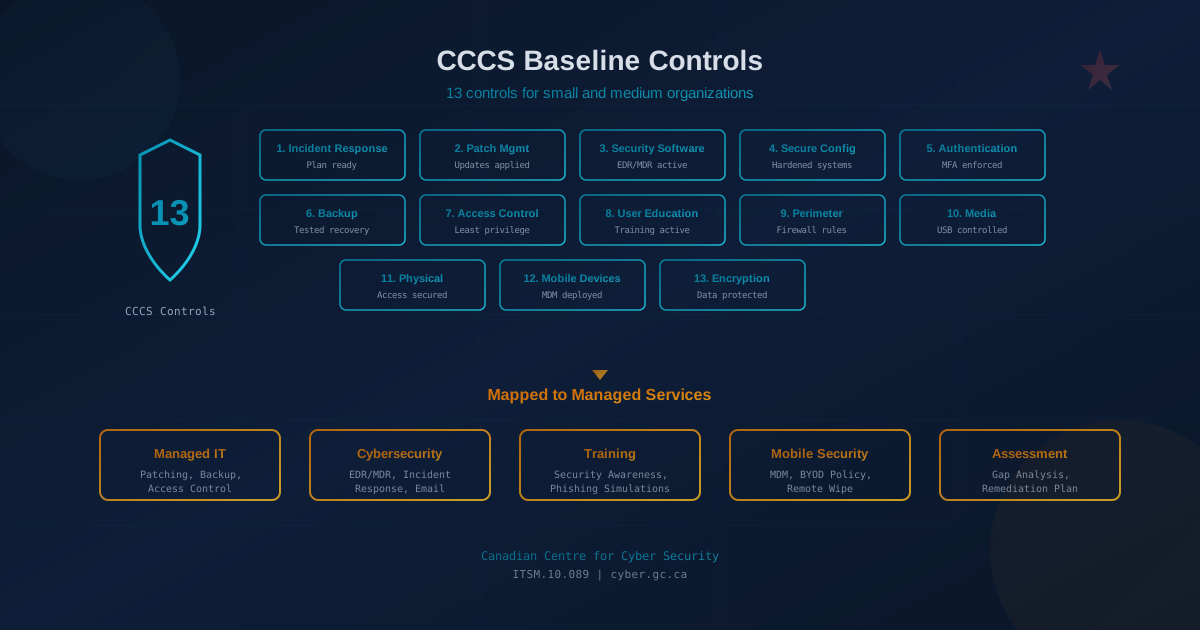
Quick answer: The Canadian Centre for Cyber Security (CCCS) publishes 13 baseline controls for small and medium organizations (ITSM.10.089). They cover incident response, patching, endpoint security, user authentication (MFA), employee training, backup and encryption, mobility, perimeter defenses, cloud services, websites, access control, and portable media. A managed IT and cybersecurity provider can implement most of these controls through services like EDR/MDR, automated patching, email security, backup monitoring, cloud configuration, and security awareness training.
What are the CCCS baseline controls and why do they matter?
The Canadian Centre for Cyber Security is Canada's national authority on cybersecurity. Under the Communications Security Establishment, the CCCS publishes practical guidance tailored to Canadian organizations, including a set of baseline cyber security controls specifically for small and medium organizations.
These 13 controls represent what the CCCS considers the minimum necessary to protect a Canadian business from common cyber threats. They are not exhaustive enterprise security standards; they are a practical starting point that any small business can work toward. Organizations that implement all 13 controls significantly reduce their exposure to ransomware, business email compromise, data breaches, and the operational disruptions that follow.
The controls are:
- Develop an incident response plan
- Automatically patch operating systems and applications
- Enable security software
- Securely configure devices
- Use strong user authentication
- Provide employee awareness training
- Back up and encrypt data
- Secure mobility
- Establish basic perimeter defences
- Secure cloud and outsourced IT services
- Secure websites
- Implement access control and authorization
- Secure portable media
Below, we break down each control in plain language and show how a managed IT and cybersecurity provider like Cyber Unit can help you implement it.
How do you create an incident response plan?
An incident response plan documents what your organization will do when a cybersecurity incident occurs. The CCCS baseline requires that you have a written plan that identifies key contacts, defines roles, and outlines steps for containment, eradication, and recovery. Without a plan, incidents take longer to resolve and cause more damage.
A managed provider helps by:
- Drafting or reviewing your incident response documentation
- Providing 24/7 SOC monitoring so incidents are detected faster
- Coordinating containment and remediation when an incident occurs
- Conducting post-incident reviews to improve defenses
For detailed guidance on the critical first hour, see our ransomware first-hour checklist.
How do you keep systems patched?
Patch management means applying security updates to operating systems, applications, and firmware in a timely manner. The CCCS baseline emphasizes prioritizing critical and high-severity vulnerabilities, especially those being actively exploited. Unpatched systems are one of the most common entry points for attackers.
A managed IT provider handles this by:
- Automating patch deployment across workstations and servers
- Monitoring for failed or missing patches
- Prioritizing patches based on severity and known exploitation (CISA KEV, CCCS advisories)
- Scheduling updates to minimize business disruption
Research shows the average time to exploit a vulnerability is now under 10 hours for some actively exploited flaws. Manual patching cannot keep pace. See our analysis of CVE exploit windows for current data.
How do you enable and manage security software?
The CCCS baseline requires security software on all devices, including antivirus, anti-malware, and ideally endpoint detection and response (EDR). This software must be kept current and centrally monitored.
Cyber Unit's approach:
- EDR deployment on all managed endpoints (SentinelOne or equivalent)
- Managed Detection and Response (MDR) with 24/7 SOC analysts reviewing alerts
- Automatic signature and engine updates
- Tamper protection to prevent malware from disabling security tools
The difference between EDR and MDR is significant. EDR is software; MDR adds human analysts who investigate and respond to threats around the clock. See our EDR vs MDR comparison for more detail.
How do you implement secure configurations?
Secure configurations mean disabling unnecessary services, removing default accounts, and hardening systems before they are deployed. The CCCS baseline emphasizes not using vendor defaults and documenting baseline configurations.
A managed provider implements this through:
- Standardized build images for workstations and servers
- Configuration baselines aligned with CIS Benchmarks or vendor hardening guides
- Removal of unnecessary software, services, and open ports
- Periodic configuration audits to detect drift
How do you enforce strong user authentication?
User authentication is one of the most critical controls. The CCCS baseline requires strong, unique passwords and multi-factor authentication (MFA) wherever possible, especially for remote access, email, and administrative accounts.
Implementation includes:
- Enforcing MFA on Microsoft 365, Google Workspace, VPN, and remote desktop
- Deploying a business password manager to eliminate weak or reused passwords
- Following current NIST password guidelines: minimum 15 characters, no forced rotation, breach database checks
- Using phishing-resistant MFA (hardware keys or passkeys) for privileged accounts
MFA alone does not guarantee protection. Attackers now use real-time phishing and token theft to bypass MFA. See our session hijacking and MFA bypass article for current threats.
How do you provide effective employee awareness training?
User education is the control that addresses human risk. The CCCS baseline requires ongoing security awareness training for all employees, covering phishing, social engineering, safe browsing, and password hygiene.
Cyber Unit delivers security awareness training through:
- Managed training programs powered by platforms like Wizer
- Realistic phishing simulations with immediate feedback
- Short, frequent modules rather than annual compliance courses
- Reporting on completion rates and simulation results
Research from the CCCS, CISA, and NIST shows that short, frequent training with immediate feedback is more effective than annual courses. See our guide to what actually works for the evidence.
How do you back up and encrypt your data?
The CCCS baseline combines backup and encryption into a single control: organizations must regularly back up critical data, store backups separately from production systems, test recovery periodically, and encrypt sensitive data both at rest and in transit. Backups are your last line of defense against ransomware, and encryption protects data if devices are lost or stolen.
A managed provider delivers:
- Automated daily backups with off-site or cloud storage
- Immutable backup copies that ransomware cannot encrypt or delete
- Regular restore testing to verify backup integrity
- Documented recovery time objectives (RTOs) and recovery point objectives (RPOs)
- Full-disk encryption on all endpoints using BitLocker (Windows) or FileVault (macOS)
- TLS enforcement for all remote access and cloud services
- Encrypted backup solutions with properly managed keys
Many organizations discover their backups do not work only when they need them. See our backup assumptions that fail for common pitfalls.
How do you secure mobility?
Secure mobility addresses the risk from smartphones, tablets, laptops, and other portable devices accessing corporate data outside the office. The CCCS baseline requires policies for mobile devices, including the ability to remotely wipe lost devices, enforce encryption, and separate personal and work data on BYOD devices.
A managed provider implements this through:
- MDM or MAM deployment (Microsoft Intune, Jamf, or equivalent)
- Work profile containerization on personal devices
- Enforcement of screen lock, encryption, and OS version requirements
- Remote wipe capability for corporate data
- VPN or zero-trust network access for remote workers
BYOD policies without MDM leave corporate data unprotected. See our BYOD security risks article for a detailed breakdown.
How do you establish basic perimeter defences?
Perimeter defenses include firewalls, intrusion detection, and filtering at the network edge. The CCCS baseline requires a firewall between the internal network and the internet, with appropriate rules and monitoring.
A managed IT provider handles this through:
- Managed firewall configuration and monitoring
- Regular rule reviews to remove unnecessary open ports
- VPN hardening for remote access
- DNS filtering to block known malicious domains
For small offices, a managed firewall service includes firmware updates, configuration backups, and proactive monitoring that most internal teams cannot sustain.
How do you secure cloud and outsourced IT services?
The CCCS baseline requires organizations to apply the same security principles to cloud services and outsourced IT that they would to on-premises systems. This means understanding the shared responsibility model: cloud providers secure the infrastructure, but the customer is responsible for securing their data, access controls, and configurations within that infrastructure.
Key requirements from the CCCS guidance include:
- Selecting cloud providers that meet recognized security standards and can demonstrate compliance
- Understanding which security responsibilities belong to the provider and which remain with your organization
- Applying strong authentication and access controls to all cloud services
- Ensuring data stored in cloud services is encrypted and access is logged
- Reviewing cloud service configurations to disable unnecessary features and enforce security settings
- Establishing contractual requirements for security, incident notification, and data handling with outsourced IT providers
A managed provider helps by configuring Microsoft 365, Google Workspace, and other cloud platforms according to security best practices, monitoring for misconfigurations, and ensuring your data is protected regardless of where it resides.
How do you secure your websites?
The CCCS baseline requires organizations that operate websites to protect them from common web-based attacks. Websites are frequently targeted because they are publicly accessible and often contain vulnerabilities that attackers can exploit to steal data, deface content, or gain access to backend systems.
Key requirements from the CCCS guidance include:
- Using HTTPS with valid TLS certificates on all web pages, not just login or payment pages
- Keeping web server software, content management systems (such as WordPress), plugins, and themes updated with security patches
- Implementing input validation to protect against injection attacks
- Using web application firewalls (WAF) to filter malicious traffic
- Regularly scanning websites for vulnerabilities and remediating findings promptly
- Restricting administrative access to websites and using strong authentication for admin accounts
A managed provider can monitor your website for vulnerabilities, apply patches to CMS platforms, configure WAF rules, and ensure TLS certificates remain valid and properly configured.
How do you implement access control and authorization?
Access control means limiting who can access what based on job function. The CCCS baseline requires the principle of least privilege: users should have only the permissions necessary for their role, and administrative access should be restricted.
Implementation includes:
- Role-based access control (RBAC) in cloud platforms like Microsoft 365
- Separate admin accounts for IT staff (not using admin privileges for daily work)
- Regular access reviews to remove unnecessary permissions
- Prompt offboarding to revoke access when employees leave
How do you secure portable media?
Portable media protection addresses the risk from USB drives, external hard drives, and other removable storage. The CCCS baseline requires controls to prevent unauthorized devices from connecting to systems and policies for secure disposal of storage media.
Technical controls include:
- Endpoint policies that block or restrict USB storage devices
- Automatic scanning of removable media when connected
- Encryption requirements for any approved external storage
- Secure data destruction procedures when disposing of drives
How does Cyber Unit help implement these controls?
The CCCS baseline controls are achievable for small and medium organizations, but implementing them requires both technical capability and ongoing attention. Most SMBs do not have dedicated IT security staff. That is where a managed IT and cybersecurity provider fits.
Cyber Unit delivers:
- Managed IT Services: Patching, configuration management, backup and encryption, access control, and employee onboarding/offboarding. These cover controls 2, 4, 7, and 12.
- Cybersecurity Services: EDR/MDR with 24/7 SOC monitoring, email security, vulnerability management, perimeter defenses, and incident response. These cover controls 1, 3, 5, 9, and 13.
- Security Awareness Training: Managed training and phishing simulations. This covers control 6.
- Cloud and Mobility Security: Cloud configuration reviews, MDM deployment, and policy enforcement. These cover controls 8, 10, and 11.
Because Cyber Unit integrates IT and security services, there are no gaps between vendors. Patching, monitoring, backup, and incident response are coordinated by a single team. This approach aligns with how the CCCS baseline is designed: as an integrated set of controls, not a checklist of disconnected products.
How do you assess your current state against CCCS controls?
Before implementing controls, you need to know where you stand. Two free options:
- Cybersecurity Canada offers a free assessment built on the CCCS framework. It produces a detailed report with recommendations by control area.
- Our free cybersecurity assessment on cyberunit.com covers 22 security areas in under five minutes and highlights gaps a provider can address.
If you would like a professional review, our security assessment service provides an analyst-led evaluation with a prioritized remediation roadmap.
What comes next?
Implementing the CCCS baseline controls is not a one-time project. Threats evolve, systems change, and controls require ongoing maintenance. The value of a managed provider is continuous coverage: patching happens every week, monitoring runs 24/7, and training continues throughout the year.
If you are starting from scratch, prioritize MFA, patching, backups, and endpoint security first. These four controls address the most common attack vectors. Then work through user training, access control, and the remaining controls.
The CCCS baseline provides a credible, government-backed framework that Canadian businesses can reference when speaking with insurers, auditors, or customers who ask about security practices. It is practical, achievable, and directly relevant to the threats Canadian organizations face.
This article is intended for general informational purposes only and does not constitute professional security, legal, or compliance advice. The CCCS baseline controls described are based on publicly available guidance from the Canadian Centre for Cyber Security (cyber.gc.ca) as of the publication date. Organizations should consult the official CCCS publications and qualified cybersecurity professionals before implementing controls or making operational changes.