
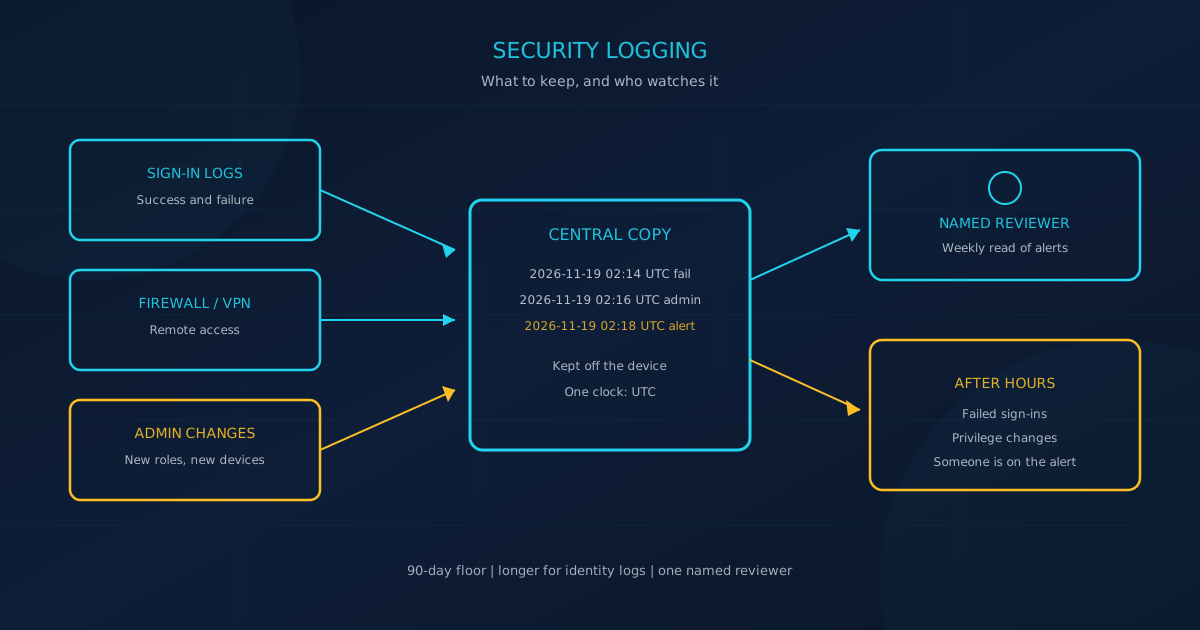
Security logging for a small business is the record of who signed in, what changed, and which system saw it. On its page for small and medium businesses, the U.S. Cybersecurity and Infrastructure Security Agency (CISA) defines logging as "the process of recording this activity on your business systems, including who accessed what, when, and from where." NIST Special Publication 800-92, Guide to Computer Security Log Management (September 2006, still the final edition), calls a log "a record of the events occurring within an organization’s systems and networks."
The Canadian Centre for Cyber Security's December 2022 guide, ITSAP.80.085, says logging collects activities, events, error conditions, or system status, and that monitoring looks for known attacks or unauthorized activity. A local copy on a firewall or mailbox helps only if someone can find it before the device overwrites it.
What is security logging for a small business?
Security logging is the choice to keep those records. Monitoring is the choice to look at them. CISA says monitoring "adds a layer of oversight by reviewing those logs in real time to identify anomalies or unauthorized behavior." ITSAP.80.085 (December 2022) says that review "should be conducted by security analysts or a security team, and not by the system administrators that set up and configure the systems."
NIST's 2006 guide says routine log analysis is beneficial for identifying security incidents, policy violations, fraudulent activity, and operational problems. CISA also says the two practices "create a clear picture of normal, baseline behavior." In a small firm the person who built the network is often asked to watch it. The record and the review are still separate jobs.
The NIST log management project page lists SP 800-92 Rev. 1, Cybersecurity Log Management Planning Guide, as a draft released October 11, 2023. The draft says it replaces the 2006 guide, and it does not cover "implementing log management technology." CISA's small-business page points readers to that 2023 draft. The final publication is still the September 2006 guide.
Which security logs should a small business keep?
Keep accounts that can change other accounts, and systems an outsider can reach, before you keep everything else. CISA tells small businesses to log "user activity, admin actions, network traffic, application logins, system events and more," on servers, firewalls, endpoint devices, and cloud services. December 2025 goal 3.Q adds operating systems, intrusion detection or prevention, data loss prevention, and virtual private networks, stored for detection and incident response.
The Cyber Centre's ITSM.80.024 (effective March 31, 2025) is written for large organizations running a security information and event management platform, a SIEM. Its minimum list still fits a smaller firm. Collect, at a minimum:
- successful and failed authorization
- privilege changes, including new or deleted accounts, group membership, and authentication changes
- actions by anyone with administrative privileges
- registration of new devices, including personal phones used for work
- application errors
ITSM.80.024 also says not to collect financial records, government ID numbers, passwords, or encryption keys.
CISA published a joint logging guide on August 21, 2024. The Cyber Centre, a co-author, says that guide is for medium to large organizations. Its enterprise list still starts with critical systems, internet-facing services, and identity servers, then firewalls and administrative workstations. On Microsoft 365, the tenant is one of those critical systems. Our Microsoft 365 security checklist says, "You can only investigate what was logged," and says to confirm audit logging is on, decide how long you keep logs, and know who can search them.
Our IT asset inventory guide quotes CIS Control 1 as knowing "the totality of assets that need to be monitored and protected within the enterprise." CIS Safeguard 8.2 lists that inventory, Safeguard 1.1, as a dependency in the CIS Controls assessment specification.
| What to keep | Where it usually lives | Action this month |
|---|---|---|
| Successful and failed sign-ins | Email, identity service, VPN | Turn on the sign-in log and alert after repeated failures |
| Privilege and account changes | Identity admin center | Alert when an admin role or a new admin is added |
| Remote access and firewall events | Firewall, VPN, remote support tool | Forward connection logs off the device |
| Endpoint alerts | Laptops and servers | Confirm each company device is enrolled and reporting |
| Mail and file admin actions | Microsoft 365 or Google Workspace | Confirm the audit log is on and name who can search it |
| New device registration | Wi-Fi, device management, directory | Record when a phone or laptop is allowed to join |
Who should watch security logs, and how often?
Name a reviewer and send alerts, not a raw stream. CIS Safeguard 8.11 says to review audit logs "on a weekly, or more frequent, basis." The assessment specification places 8.11 in Implementation Groups 2 and 3, past the smallest set, and it is still the clearest published rhythm. CISA's examples of alerts are failed login attempts and privilege escalation. December 2025 goal 3.E says security personnel are notified after consecutive unsuccessful logins in a short period.
ITSAP.80.085 says monitoring should be done by analysts or a security team, "not by the system administrators that set up and configure the systems." It also says to establish a security operations center or subscribe to a SOC service.
Nights and weekends are the gap. Our EDR vs MDR guide separates endpoint software, which records activity and flags suspicious behaviour, from a managed service whose analysts monitor alerts and respond. It asks who sees a serious alert on a Saturday night. Cyber Unit's cybersecurity services describe endpoint detection and response as monitoring devices for threats, and managed detection and response as 24/7 human analysis by security experts who investigate alerts and respond to real threats. That page says its Security Operations Center provides 24/7 monitoring and threat response. Watching logs does not make a business compliant with any rule.
Our incident response guide asks, ahead of time, "What systems generate logs or alerts that might reveal problems?" It lists "understanding the timeline and root cause" as a reason to keep records during an incident.
How long should a small business keep security logs?
The published numbers differ, so write down the one you will use. CIS Safeguard 8.10 says to "retain audit logs across enterprise assets for a minimum of 90 days." ITSM.80.024 (March 31, 2025) recommends at least 6 months for important logs and says to consider 13 months for more critical logs. CISA goal 3.Q (December 2025) says to store logs "for a duration informed by risk or pertinent regulatory guidelines."
A contract may set a different period. Confirm any retention duty with counsel. This is not legal advice. The August 2024 joint guide says to keep logs "for long enough to support cyber security incident investigations," and that default periods "are often insufficient." Many systems overwrite old logs when storage runs out. Goal 3.Q puts the copy in a central system only authorized users can change, with an alert if logging is turned off. ITSAP.80.085 says log data at rest should be cryptographically protected.
Timestamps have to agree. Safeguard 8.4 says to use at least two synchronized time sources where the device supports it. ITSM.80.024 says to use a central time server and at least three time servers. The joint guide prefers Coordinated Universal Time. Our managed security provider checklist says a provider should tell you exactly where your data and security logs are stored, and it asks, "Can we see our own security logs?"
What should a smaller firm write down first?
CIS Control 8, Audit Log Management, starts with a written process, not a product. The CIS Controls Navigator (v8.1) and the assessment specification share Safeguard 8.1: document the "collection, review, and retention of audit logs for enterprise assets," and review it yearly or after a big change. Safeguard 8.2 says to turn logging on across those assets. Safeguard 8.3 says the destination needs enough storage. The specification places 8.1, 8.2, and 8.3 in Implementation Groups 1, 2, and 3.
Later safeguards sit in larger groups. Safeguard 8.9 says to centralize logs and names a SIEM as an example. Safeguard 8.12 (Group 3 only) says to collect provider logs where supported, including authentication and user management. Ask email, payroll, and remote-access vendors which of those events you can export.
ITSAP.80.085 lists the cloud questions to write beside that process: what is monitored, how often logs are reviewed, where your log data is stored, what you can see, and when it is destroyed.
How can a small business start in 30, 60, and 90 days?
Month one turns on the logs a stolen password would leave. Month two copies them off the device that wrote them. Month three proves someone reads them. CISA's small-business page matches that order: set up logging, monitor regularly, and write retention plus a crisis-response team.
Days 1 to 30: name the records and the reviewer
- Write one page: systems, events, reviewer, and retention. That page is Safeguard 8.1.
- List the assets. Safeguard 8.2 depends on the inventory.
- Turn on sign-in and admin logs for email, the VPN or firewall, and endpoints. Confirm a failed password creates a findable line.
- Name the reviewer and a backup. New admin roles and repeated failed sign-ins are alerts.
Days 31 to 60: move the copy and set the clock
- Forward firewall, VPN, and identity logs to a store the device cannot erase when its disk fills. Goal 3.Q calls that a central system.
- Compare storage with the retention number. If the page says 90 days and the tool keeps 14, fix one of them (Safeguard 8.3).
- Use one time source and record times in UTC, so a Vancouver laptop and a Chicago server agree.
- Limit who can delete logs, and alert if logging is switched off, as goal 3.Q describes.
Days 61 to 90: review on a schedule and test the search
- Once a week, read failed sign-ins, new privileged accounts, new devices, and open alerts. Safeguard 8.11 uses a weekly bar.
- Find a sign-in from 30 days ago, then from the oldest day you claim to keep. If the second search fails, fix the archive or shorten the claim.
- Ask each critical vendor the ITSAP.80.085 questions: what it monitors, where logs sit, what you can export, and when it deletes them.
- Write the after-hours answer: a named person or a monitoring service, and which alerts they may act on without calling you.
What should you ask before you trust a log tool?
Ask whether the record survives after the device that wrote it is gone. The August 2024 joint guide says a missing history hurts response, and a central store prevents the loss when local storage fills. CISA says effective logs "should contain enough detail to aid incident responders." Five questions are enough:
- Which rows in the table above are actually on, and which still sit on one device?
- Who is told about repeated failed sign-ins, and who is told when an admin role is granted?
- Can we search a sign-in from 90 days ago without calling the vendor?
- Who reviews the weekly alerts, other than the person who configured the system?
- What happens at 2 a.m., and is that written down?
If those answers are unclear, write the process before you buy another tool. A free cybersecurity assessment shows where logging sits beside the rest of your controls. The assessment page calls it a free 5-minute version that "covers 22 security areas and runs entirely in your browser, with no signup required."
This article is intended for general informational purposes only and does not constitute professional security, legal, or compliance advice. Retention periods and monitoring practices described here are drawn from public guidance by CISA, the Canadian Centre for Cyber Security, NIST, and the Center for Internet Security as of the date of publication and may change. Organizations should consult qualified legal and cybersecurity professionals before treating any retention period or control as a requirement for their business.