
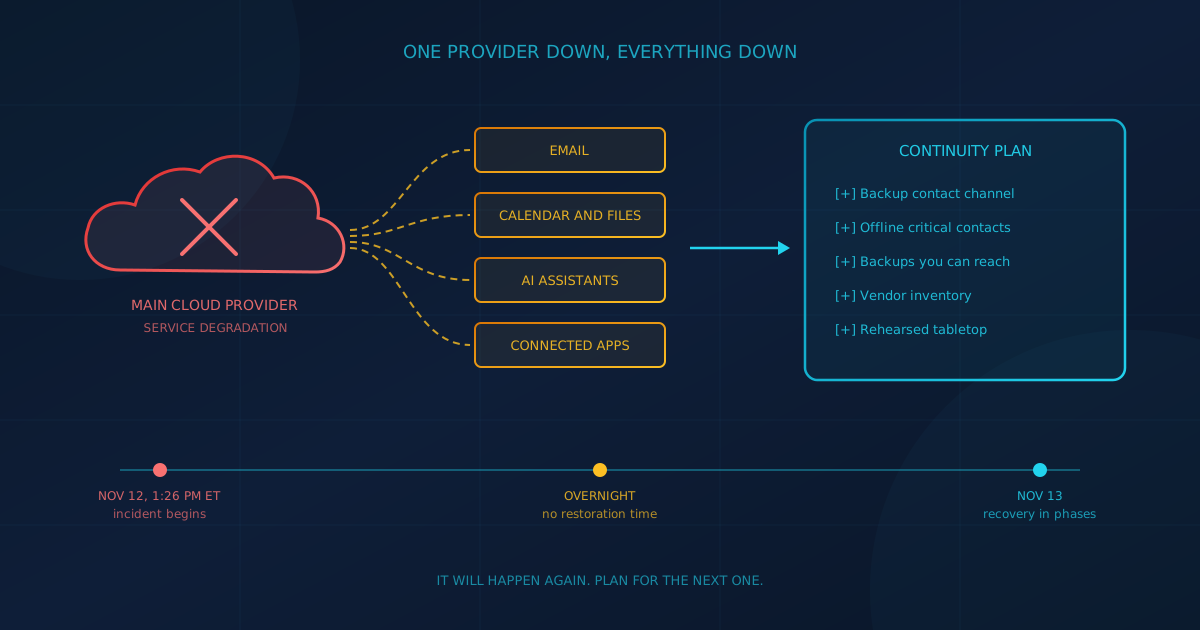
The Microsoft 365 outage that began on November 12, 2026 is a warning for every business, not only for Microsoft customers. According to Microsoft's own updates, reported by BleepingComputer, the incident began at 1:26 PM ET and cut users off from Exchange Online, Outlook, Teams features, SharePoint Online and Copilot. Nearly 24 hours later, Microsoft was still restoring service to remaining customers and regions. It will happen to Microsoft again, and it will happen to the other providers your business runs on.
Small and mid-sized businesses in Canada and the United States now rent most of their critical systems, from email and identity to accounting, phones and AI tools. Whatever the vendor, the outage questions are the same: who decides, how do people reach you, and can you still open the files you need?
What happened in the Microsoft 365 outage?
Microsoft tracked the incident as MO1550821 in the Microsoft 365 admin center. At 2:31 PM ET on November 12, the Microsoft 365 Status account on X said the elevated load "isn't driven by an increase in traffic, but by a number of servers being unexpectedly unavailable." Overnight, it said some fixes were "not taking as expected." On November 13, Microsoft apologized and said the incident "was introduced by an issue during an earlier network capacity upgrade."
- What broke: Mailbox access through Outlook on the web and desktop, email delivery, Copilot access to work data, and Teams features that depend on Exchange Online, such as calendar scheduling and invites.
- What mostly kept working: According to Microsoft's service notes as summarized by Euronews, joining Teams calls and meetings, group chats and channel messages were largely not affected.
- Delayed mail: Microsoft said it extended its email timeout to 48 hours to help preserve delayed messages, so many inbound emails arrived late rather than bouncing.
- Not an attack: On November 13, Microsoft said there was no indication the outage was the result of malicious or cyber activity, and later called it a technical issue not related to cyber or AI. A full post-incident report is still to come.
Why is this not just a Microsoft customer problem?
The outage spread well past Microsoft's own apps. The BBC reported that it hit AI companies Anthropic and OpenAI, which work with Microsoft's systems, and CNBC reported that numerous external services that connect with Microsoft products were also hit. A business that never logs in to Outlook can still lose a tool that quietly depends on it.
The same CNBC report quoted a Control Risks partner calling the event a "resilience and dependency issue that has been decades in the making," and pointing to manual backups, protocols that do not need an internet connection, diverse suppliers and rehearsed crisis plans. That is the lesson. In 2024, a faulty CrowdStrike update took down Windows machines worldwide, according to CISA's alert on that outage. Next time it may be your accounting platform, your phone system or your identity provider. As we wrote in our look at third-party vendor risk, the question to ask is what would happen to your operations if a key vendor had a prolonged outage.
What should a business continuity plan cover for a cloud outage?
A business continuity plan for a cloud outage answers three questions: who makes decisions, which work continues without the system, and when you escalate. Duration is the hard part. On November 12 and 13, Microsoft gave regular updates but no firm restoration time for most of a day, so plan around checkpoints, such as one hour, four hours and a full business day, rather than a single guess.
- Name the decision maker and a backup.
- List the work that can continue offline or on other systems, and the work that must stop.
- Decide in advance what triggers each step: telling customers, switching channels, sending staff home or moving to manual processes.
- Do not weaken security to get back to work. When sign-in or MFA is down, the temptation is to create a shortcut. Agree on a controlled fallback ahead of time instead.
Our guide to writing a disaster recovery plan for a small business covers recovery time objectives, roles and contact lists in more depth.
How do staff and customers reach you when email is down?
Internal chat is only half the problem. The harder part is two-way contact with customers: how you tell them what is happening, and how they reach you when your email bounces. Air India said it "temporarily rerouted" emails to keep receiving customer messages, CNBC reported. Decide your own version before you need it.
- Keep one internal channel that does not run on your main provider, such as a separate messaging app or a phone tree with personal mobile numbers.
- Publish a backup contact route in advance, for example a support address on a different email provider and a phone number, and make sure your main customer contacts already have it.
- Get consent before you need to text people. Text alerts work well in an outage, but confirm you have permission to send them before the day you need them.
- Prepare a website status banner that links to an update page. Customers can check it instead of calling, provided your website is hosted outside the provider that is down.
Are your backups available during an outage, or just safe?
A backup protects data. It does not guarantee you can reach that data while a provider is down. Our Microsoft 365 backup guide explains that under shared responsibility you own your Microsoft 365 data, and that cloud availability is not the same as data protection. The reverse is also true: a protected backup is not the same as data your staff can open at 9 AM.
- Decide how staff would get to backed-up files during an outage, and test that path, not just the restore job.
- Keep offline copies of the few things you cannot work without: customer and supplier contacts, emergency contacts, the continuity plan itself and key account details. A monthly export to an encrypted drive and a printed contact sheet are simple ways to do it.
- Cover your other platforms too. CRM and accounting systems need an export path as well.
Our disaster recovery guide recommends storing contact information in multiple places, including printed copies, personal phones and an out-of-band channel that does not depend on your corporate network.
Should you keep a standby email provider?
It is rarely a quick fix. Re-pointing your domain's mail (MX) records to a second provider is possible, but Microsoft notes that DNS changes can take longer than expected to become visible because of caching, and propagation can take up to 48 hours with some DNS providers. Mail received on the standby system has to be moved back later. During this outage, Microsoft's 48-hour timeout meant much delayed mail arrived late rather than being lost.
Because no one knows in advance how long an outage will last, a switch that takes hours to spread can leave you cut off longer than the outage itself, and then you have to switch back. If email truly cannot go down for an hour, design for it in advance (a domain already verified with a second provider, a short DNS time to live and a clear switching trigger) and test it.
How can you tell an outage from an attack?
Check the provider's official status channels first. Microsoft's guidance on checking Microsoft 365 service health points admins to the Service health page, the public status page when the admin center is unavailable, and @MSFT365Status on X. An outage can still create an attack window, and criminals move fast. CISA said it saw threat actors using the 2024 CrowdStrike outage for phishing and other malicious activity.
- Expect outage-themed phishing. Infosecurity Magazine reported that the UK's National Cyber Security Centre and Australia's National Cyber Security Coordinator urged caution with unexpected calls and messages during this outage. We have seen the same pattern before with news headlines turned into phishing.
- Warn staff about fake IT support calls. Microsoft says it will never proactively reach out to provide unsolicited technical support, and genuine error messages never include a phone number to call.
- Review the outage window afterwards. A security vendor executive quoted by Computer Weekly warned that a suspicious sign-in or a new inbox forwarding rule is easy to miss while everyone is focused on getting email back.
Which vendors could stop your business for a day?
Start with a simple vendor inventory: every provider that holds your data or runs a process you cannot do by hand. The November 12 outage showed one more dependency worth adding: AI tools. Copilot could not reach work data for some users, and Reuters and the BBC reported that connectors used by other AI services were affected.
- Rank each vendor by how long you could work without it, and note what depends on it, especially your identity provider, since every app that signs in through it goes down with it.
- Subscribe to each vendor's status page, and send alerts to an address or phone that does not live on the same platform.
- Read what your contracts promise about incident communication, post-incident reports and how you can export your data.
- Watch for concentration. As our post on AI outage risk and business continuity puts it, when one vendor supports everything, that vendor's bad day is your bad day.
How do you rehearse before the next outage?
Run a tabletop exercise: a one-hour discussion where your leadership team walks through a realistic scenario, such as "email and Teams are down for a full business day, starting now." CISA publishes more than 100 Tabletop Exercise Packages with template scenarios and discussion questions. Our disaster recovery guide recommends at least an annual tabletop for most small businesses.
Use the exercise to test the plan, the contact list and the backup access path, then fix what breaks. Cyber Unit's managed IT services include backup and disaster recovery, quarterly restore testing and business continuity support, and our cybersecurity services add email security for Microsoft 365 and Google Workspace and incident response for the phishing that tends to follow an outage.
The question to ask your IT provider
The next long outage may come from Microsoft or from any other provider you rely on. Ask your IT lead or provider one question this week: "If our main cloud provider went down for a full business day starting tomorrow morning, how would our staff, our customers and you reach each other, and which critical files could we still open?"
If the answer is unclear, a free cybersecurity assessment is a quick place to start. It takes about five minutes, covers 22 security areas and runs in your browser with no signup required.
This article is intended for general informational purposes only and does not constitute professional security, legal, or compliance advice. Details about the November 12, 2026 Microsoft 365 outage are based on Microsoft's public status updates and news reporting as of the date of publication and may change when Microsoft publishes its post-incident report. Organizations should consult qualified IT and cybersecurity professionals before changing email routing, backup or continuity arrangements based on this article.