
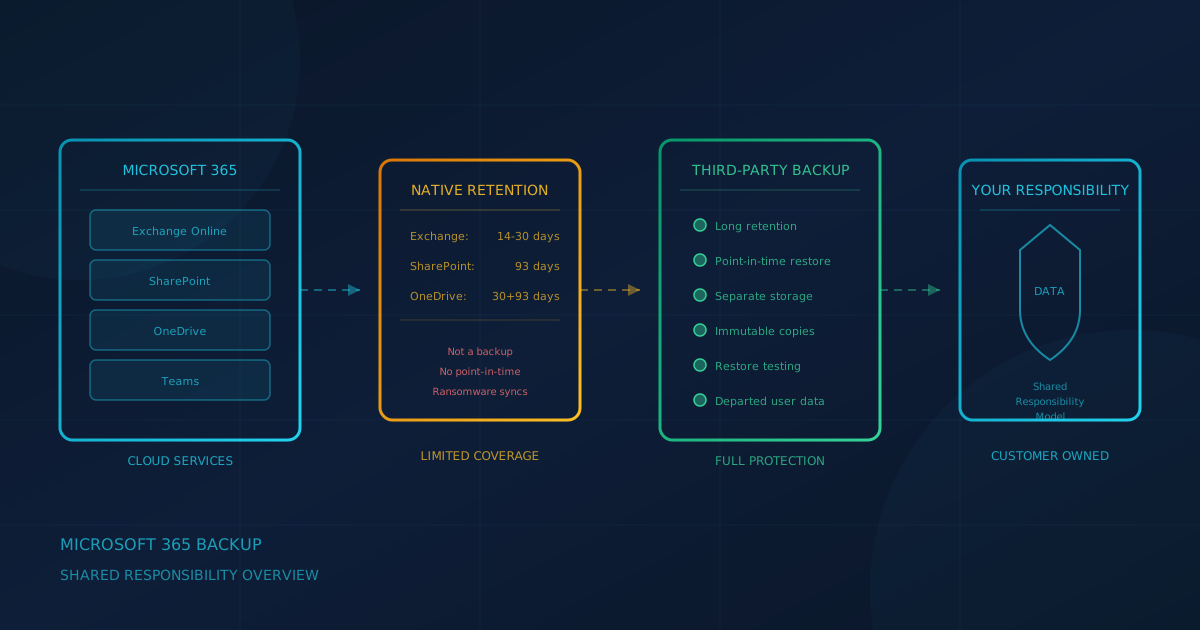
Under the shared responsibility model, you own your Microsoft 365 data. According to Microsoft's shared responsibility documentation, "For all cloud deployment types, you own your data and identities. You're responsible for protecting the security of your data and identities, on-premises resources, and the cloud components you control." Native retention features cover accidental deletion for 14 to 93 days depending on the workload, but they have limits when dealing with ransomware, intentional deletion by a compromised account, or data loss when a departing employee's licence is removed.
This guide explains what shared responsibility means for small and mid-sized businesses in Canada and the US, what native retention actually covers, and what questions to ask when evaluating a Microsoft 365 backup solution.
What does shared responsibility mean for Microsoft 365?
Microsoft handles physical datacenter security, infrastructure availability, and platform operations. Protecting data from accidental or malicious deletion, ransomware encryption, and compliance requirements falls to the customer. The Microsoft 365 Backup overview describes scenarios where backup matters: "In cases of a ransomware attack that encrypts large swaths of your data, or instances of an internal accidental or malicious data deletion or overwrite event, you need to be able to get your business back to a healthy state as soon as possible."
We covered this concept in our article on shared responsibility for data protection. Cloud availability is not the same as data protection. Microsoft can keep the service running while your data is at risk from threats in your environment.
What do native retention features actually cover?
Microsoft 365 includes recycle bins and retention periods, but each workload has different limits. According to Microsoft Learn documentation:
- Exchange Online: Soft-deleted items stay in the Recoverable Items folder for 14 days by default, with a maximum of 30 days. After this period, items are permanently purged unless a retention policy or litigation hold applies.
- SharePoint Online: Deleted sites are retained for 93 days. After 93 days, sites and all their content are permanently deleted.
- OneDrive: When a user is deleted, their OneDrive is retained for 30 days by default, then remains in a deleted state for 93 more days before permanent deletion.
These retention periods help with accidental deletion, but they are not backups. Retention features do not let you restore to a point in time before a ransomware attack, recover data overwritten by a malicious insider, or retrieve content from months or years ago.
What happens when an employee leaves and their licence is removed?
Departing employees create a specific data risk. According to Microsoft's guidance on removing former employees:
- "When you remove or delete a license, the former employee's email, contacts, and calendar are retained for 30 days, and are then deleted permanently."
- "After you delete an employee's account, the content in their OneDrive and Outlook is retained for 30 days."
- OneDrive then remains in a deleted state for 93 more days before permanent deletion.
If an employee's departure is not handled properly, their email history, files, and project data can disappear before anyone realizes it is needed. A third-party backup solution retains departed user data according to your policy, independent of licence assignments. We covered the broader offboarding challenge in our guide to access reviews and access revocation.
Can ransomware encrypt my Microsoft 365 data?
Yes. If ransomware encrypts files on a device that syncs to OneDrive or SharePoint, the encrypted files sync to the cloud. According to Microsoft Support, OneDrive's Files Restore feature lets you "restore your entire OneDrive to a previous time" if files are "deleted, overwritten, corrupted, or infected by malware," but only within the last 30 days and only for Microsoft 365 subscribers.
The larger concern is that native retention and version history are within the same environment that an attacker might compromise. The CISA #StopRansomware Guide recommends: "Maintain offline, encrypted backups of critical data, and regularly test the availability and integrity of backups in a disaster recovery scenario." CISA notes that "many ransomware variants attempt to find and subsequently delete or encrypt accessible backups."
The Canadian Centre for Cyber Security (ITSAP.40.002) recommends offline backups: "offline backups (sometimes called cold backups) remain unconnected to your organizations' systems and are only connected when they are required. Because these offline backups are not connected, they remain unaffected by many cyber threats, like ransomware, that can compromise all systems and devices on your network."
A backup stored outside your Microsoft 365 tenant provides a recovery path that ransomware cannot reach. We discussed this in our article on how to ransom-proof your backups.
What is Microsoft 365 Backup?
Microsoft now offers its own backup product, Microsoft 365 Backup, which backs up SharePoint sites, OneDrive accounts, and Exchange mailboxes within the Microsoft 365 data trust boundary. According to Microsoft's documentation, key features include:
- Retention windows: For SharePoint and OneDrive, "Configurable on a backup policy: 3 months, 6 months, or any whole number of years from 1 through 10." For Exchange, "3 months, 6 months, 1 year, or 2 years."
- Restore points: Every 10 minutes for the most recent two weeks, weekly snapshots beyond that for SharePoint and OneDrive.
- Restore speeds: Designed for fast recovery, with median rates of up to 1 to 3 TiB per hour for large restores.
- Data residency: Backups stay within the Microsoft 365 data boundary and honor geographic residency requirements.
Microsoft 365 Backup addresses gaps that native retention does not cover. However, it keeps backups within the Microsoft environment. Organizations requiring backups with a separate provider may still need a third-party solution.
What do CISA and CCCS recommend?
The CCCS guidance (ITSAP.40.002) recommends the 3-2-1 rule: "3 copies of your information (1 original and 2 backups), saved on 2 different media types, with 1 copy kept off site." CCCS also recommends "testing the process of recovering from your backup on a routine basis." Both CISA and CCCS emphasize that untested backups are assumptions, not assurances.
Questions to ask a backup vendor or provider
When evaluating a third-party backup solution or asking your IT provider about backup capabilities:
- What is backed up? Does it cover Exchange, SharePoint, OneDrive, and Teams?
- How long is data retained? Can retention be configured to meet compliance requirements?
- Where are backups stored? A separate cloud, tenant, or offline location?
- Are backups immutable? Can an attacker with admin access delete them?
- How are restores tested? Does the provider perform regular restore tests?
We covered vendor risk considerations in our article on third-party vendor risk for SMBs, and what can go wrong when a backup vendor is breached in our coverage of the ConnectWise Cloud Backup credential breach.
A buyer checklist for Microsoft 365 backup
- Backups cover all workloads you use: Exchange, SharePoint, OneDrive, Teams
- Retention meets compliance and business continuity requirements
- Backups are stored outside your primary Microsoft 365 tenant
- Backups are immutable or air-gapped to protect against ransomware
- Provider performs and documents regular restore tests
- Data residency meets Canadian or US requirements as applicable
What should small businesses do next?
The question to ask your IT lead or provider is: "If our Microsoft 365 data were encrypted or deleted tomorrow, what could we actually restore, and how long would it take?"
If the answer is uncertain, that is the gap to close first. Native retention provides some protection, but it is not a substitute for a tested backup strategy that stores data outside the primary environment.
Cyber Unit's managed IT services include backup monitoring and quarterly restore testing as part of an ongoing managed relationship, along with Microsoft 365 administration. If your business needs help evaluating or implementing a backup solution, a managed provider can take that work on.
A free cybersecurity assessment takes under 5 minutes and covers 22 security areas including backups, with no signup required.
This article is intended for general informational purposes only and does not constitute professional security, legal, or compliance advice. Microsoft 365 retention periods and product features are based on Microsoft documentation as of the date of publication and may change. Organizations should consult qualified IT and cybersecurity professionals before making operational changes based on this article.