
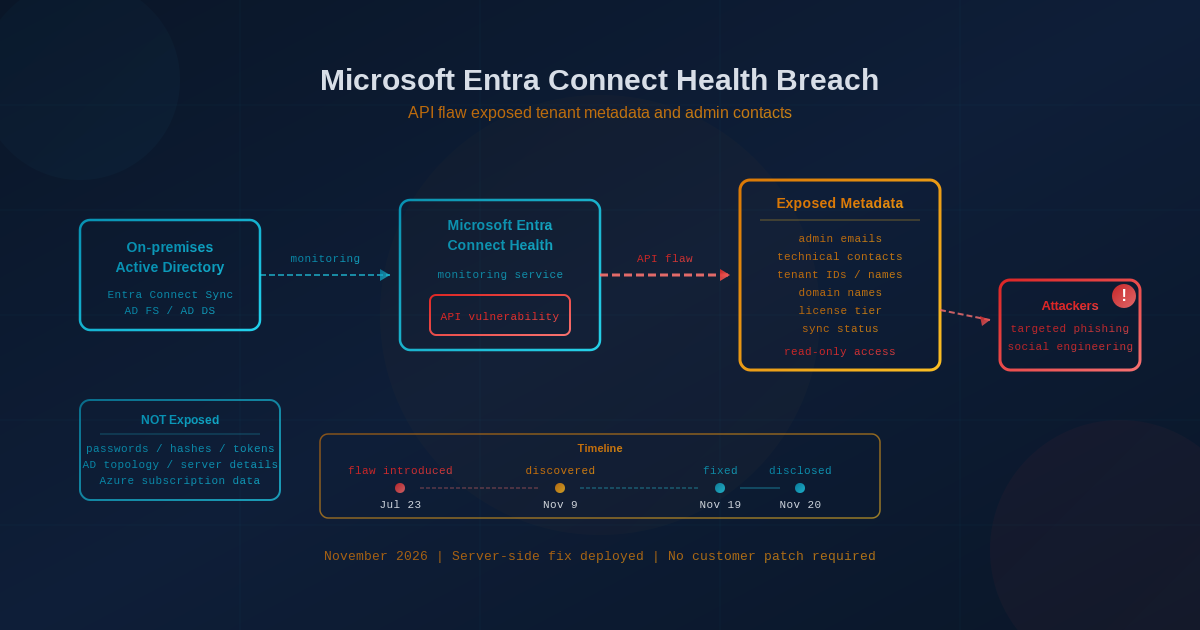
Microsoft disclosed on November 20, 2026, that attackers exploited a flaw in its Entra Connect Health service to gain read-only access to tenant metadata and administrator contact information. According to Microsoft's customer notification, the flaw was introduced on July 23, 2026, discovered on November 9, and fixed server-side on November 19. Microsoft says no customer patch or other remediation is required.
This is not a reset-all-passwords emergency. Microsoft says the access was read-only and that it found no unauthorized configuration changes. The risk is what comes next: the exposed details make targeted phishing aimed at your IT administrators and technical contacts easier to write and harder to spot.
What did the Entra Connect Health breach expose?
According to Microsoft's customer notification, as reported by BleepingComputer on November 21, 2026, the exposed information included:
- Email addresses of tenant administrator accounts and technical contacts
- Tenant IDs, display names, initial domain names, country codes, and regional information
- Microsoft Entra license tier and directory synchronization status (including whether sync was enabled and the last synchronization timestamp)
- Connect Health onboarding status
- An expired certificate previously used to register Connect Health agents with an internal Microsoft service decommissioned in late 2024
Microsoft says, as SecurityAffairs also reported, that the flaw did not expose user passwords, password hashes, authentication tokens, valid cryptographic keys, on-premises server and Active Directory topology details, or Azure subscription information. Microsoft has not disclosed who exploited the flaw, how many tenants were affected, or when the access began.
Why does tenant metadata matter if no passwords leaked?
Microsoft describes Entra Connect Health as monitoring for your on-premises identity infrastructure, the setup where an office Active Directory is synchronized with Microsoft 365 and Microsoft Entra ID (formerly Azure AD). Connect Health is a feature of Microsoft Entra ID P1 or P2. Microsoft's notice warns of targeted phishing and social engineering against the exposed addresses.
Put together, the exposed fields tell an attacker who your administrators are, what your tenant is called, and whether you run directory sync. Expect fake Microsoft security notices that copy the style of the real advisory, addressed by name to your technical contacts, possibly mentioning sync problems or your real tenant name.
The on-premises sync server deserves extra attention in any hybrid setup because it bridges the office network and Microsoft 365. A list of organizations that run directory sync makes that server a more attractive target.
How do you know if your tenant was affected?
Microsoft says it notified affected organizations through Azure Service Health. To check for yourself:
- Sign in directly to the Azure portal or the Microsoft 365 admin center. Do not click links in any email claiming to be from Microsoft about this incident.
- Open Service Health and look for a security advisory about Entra Connect Health.
Because Connect Health monitors on-premises identity infrastructure, cloud-only organizations without a sync server may be less likely to be affected. Microsoft has not said that cloud-only tenants were excluded, so check Service Health regardless.
What should you do now?
Microsoft recommends alerting your security team to targeted phishing, using phishing-resistant MFA on privileged accounts, reviewing Connect Health configurations, and checking Entra audit and sign-in logs. A practical order for working through them:
- Verify any notice directly in the Azure portal. Sign in at portal.azure.com and open Service Health. Do not trust an email link, especially one that references this incident.
- Require phishing-resistant MFA on every administrator account. Microsoft lists passkeys (FIDO2) and Windows Hello for Business among its phishing-resistant options. Start with Global Administrators and anyone listed as a technical contact. Our post on phishing kits that bypass traditional MFA explains why SMS codes and authenticator apps are no longer enough on their own. With Conditional Access, you can require phishing-resistant authentication for administrators while allowing app-based MFA for everyone else.
- Warn the people listed as administrator and technical contacts. Tell them their addresses were exposed and that they should expect convincing messages that use your organization's real name. Ask them to call IT before acting on any urgent Microsoft notice.
- Review your Entra sign-in and audit logs. Look for unfamiliar sign-ins, new MFA methods, or changes to privileged accounts. Microsoft retains sign-in and audit logs for 30 days with an Entra ID P1 or P2 license. The flaw existed from late July to mid-November, so much of that window is already outside the default retention period unless your logs are exported to longer-term storage. Our security logging guide notes that CISA and the Cyber Centre both say to centralize those records.
- Treat the sync server as a critical asset. As general good practice, give it endpoint detection and response (EDR), timely patching, and as few administrators as possible. IT staff who manage it should use a separate admin account reserved for administrative tasks, as our least privilege guide describes.
- Ask whether Entra Cloud Sync fits. Microsoft describes Cloud Sync as using a lightweight on-premises agent, with agents that automatically receive security updates from Microsoft. It does not suit every environment, but a smaller on-premises footprint means fewer servers to protect.
What should IT teams that manage several tenants check?
Notices may arrive tenant by tenant. BleepingComputer reported that some managed service providers received notifications for multiple customer tenants, with one administrator saying the emails arrived hours apart. If you look after more than one Microsoft 365 tenant, check Service Health in each one, confirm every technical contact address is current and monitored, and send the same phishing warning to each listed administrator.
Is this the same as the earlier Cymulate Connect Health finding?
No. Cymulate published research on September 3, 2026 showing that a user with only the Global Reader or Security Reader role could retrieve the client secret of the Connect Health agent in a hybrid environment. Cymulate says Microsoft reported that issue resolved on August 10, 2026. It is a separate issue from the November disclosure.
One question to ask your IT provider
Ask: "Do we run directory sync, and is every one of our admin accounts on phishing-resistant MFA?" If the answer is unclear, our free 5-minute security assessment is a quick way to see where the gaps are.
This article is intended for general informational purposes only and does not constitute professional security, legal, or compliance advice. Details about the Microsoft Entra Connect Health breach are based on public reporting and Microsoft's customer notification as of November 23, 2026, and may evolve as Microsoft updates its guidance. Organizations should consult qualified cybersecurity professionals before acting on any specific recommendation or making operational changes based on this article.