
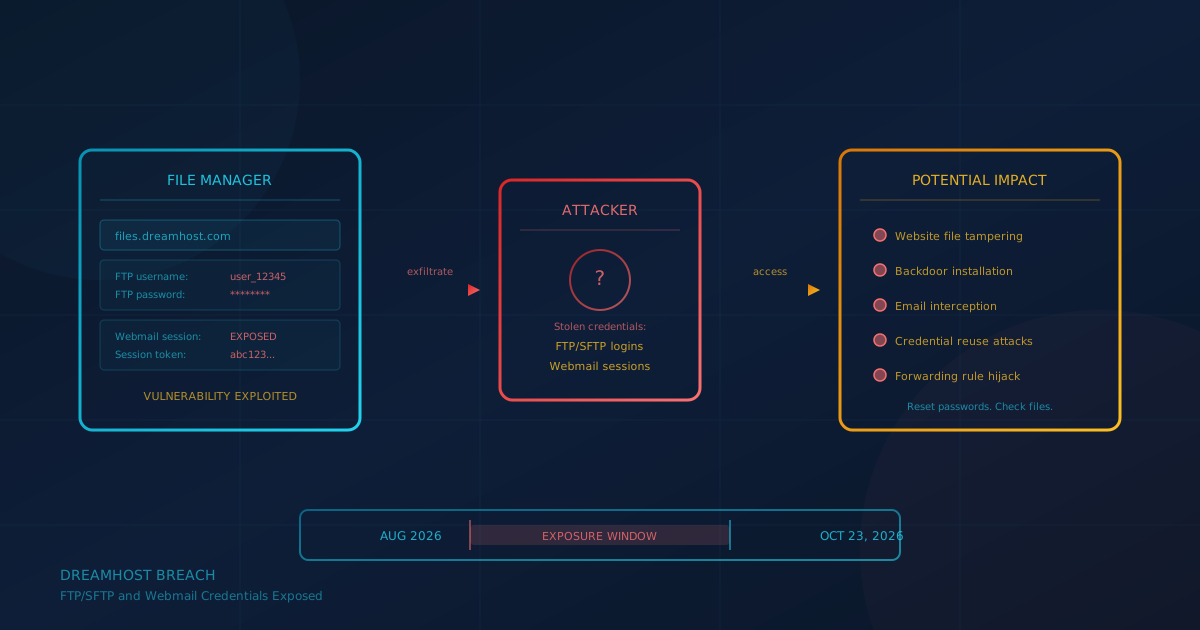
The DreamHost breach exposed FTP/SFTP usernames and passwords for users who logged into the company's web-based File Manager between approximately August 2026 and October 23, 2026. According to DreamHost's official announcement, attackers exploited a vulnerability in the File Manager software. Some webmail session credentials were also reached, and in a small number of cases, attackers may have viewed mailbox contents. DreamHost says it found no evidence that control panel logins or customer billing details were accessed. The company reset affected passwords the same day the breach was discovered.
This incident matters beyond DreamHost customers. If your business uses any shared hosting provider with FTP, SFTP, or browser-based file management, the same risk pattern applies: a single vulnerable component can expose credentials that attackers then use to access files, plant backdoors, or pivot to other accounts where the same password was reused.
What happened in the DreamHost breach?
On October 23, 2026, DreamHost discovered that an unauthorized third party had accessed the server running its web-based File Manager at files.dreamhost.com. According to BleepingComputer, the breach extended from August 2026 to October 23, 2026. The attackers exploited a vulnerability in third-party software that powers the File Manager.
DreamHost's announcement states that the attacker "was able to access the FTP/SFTP usernames and passwords of users who logged into this File Manager before the activity was detected on October 23, 2026." The attacker also reached certain webmail systems and obtained session credentials for a limited number of users. In its notice filed with the California Attorney General, DreamHost confirmed that "other information such as the contents of your email and files in the FTP/SFTP server may have also been accessed."
DreamHost took the File Manager offline immediately, addressed the vulnerability, terminated active sessions for affected users, and reset their passwords. The company says it retained outside security and forensics experts and is notifying regulators as required by law.
Who was actually at risk?
According to DreamHost, the incident affected "a fraction of email and FTP/SFTP accounts hosted at DreamHost, well under approximately 10%." You may have been affected if:
- You or an FTP/SFTP user on your account logged into File Manager between approximately August 2026 and October 23, 2026
- An email user on your account was signed out and the old password stopped working on or after October 23
If a previously working password still works and you have not changed it yourself, DreamHost's investigation indicates it was not exposed. However, the company recommends changing it as a precaution.
What was not accessed?
DreamHost states it found no evidence that attackers accessed control panel login information or customer billing details. The company notes it does not store full payment card numbers. Card payments are handled by a third-party payment processor, and DreamHost retains only a secure token that cannot be used elsewhere. Both BleepingComputer and TechCrunch confirmed this based on DreamHost's disclosures.
What businesses using shared hosting should do now
If you use DreamHost or any hosting provider with FTP/SFTP and webmail, treat this incident as a prompt to review your own setup. Here is a practical checklist:
- Reset FTP/SFTP passwords. Even if you are not a DreamHost customer, rotating file transfer credentials periodically is good hygiene. If you logged into any browser-based file manager during an uncertain window, treat those credentials as potentially exposed.
- Change reused passwords elsewhere. If you used the same password for FTP/SFTP as for any other account, change it on every service where it was reused. We covered why credential reuse is dangerous in our guide to choosing a business password manager.
- Review website files for unauthorized changes. Look for files you do not recognize, modified timestamps on critical files (like index pages or configuration files), or injected code. An attacker with FTP credentials could have uploaded a backdoor or modified existing files.
- Check webmail forwarding rules and filters. A common attacker move after compromising email credentials is to set up a forwarding rule that silently copies incoming mail to an external address. Review your mail settings for anything you did not configure.
- Enable multi-factor authentication where available. If your hosting provider supports MFA for the control panel, enable it. Not all hosts offer MFA for FTP/SFTP itself, but protecting the panel account limits what an attacker can do with stolen file-level credentials.
If your business lacks internal IT resources to run through this checklist, Cyber Unit's managed IT services include ongoing system monitoring and quarterly reviews that catch configuration drift and credential hygiene gaps before they become incidents.
Questions to ask your hosting provider or IT partner
This breach highlights questions every business should be able to answer about their web hosting environment:
- How does the host notify customers of security incidents? DreamHost emailed affected account owners and posted updates to a status blog. Know what channel your provider uses so you do not miss a critical alert.
- What happens when credentials are compromised? DreamHost reset passwords and terminated sessions the same day. Ask your host whether they have a similar automatic-rotation policy or whether you are responsible for manually changing passwords after a breach.
- Does the host monitor for suspicious file changes? Some providers offer file integrity monitoring or malware scanning. Others leave that entirely to the customer.
- What third-party software powers the hosting control panel and file manager? The DreamHost breach exploited a vulnerability in third-party software. Your hosting stack likely includes similar components. We covered the broader challenge in our article on third-party vendor risk.
- Are logs available if you need to investigate? Access logs showing who logged in and when can help determine whether your account was accessed during an exposure window.
Why credential exposure matters beyond the immediate host
Stolen FTP/SFTP credentials are not just a hosting problem. Attackers frequently use exposed credentials to:
- Plant malware or redirect visitors. A compromised website can serve malicious downloads or redirect visitors to phishing pages, damaging your reputation and potentially your customers.
- Access other accounts where the password was reused. Credential stuffing attacks test stolen username and password pairs across many services. If you reused a password, exposure at one host means exposure everywhere.
- Establish persistence. An attacker who uploads a web shell or backdoor can return even after you change the original credentials. File review is essential after any credential exposure.
DreamHost's announcement warned customers: "If you use the same or a similar password for any other account or service, we recommend changing it there as well." That advice applies universally. A business password manager with shared vault controls helps ensure every credential is unique. Our article on access reviews covers how to audit who has access to your systems and when to rotate credentials.
What about phishing after the breach?
DreamHost's announcement included a warning: "Incidents like these are often followed by scam emails that imitate the companies involved." The company noted that DreamHost will never email you asking for your password, and legitimate incident notices will never ask you to sign in through a link.
If you received a notification about this breach, verify it by going directly to your hosting control panel rather than clicking links in the email. Attackers may send convincing phishing messages that reference real breach details to harvest credentials or trick recipients into downloading malware.
A question to ask this week
The question to ask your IT lead, managed service provider, or yourself: "If our web host notified us tomorrow that FTP credentials had been exposed, would we know exactly which passwords to change and which files to check?"
If the answer is uncertain, that is the gap to close first. Credential management, file integrity awareness, and vendor communication channels are foundational controls that should not depend on a breach to surface.
If you are unsure where your business stands on these basics, a free cybersecurity assessment takes under 5 minutes and covers 22 security areas including password practices, backup, and access control. It runs entirely in your browser with no signup required.
This article is intended for general informational purposes only and does not constitute professional security, legal, or compliance advice. Details about the DreamHost security incident are based on the company's official announcement, notices filed with state regulators, and reporting from BleepingComputer and TechCrunch as of the date of publication. The investigation is ongoing, and details may evolve. Organizations should consult qualified cybersecurity professionals before acting on any specific indicator or making operational changes based on this article.