
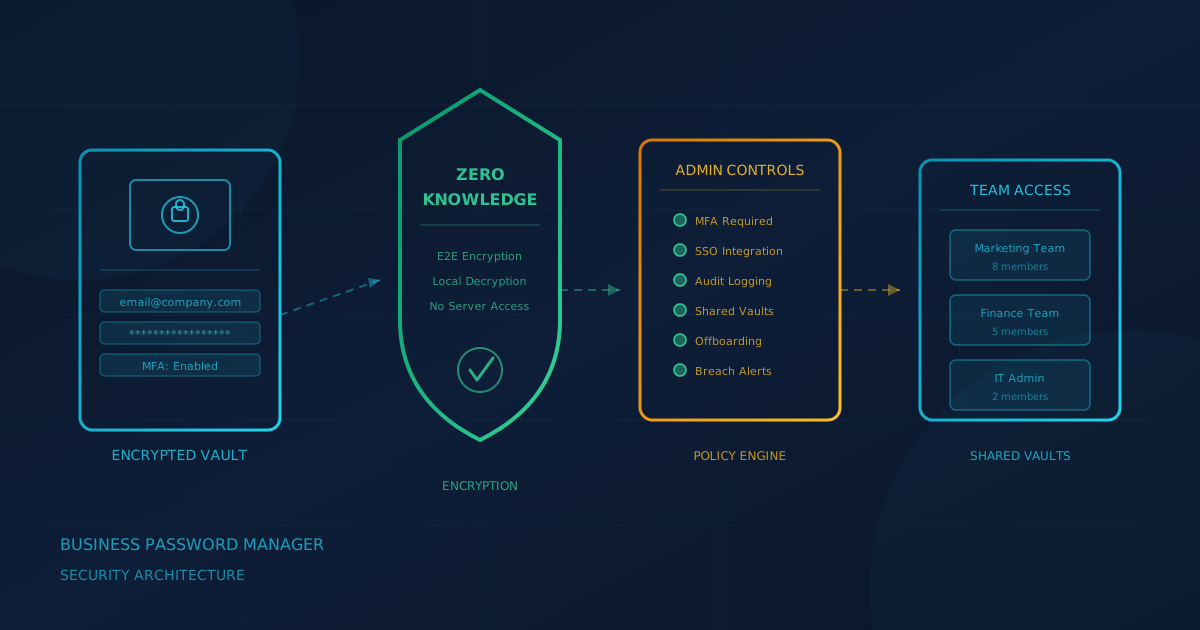
A business password manager generates, stores, and autofills strong, unique passwords for every account your organization uses. According to CISA, using a password manager "is one of the easiest ways to protect ourselves from someone logging into our accounts and stealing sensitive information, data, money or even our identities." For businesses, the value goes beyond individual accounts: a password manager with admin controls lets you enforce policies, share credentials securely, and revoke access when someone leaves.
What is a business password manager?
A business password manager solves the core password problem: people have too many accounts to remember a strong, unique password for each one. The manager generates random credentials, stores them in an encrypted vault, and fills them in automatically. Business versions add centralized administration, shared vaults for team credentials, audit logs, and the ability to remove access when an employee leaves.
The Canadian Centre for Cyber Security recommends password managers in Best practices for passphrases and passwords (ITSAP.30.032), advising organizations to "use a password manager to generate and track your many passwords." CCCS recommends securing the password manager with a strong password and multi-factor authentication, and suggests storing lower-sensitivity credentials in the manager while keeping highly sensitive credentials (administrative access, banking) separate.
What should you look for in a business password manager?
When evaluating password managers, these capabilities matter most. The criteria are drawn from vendor security documentation, independent audits, and NIST and CCCS guidance.
Zero-knowledge encryption
Reputable password managers advertise "zero-knowledge" or "end-to-end" encryption: your vault is encrypted on your device before it reaches the vendor's servers, and the vendor does not hold your decryption key. However, research from ETH Zurich in 2026 found that the practical security of this promise depends on implementation details. Look for vendors that publish detailed security whitepapers and undergo independent audits (SOC 2 Type II, penetration testing), not just marketing language.
SSO and MFA enforcement
For organizations using single sign-on, look for a password manager that integrates with your identity provider. MFA enforcement is equally important: the admin console should let you require all users to protect their vault with a second factor. Some password managers support hardware security keys and passkeys for phishing-resistant authentication.
Admin controls and policies
Business password managers should include an admin console to set and enforce policies: minimum master password length, MFA requirements, session timeouts, and device restrictions. Without these controls, security depends entirely on individual user behavior.
Shared vaults and least privilege
Teams need to share credentials for services that lack individual accounts. Look for granular sharing: separate vaults for different teams, view-only access, and the ability to hide passwords from users who only need to log in. This applies the principle of least privilege to credential management.
Offboarding
When an employee leaves, you need to revoke their password manager access immediately and identify which credentials they could see. A good password manager shows admins which vaults and credentials a departing user accessed. Any shared password they could see should be rotated. We covered the broader offboarding challenge in our guide to access reviews.
Recovery, breach monitoring, audit logs, and passkeys
Understand your vendor's recovery model: some offer administrator recovery, emergency contacts, or recovery keys. Many password managers now check credentials against breach databases and alert you to exposed passwords. Audit logs showing who accessed which credentials are essential for compliance and incident response. If your organization is adopting passkeys, check whether your password manager supports them.
Lessons from the LastPass 2022 breach
The 2022 LastPass breach illustrates both the protections encryption provides and its limits under real-world conditions.
According to LastPass's December 2022 disclosure, attackers gained access to cloud storage containing backups of customer vault data. According to Krebs on Security, the stolen vaults covered more than 25 million users. The stolen data included unencrypted metadata (website URLs) and encrypted fields (usernames, passwords) protected by each user's master password. LastPass stated the encrypted fields "remain secured with 256-bit AES encryption and can only be decrypted with a unique encryption key derived from each user's master password."
However, as Krebs on Security reported, security researchers have linked an estimated 35 million dollars in cryptocurrency thefts to cracked LastPass vaults. Attackers had "offline" access, meaning they could attempt to guess master passwords indefinitely without triggering lockouts. Users with weak master passwords or older accounts with fewer encryption iterations were especially vulnerable.
The practical lessons:
- Master password strength matters. Require long, unique master passwords. NIST SP 800-63B now requires at least 15 characters for passwords used as a sole authenticator.
- Iteration count matters. Password managers use key derivation functions to slow brute-force attacks. Check your vendor's default iteration count and whether older accounts have been migrated.
- Evaluate vendor incident response. How quickly and transparently did the vendor disclose? Did they proactively upgrade security settings? A vendor's history is part of the security equation.
- High-value secrets may warrant extra protection. CCCS suggests not storing highly sensitive credentials in a password manager. For cryptocurrency seed phrases, consider offline storage.
The breach does not mean password managers are unsafe. As the ETH Zurich researchers noted, "Using a password manager is probably the single most effective action you can take to strengthen your security." We covered the ongoing consequences in our article on LastPass phishing attacks in 2026.
What do NIST and CISA say?
NIST Special Publication 800-63B Revision 4, "Digital Identity Guidelines: Authentication and Lifecycle Management," requires: "Verifiers SHALL allow the use of password managers and autofill functionality. Verifiers SHOULD permit claimants to use the 'paste' function when entering a password to facilitate password manager use when password autofill APIs are unavailable." The guidance notes that "password managers have been shown to increase the likelihood that subscribers will choose stronger passwords."
CISA's Use Strong Passwords guidance recommends password managers: "A password manager is an easy-to-use program that generates, stores and even fills in all your passwords." CCCS's Best practices for passphrases and passwords (ITSAP.30.032) recommends securing a password manager with "a strong password and multi-factor authentication."
Questions to ask a vendor
When evaluating a business password manager:
- Where is your security architecture documented? Look for a published whitepaper explaining encryption, key storage, and breach scenarios.
- What independent audits have you completed? SOC 2 Type II or penetration testing from a named firm.
- What is your default iteration count? Higher iterations mean more resistance to brute-force attacks.
- How do you handle breaches? Incident response plan, disclosure timeline, proactive customer protections.
- What happens when an employee leaves? Immediate revocation, visibility into accessed credentials, documented offboarding.
A buyer checklist
- Vendor publishes a security whitepaper explaining encryption architecture
- Recent independent security audit from a named firm
- Admin console enforces MFA, master password requirements, session policies
- Shared vaults support granular access controls
- Offboarding tools let you revoke access and identify exposed credentials
- Breach monitoring and audit logs included
- Vendor's incident response history shows transparent handling
A question to ask your IT provider
If your organization uses a password manager, ask your IT lead or managed service provider: "When an employee leaves, how do we know which shared passwords they had access to, and how do we make sure those credentials get rotated?"
If the answer is uncertain, that is the gap to close first. Deploying and managing a business password manager is exactly the kind of operational task that Cyber Unit's managed IT services handle, including employee onboarding and offboarding.
If you are unsure where your business stands on credential management, a free cybersecurity assessment can help identify gaps. The assessment takes under 5 minutes, covers 22 security areas, and requires no signup.
This article is intended for general informational purposes only and does not constitute professional security, legal, or compliance advice. Password manager features and vendor practices are based on publicly available documentation and guidance from NIST, CISA, and the Canadian Centre for Cyber Security as of the date of publication and may change. Organizations should consult qualified cybersecurity professionals before making purchasing decisions.