
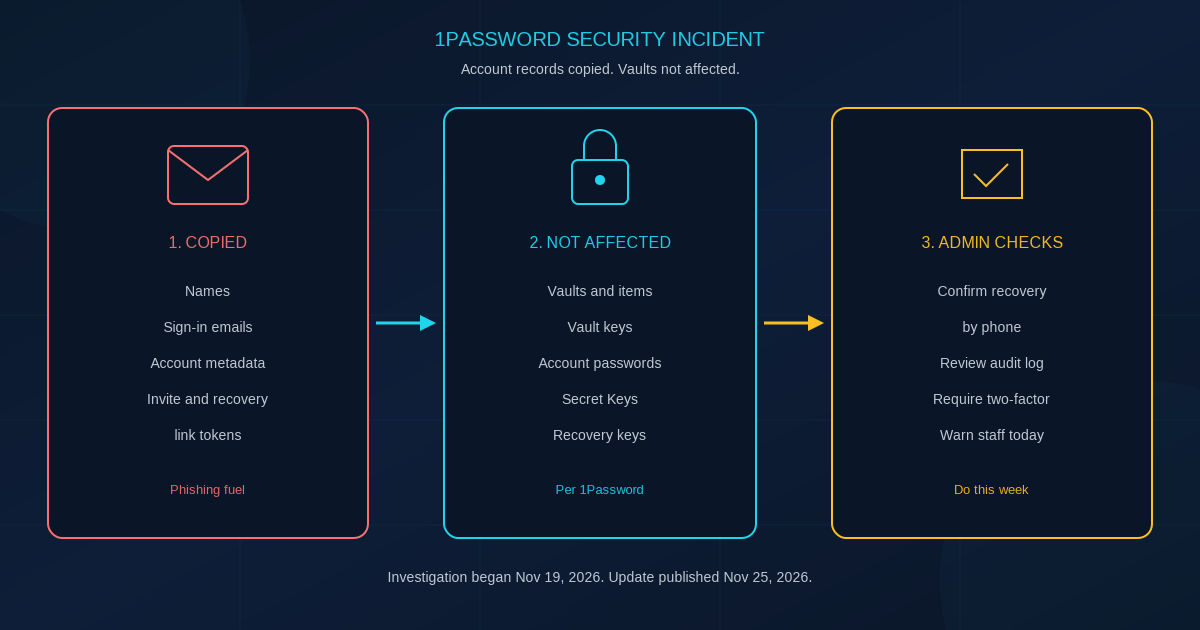
The 1Password security incident disclosed on November 25, 2026 exposed customer names, sign-in email addresses, and account metadata, but not vaults. In its official update, 1Password says an attacker gained access to an employee's corporate GitHub account, pushed malicious code to backend services, and copied account records for a subset of customers. The company says vault contents were never accessed and that customers do not need to update anything in their accounts.
For a small or mid-sized business in Canada or the United States, the work this week is not a mass password reset. It is preparing for phishing that uses real names and real work addresses, and tightening the invitation and account recovery steps that an attacker would try to abuse. As of publication, 1Password's update was the only detailed public account of the incident we could find, so this post sticks to what 1Password has stated. The company says it will update its post if anything changes.
What happened in the 1Password security incident?
On November 19, 2026, 1Password began investigating signs that an attacker had gained access to an employee's corporate GitHub account, according to the company's November 25 update. 1Password says the attacker used the account to access source code and push malicious code to backend services, and that code downloaded administrative data about customers. The attacker also copied source code from private repositories and gained access to 1Password's CI/CD system (the automated pipeline that builds and ships its software).
1Password says its source code contains no user secrets. It says the CI/CD system holds infrastructure secrets, and that it has triggered a rotation of all credentials that may have been exposed. The company lists these response steps:
- Disabled the affected GitHub account, revoked the stolen token, and removed the access the attacker created.
- Rotated or revoked internal credentials that may have been exposed.
- Lengthened the codes in invitation and recovery emails from six digits to ten characters.
- Tightened internal GitHub, CI/CD, and endpoint controls, and added detections for this kind of attack.
- Brought in independent cybersecurity experts to validate containment and remediation.
What customer data was taken, and what was not?
The attacker downloaded account records for a subset of 1Password users, not every customer. 1Password's update lists names and email addresses, account and user identifiers, account creation and last sign-in times, public keys, Secure Remote Password protocol parameters, tokens in certain emailed links for invitations, provisioning, and account recovery, and other non-secret metadata. The company says public keys are public by design and that the protocol parameters cannot be used to access an account.
1Password lists what was not affected:
- Vaults and the items in them.
- The keys that protect vaults.
- Account passwords and Secret Keys, which 1Password says it does not store.
- Account recovery keys.
- 1Password apps and browser extensions.
The emailed tokens need a closer look. 1Password says invitation and recovery emails contain a token, and that the token completes the process only when combined with a single sign-on (SSO) sign-in or a code sent to the user's registered email address. It says a small number of users had a pending invitation or recovery during the incident and have been notified directly. The company also says it found no internal evidence of account takeovers using exposed provisioning tokens.
Do you need to change passwords or rotate secrets?
Not because of this incident alone. 1Password's update states, "You do not need to update anything in your 1Password account," and says vault contents and the keys protecting them were not affected. Rotating every stored password would cost staff time without addressing the actual exposure, which is that attackers now know names and sign-in addresses of some 1Password users.
Rotate in three cases. First, if anyone entered a 1Password account password or Secret Key on a page they reached from an email, text, or call. Second, if 1Password notified you about a pending invitation or recovery, follow that notice. Third, if Watchtower already flags problems: 1Password's business security best practices say the Business Watchtower report shows owners and the Security group weak, reused, or compromised passwords across shared vaults. This week is a reasonable time to clear that list.
A password manager is only as safe as the email accounts and recovery steps around it. Our free assessment takes under 5 minutes and covers password management, email security, and 20 other risk areas.
Which phishing emails should staff expect?
Expect messages about 1Password invitations, account recovery, or account problems that the person did not start. 1Password's update tells customers to be cautious about unexpected emails, texts, or calls that mention 1Password, invitations, or account recovery attempts. Because the stolen records include names and sign-in email addresses, these messages can greet a user by name at the exact address they use for 1Password.
The pattern is familiar. Our write-up of the January 2026 LastPass phishing campaign describes fake maintenance emails that urged users to back up their vaults within 24 hours and linked to fake sign-in pages. 1Password's own rule is simple: it will never contact you to ask for your account password or Secret Key, and those should only be entered in the official app or on a website address you typed yourself.
What should a 1Password admin check this week?
Start with account recovery, because that is the process an attacker holding names and email addresses would try to abuse. The recovery steps below come from 1Password's support documentation. Several of the reports are only available in 1Password Business.
- Confirm every recovery outside email. 1Password's best practices say owners should be "able to verify recovery requests independently of email," using a face-to-face conversation or a phone call. The account recovery guide says an administrator is emailed when a recovery is waiting, then selects Complete Recovery. Do not complete one you cannot confirm with the person.
- Review the audit log. In 1Password Business, the audit log records events such as invitations, provisioning, devices, multi-factor authentication changes, and SSO settings. Look for any of these that nobody on your team made since November 19.
- Read the sign-in attempts report. The sign-in attempts report shows failed attempts from the past 60 days, including wrong account passwords, Secret Keys, or second factors. You can deny a suspicious IP address, which adds a firewall rule.
- Require two-factor authentication. 1Password's best practices say that with two-factor authentication on, a second factor is required to sign in on a new device. Our guide to choosing a business password manager covers why the admin console should let you require it for everyone.
- Protect the mailboxes. 1Password says invitation and recovery tokens work only with an SSO sign-in or a code sent to the registered email address. That makes each user's email account part of the defence, so confirm multi-factor authentication is enforced on email.
- If you use Unlock with SSO, harden the identity provider. The Unlock with SSO guide says team members sign in with their identity provider username and password instead of their account password and Secret Key. Whatever protects that identity provider account, including multi-factor authentication, now protects 1Password too.
What should you tell staff?
Send a short, calm note today, before the phishing arrives. Staff who hear about the incident from the news or from a fake email are more likely to click. Keep it to facts 1Password has stated and one clear instruction for reporting.
- 1Password says vaults and passwords were not affected, and nobody needs to change anything in their 1Password account because of this incident.
- Expect fake emails, texts, or calls about 1Password, invitations, or account recovery. Do not click. Open the 1Password app or type the address yourself.
- Nobody from 1Password or from our IT team will ever ask for your account password or Secret Key.
- If you get a recovery or invitation email you did not expect, forward it to IT and do not act on it.
The last point only works if people know how to report and feel safe doing it. Our guide to phishing simulations for small business explains how practice messages help staff spot and report a fake before a real one arrives.
What question should you ask your IT lead?
Ask one question: "Who in our 1Password account can complete an account recovery, and how do they confirm the request is real before they do?" A good answer names the people, confirms there are at least two owners, and describes a phone or in-person check. If the answer is "we approve the email," fix that first.
Then add a vendor question to your next review. Our guide to vendor risk management for small business lists the Cyber Centre's sample question of whether a provider will tell you about a cyber event and how quickly. 1Password's public update came six days after it began investigating. Know which of your other critical tools would tell you at all.
The durable lesson: the recovery path is the attack path
1Password's design kept vault contents out of reach, which is the outcome a password manager is supposed to deliver. What the attacker did get, names and email addresses, is exactly what a convincing recovery or invitation phish needs. Treat every recovery request as something to confirm in person or by phone, keep multi-factor authentication on the email accounts and identity provider behind 1Password, and give staff one clear way to report a message that looks wrong.
This article is intended for general informational purposes only and does not constitute professional security, legal, or compliance advice. Details about the November 2026 1Password security incident are based on 1Password's official update published November 25, 2026 and 1Password support documentation as of the date of publication, and may change as 1Password updates its disclosure. Organizations should consult qualified cybersecurity professionals before making operational changes based on this article.