
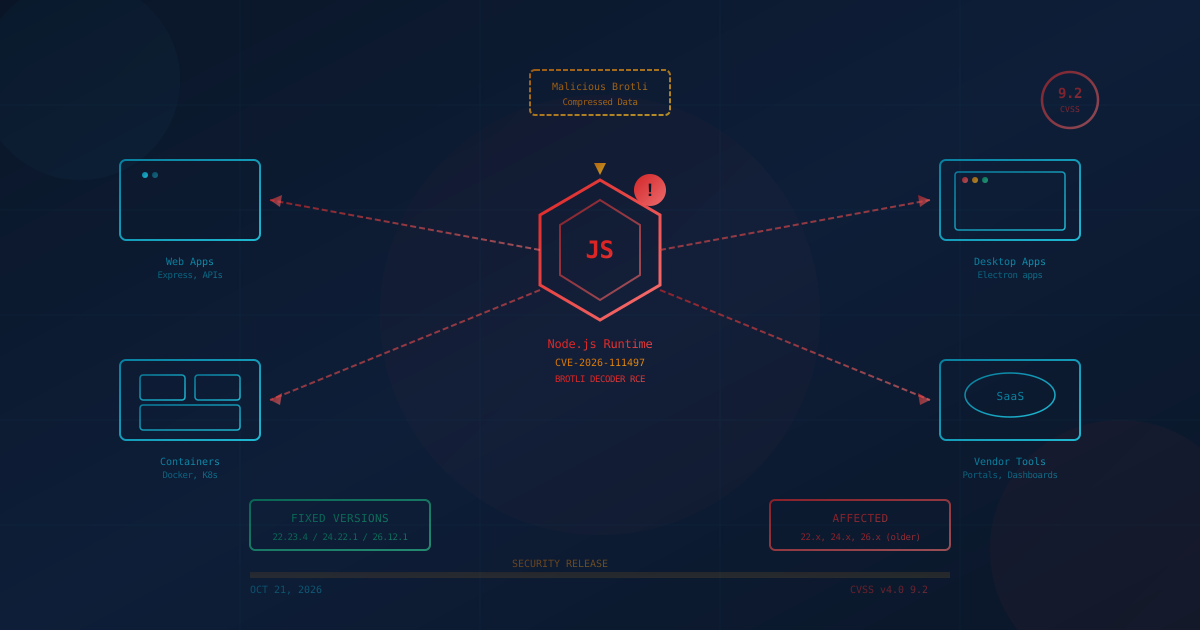
A critical Node.js vulnerability (CVE-2026-111497) can allow remote code execution when an application decompresses attacker-controlled Brotli data, according to security advisories released on October 21, 2026. Google, as the CVE numbering authority, rates the flaw CVSS v4.0 9.2 (Critical). Node.js rates it high severity. Patches are available for all supported Node.js versions, but many small and mid-sized businesses run Node.js without knowing it, inside vendor web applications, Electron desktop apps, and internal tools. Here is how to find where Node.js is running in your environment and how to get it patched.
What is the Node.js vulnerability and how serious is it?
CVE-2026-111497 is an out-of-bounds write in the Brotli decoder bundled with Node.js. The flaw was disclosed by the Node.js project on October 21, 2026, alongside nine other vulnerabilities. Node.js rates the Brotli flaw "high" severity. The official CVE record carries a CVSS v4.0 score of 9.2 (Critical), assigned by Google as the CVE numbering authority. According to the Node.js security advisory, the vulnerability was reported by OpenAI Codex Security researchers Khai Tran and Sylvie Mayer and fixed by mcollina and aduh95.
Brotli is a compression algorithm from Google, and Node.js bundles its own copy. Any application that decompresses Brotli data an attacker controls is exposed. That includes:
- Web servers that decode Brotli-compressed request bodies. According to Aikido and Imperva, Express 5 and body-parser 2.x decompress Brotli-encoded request bodies, so endpoints using
json()orraw()can pass attacker data to the vulnerable decoder. The flaw is in Node.js, not Express. - Applications that call
fetch()on a response sent with Brotli compression. According to Aikido and Imperva,fetch()auto-decodes Brotli responses. - Any code using the
node:zlibmodule to decompress untrusted data
Imperva's Red Team reported on October 22, 2026 that it had demonstrated code execution, which it named "Node2Shell," on the official Node.js 24.22.0 Linux arm64 image. Imperva said execution took multiple attempts in its setup, and other builds were not tested. The patched version 24.22.1 rejected the exploit. No confirmed exploitation in the wild has been reported as of October 23, 2026. The vulnerability is not in the CISA Known Exploited Vulnerabilities catalog.
Not every researcher agrees on the impact. One independent researcher has argued that the flaw can only cause a crash (denial of service), not code execution, according to a Brandefense analysis. Even a crash can take a production service offline, so patching is still urgent.
Which Node.js versions are affected?
All three currently supported Node.js release lines are affected: 22.x before 22.23.4, 24.x before 24.22.1, and 26.x before 26.12.1. The fixed versions were released on October 21, 2026. End-of-life versions, including Node.js 25.x, 23.x, 20.x, and earlier, do not receive patches and must be migrated to a supported line, according to the Node.js security advisory and Aikido.
The underlying flaw also affects the Google Brotli library itself (versions 1.0.3 through 1.2.0), which ships in other software. Fixed Brotli versions are 1.0.10, 1.1.1, and 1.2.1. According to Aikido, distribution-packaged Node.js may use the system Brotli library, in which case the fix arrives via the distribution's Brotli package rather than a Node.js update.
The flaw is in Google's Brotli decoder, so other software that bundles it is affected too. The same CVE is now also being called "HTTP2Shell," according to Aikido. Bun, an alternative JavaScript runtime, is affected in versions 1.0.21 through 1.4.3 and fixed in 1.4.4, according to the Bun security advisory. The Python packages Brotli and brotlicffi are fixed in versions 1.2.1 and 1.2.1.0, according to GitHub advisory GHSA-9v8h-qqgm-4m35, so teams that use Python should check for those packages as well.
Does my business run Node.js?
Many SMBs run Node.js without realizing it. Unlike a database or email server with a clear brand, Node.js is a runtime, a piece of software that runs other software. It often ships invisibly inside products you already use:
- Vendor web applications and customer portals: Many SaaS and self-hosted line-of-business tools are built on Node.js, from scheduling software to accounting dashboards.
- Electron desktop apps: Many desktop applications are built on Electron, which bundles its own copy of Node.js inside each app. Each copy is separate and can only be updated by the app's vendor. As of October 22, Electron had not published an advisory naming this CVE, and its newest stable releases still listed Node.js 24.22.0, according to Safeguard. Whether a given app is exposed depends on its Electron version and how it handles compressed data.
- Container images: If your organization uses Docker or Kubernetes, Node.js may live inside container base images for APIs, web frontends, or internal utilities.
- Build tools and internal scripts: Node.js powers many development workflows, CI/CD pipelines, and automation scripts.
The practical question for a business owner or operations lead is not "do we use Node.js?" but "where does Node.js run in our environment, and who is responsible for updating it?"
How do I find where Node.js is running?
Finding every copy of Node.js in a business environment takes a combination of approaches. Here is where to look:
- Ask your IT provider or internal IT team. A managed service provider or internal team should be able to query their endpoint management or RMM platform for installed software containing "Node" or "nodejs."
- Check servers directly. On any Linux or macOS server that might host web applications, run
node -vorwhich node. On Windows, open a command prompt and runnode -v. If a version number appears, Node.js is installed. - Review EDR or asset inventory reports. Modern endpoint detection and response (EDR) tools and endpoint management platforms maintain software inventories. Search for "node" in those lists. We discussed the difference between EDR and MDR if you are unsure which your business uses.
- Check Electron apps. Any desktop app built on Electron bundles its own Node.js. The app's "About" dialog or vendor documentation often shows this. Ask the vendor which Electron and Node.js versions the current release ships and when it will include the fix.
- Ask vendors for a software bill of materials (SBOM). If a vendor provides a web app, customer portal, or self-hosted tool, ask what runtime it uses and what version. Vendors increasingly provide SBOMs listing the components inside their software, and requesting one is a reasonable ask. We covered vendor relationship questions in our guide to third-party vendor risk for SMBs.
If your business has no formal software inventory, this is a prompt to build one. You cannot patch what you do not know exists.
How do I get Node.js patched?
The path to patching depends on who controls the Node.js installation:
If you control the runtime directly
Update to Node.js 22.23.4, 24.22.1, or 26.12.1. Use your existing update mechanism (package manager, nvm, or direct download from nodejs.org). Release notes for Node.js 22.23.4 and the other fixed versions are linked from the Node.js advisory.
Updating application dependencies (the packages your app uses) is not enough. The vulnerable code is in the Node.js runtime itself, not in an npm package. This point was emphasized by Qualys in their analysis of the vulnerability.
If Node.js runs inside container images
Rebuild your container images with a patched Node.js base image. Check which base image your Dockerfile uses and verify the version. If you use official Node.js images from Docker Hub, new tags with the patched versions should be available. Run docker pull and rebuild affected containers.
If Node.js is inside an Electron app
The app's vendor must ship an update. Keep auto-update enabled where possible. Check the vendor's release notes or security advisories for information about their Node.js version. For business-critical Electron apps, contact the vendor to ask when they will incorporate the fix.
If a vendor runs Node.js on your behalf
Ask the vendor directly: "Does your platform use Node.js, and if so, have you applied the October 21, 2026 security update for CVE-2026-111497?" A responsible vendor should be able to answer that question. If they cannot, that is information about how they handle security.
If your IT provider handles patching for you, verify they have a timeline for this update. Our guide to setting a patch SLA with your IT provider covers what to put in writing.
Is there a workaround if I cannot patch immediately?
The Node.js advisory lists no workaround. Qualys also notes that Node.js has not published workarounds and that upgrading the runtime is the only complete fix.
If patching is delayed, reducing exposure is possible in some cases. Vercel, which runs Node.js for its customers, said it added web application firewall rules on October 21 to block the attack in inbound requests, according to The Hacker News. Those rules do not cover Brotli responses an application fetches from other servers. If your organization has a WAF, contact your provider to ask whether they have deployed similar rules.
Limiting where untrusted Brotli-compressed data can reach your applications reduces attack surface, but does not remove the flaw.
What should US and Canadian business leaders take from this?
This vulnerability is a specific instance of a pattern: a flaw in a runtime that runs invisibly inside many other products. The broader lessons for SMBs in the US and Canada:
- Know your software inventory. If you cannot list where Node.js (or any other runtime) runs in your environment, you cannot patch it in time. An asset inventory is not optional in 2026.
- Understand the difference between dependencies and runtimes. Modern software has layers. Your developers may update npm packages regularly, but if no one updates the Node.js binary itself, vulnerabilities in the runtime remain.
- Include runtimes in patch management. Patching the operating system and applications is standard. Patching the runtimes those applications sit on is equally important. We covered the fundamentals in our guide to patch management for SMBs.
- Ask vendors the right questions. "What runtime does your software use? How quickly do you apply security updates? Can you provide an SBOM?" These are reasonable procurement questions, and vendors who balk at them are telling you something about their security posture.
- Electron apps are a special case. Each Electron app bundles its own runtime. You cannot update them centrally. Keep auto-update enabled, and for business-critical apps, monitor vendor release notes.
One question to ask your IT provider this week
"Do any of our servers, containers, or vendor-managed applications run Node.js, and if so, have the October 21, 2026 security updates been applied?"
If the answer is unclear, that is the first thing to fix. If you are unsure where your broader security posture stands, our free cybersecurity assessment covers 22 security areas in under five minutes and can help surface gaps in asset inventory and patch management.
Closing reflection
The Node.js Brotli vulnerability is not exotic. It is a flaw in widely deployed software, with a patch available, that requires knowing where the software runs before you can fix it. For SMBs, the lesson is the same one supply chain incidents keep teaching: visibility into what software runs in your environment is the floor everything else stands on. You do not need a dedicated security team to build an inventory. You do need to ask the question, and keep asking it, before the next advisory arrives.
This article is intended for general informational purposes only and does not constitute professional security, legal, or compliance advice. Details about CVE-2026-111497 are based on public advisories from the Node.js project, the official CVE record, Bun, GitHub, Aikido, Imperva, Qualys, Brandefense, Safeguard, and The Hacker News as of October 23, 2026, and may evolve as additional information becomes available. Organizations should consult qualified cybersecurity professionals before making operational changes based on this article.