
The Wi-Fi in your hotel lobby or conference hall can now log you into a fake Microsoft 365 page without sending you a single phishing email. In a threat report published in July 2026, security firm ReliaQuest described a campaign—active since at least June 2026—in which attackers took control of the Wi-Fi gateways at hotels and conference centers and quietly rewrote their DNS settings. The result: a traveler opens their laptop, tries to reach Outlook or Microsoft 365, and lands on a counterfeit login page controlled by an attacker instead.
No suspicious link. No typo in the web address. The employee did everything right and still ended up on a fake site, because the network itself was lying about where "microsoft.com" lived. For any business whose people travel—to sales meetings, industry conferences, client sites, or just an overnight hotel stay—this is a clear, concrete reason to stop treating public Wi-Fi as merely inconvenient and start treating it as hostile.
What actually happened with the hotel Wi-Fi DNS attack?
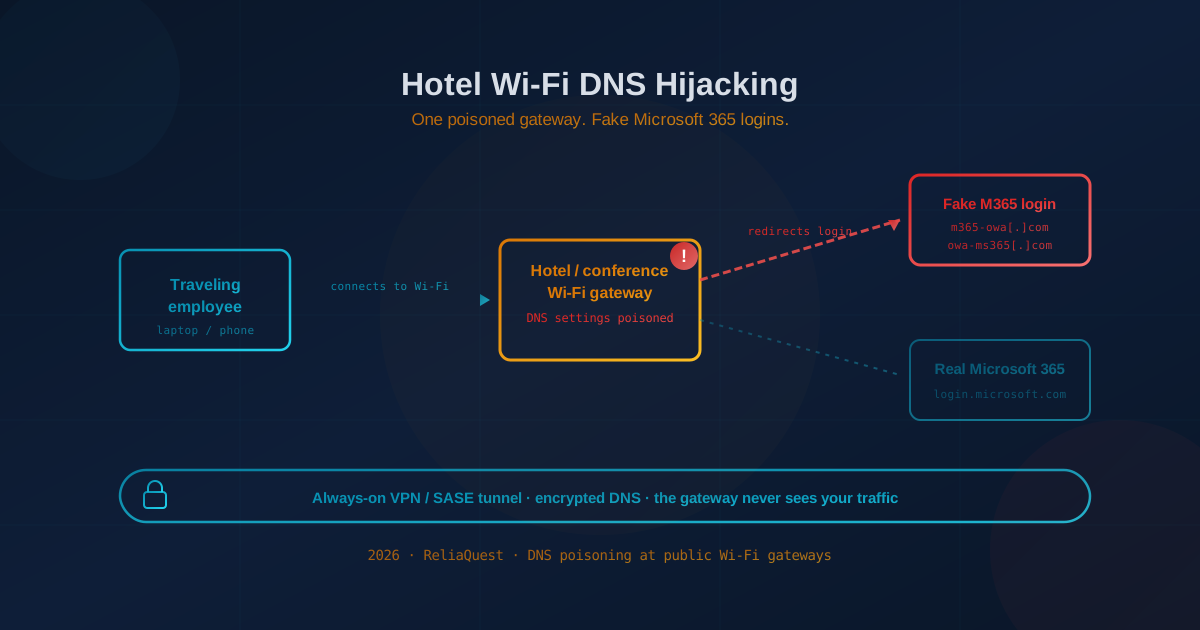
Attackers compromised the internet gateways—the boxes that hand out Wi-Fi—at hotels, conference centers, and similar venues, then changed each gateway's DNS settings so that guests were redirected to fake Microsoft 365 login pages. DNS is the internet's phone book: it turns a name you type, like outlook.office.com, into the numeric address of the right server. Poison that phone book at the gateway and every device on the network gets sent to the attacker's address instead of Microsoft's.
According to ReliaQuest, the attackers registered lookalike domains—m365-owa[.]com, owa-ms365[.]com, ms365-device[.]com, and ms365-live[.]com—and hosted the fake portals on their own servers. Because the redirection happens at the network level, the victim's browser shows a normal-looking Microsoft sign-in prompt, and nothing in the user's own behavior looks wrong.
ReliaQuest says it is unclear exactly how the attackers first got into the Wi-Fi appliances, but the likely paths are familiar: weakly protected or internet-exposed management interfaces (SSH, SNMP, or web admin dashboards left open with default or guessable credentials) or unpatched vulnerabilities in the devices themselves. Once an attacker has administrator access to the gateway, changing its DNS settings is a routine configuration step.
Why this attack bypasses multi-factor authentication
The most important detail for business leaders is this: in some cases the attack did not need to steal a password at all, and it was designed to work even when multi-factor authentication (MFA) is turned on. ReliaQuest observed limited abuse of Microsoft's "device code" authentication flow—a legitimate feature meant to help sign in devices like smart TVs and conference-room displays that are awkward to type passwords into.
Here is the trick in plain terms. The attacker starts a real login to Microsoft 365 and gets a short code. The fake page then asks the victim to "verify your device" by entering that code and approving the sign-in—including the MFA prompt on their phone. The victim believes they are logging into their own account. In reality, they are approving the attacker's session. Microsoft dutifully issues a valid access token to the attacker, MFA and all. This is the same class of problem we've written about in token theft and session hijacking that bypass MFA and in the Kali365 Microsoft 365 MFA-bypass toolkit: once an attacker holds a live token, they don't need your password and they've already sailed past the MFA prompt.
ReliaQuest also reported that in roughly one-third of the cases it observed, the attackers tried to abuse Windows' Web Proxy Auto-Discovery (WPAD) feature to route a victim's application traffic through a malicious proxy—another way to intercept traffic once you control the network the device trusts.
Who was actually at risk?
The people at risk are business travelers connecting corporate devices to public venue Wi-Fi—not consumers browsing at home. ReliaQuest identified compromised gateways in multiple U.S. cities and internationally in India and Saudi Arabia, concentrated in the hospitality sector. Crucially, the traffic hitting those poisoned gateways came from organizations across a wide range of industries: financial services, professional services, legal, healthcare, energy, and retail.
That spread tells you the campaign is not hunting a specific industry. It is hunting a specific moment—the moment a corporate laptop or phone connects to a network the company does not control. A partner at a law firm checking email from a conference hotel, a finance director logging into Outlook between sessions, a field engineer at a client site: each is a viable target, and each is carrying credentials to a Microsoft 365 tenant that holds the business's email, files, and identity.
Why this one is different from ordinary public Wi-Fi risk
For years the standard advice about public Wi-Fi assumed the danger was a nearby stranger snooping on your unencrypted traffic. That threat has faded, because almost all web traffic is now encrypted by default. This campaign is a different and more serious problem: the attacker owns the network's own infrastructure, so the network itself becomes the attacker.
Three things make this stand out:
- There is no phishing email to spot. Employee security awareness training teaches people to scrutinize links and senders. Here there is no email and no bad link to hover over—the poisoning happens invisibly at the gateway after the user is already on the network.
- MFA alone doesn't stop it. Many organizations treat MFA as the finish line. This attack is built to defeat ordinary MFA by abusing legitimate sign-in flows and stealing live sessions, not passwords.
- It echoes nation-state tradecraft. ReliaQuest noted the technique closely resembles the "FrostArmada" router-based campaigns previously attributed to the Russian espionage group APT28 (also known as Fancy Bear or Forest Blizzard). ReliaQuest stopped short of directly attributing this hospitality campaign to APT28, citing differences in the domains and servers used—but the overlap is a reminder that advanced techniques reliably trickle down into wider criminal use.
What Canadian and US business leaders should take from this
The practical lesson is that any network your business does not control should be treated as untrusted by default—and the control that neutralizes a hostile network is encryption your own organization owns end to end. This is precisely why, when clients ask us how to protect a traveling workforce, we recommend routing all traffic through a company-managed VPN or SASE (Secure Access Service Edge) connection whenever employees are on Wi-Fi they don't control.
Here's why that single control addresses this specific attack so directly. An always-on, full-tunnel VPN builds an encrypted pipe from the device to your organization's own gateway before any browsing happens. Name lookups (DNS) and web traffic travel inside that pipe, so the hotel gateway never gets to answer "where does microsoft.com live?"—your infrastructure does. The poisoned DNS settings on the venue's equipment simply never come into play. A SASE platform extends the same idea with cloud-delivered security, secure web gateways, and consistent DNS and access policy no matter where the employee sits. If you're newer to the concept, our primer on what a VPN is and why you should use one covers the fundamentals.
Questions worth asking your IT lead or managed provider this week:
- When an employee is on hotel, airport, or conference Wi-Fi, does their traffic automatically go through our VPN or SASE—without them having to remember to switch it on?
- Do we enforce encrypted DNS (DNS over HTTPS or DNS over TLS) so a network can't silently reroute our name lookups?
- Is Microsoft's device code authentication flow disabled in our Microsoft Entra ID unless a specific business need requires it?
- Are we using phishing-resistant MFA—passkeys or hardware security keys—rather than SMS or app-approval prompts that can be tricked into approving an attacker's session?
Practical steps to protect a traveling workforce
These map directly to ReliaQuest's recommendations and to the controls we deploy for clients with mobile teams:
- Deploy an always-on, full-tunnel VPN or SASE. "Always-on" and "full-tunnel" matter: it should activate automatically on untrusted networks and carry all traffic, not just connections to internal apps.
- Enforce encrypted DNS in strict mode. This stops a network from tampering with or downgrading your name lookups.
- Disable the device code authentication flow in Microsoft Entra ID unless you have a documented reason to keep it on, and restrict it with Conditional Access where it is needed.
- Disable WPAD on managed Windows devices to remove the automatic-proxy abuse path.
- Move to phishing-resistant MFA (passkeys, FIDO2 hardware keys) for Microsoft 365 and other critical accounts, so a stolen session or approved prompt is far harder to weaponize.
- Consider a mobile hotspot as the default. For sensitive travel, a company-issued cellular hotspot sidesteps venue Wi-Fi entirely. Our guidance on staying safe while working remotely and good IT practices for remote work covers this in more depth.
- Watch for the tell-tale prompt. Train travelers that a legitimate app login should never ask them to type a code into a web page they were "redirected" to, or to approve a sign-in they didn't initiate. When in doubt, disconnect and use cellular.
If you're not sure which of these controls your business already has in place, our free quick security assessment is a 5-minute way to find the gaps before your next trip does.
The durable lesson
The comfort of a "trusted" network at a reputable hotel or a well-run conference is an illusion the moment someone else controls the equipment. The organizations that weather this campaign won't be the ones whose employees got better at spotting bad links—there was no link to spot. They'll be the ones who decided, in advance, that their people's traffic would always ride inside their own encrypted tunnel, so that a compromised gateway three cities away has nothing to redirect. Travel is a normal part of doing business. Trusting the network you find when you get there shouldn't be.
This article is intended for general informational purposes only and does not constitute professional security, legal, or compliance advice. Details about the hotel and conference Wi-Fi DNS-poisoning campaign are based on public reporting and ReliaQuest's threat research as of the date of publication and may evolve as the investigation continues. Organizations should consult qualified cybersecurity professionals before acting on any specific indicator of compromise or making operational changes based on this article.