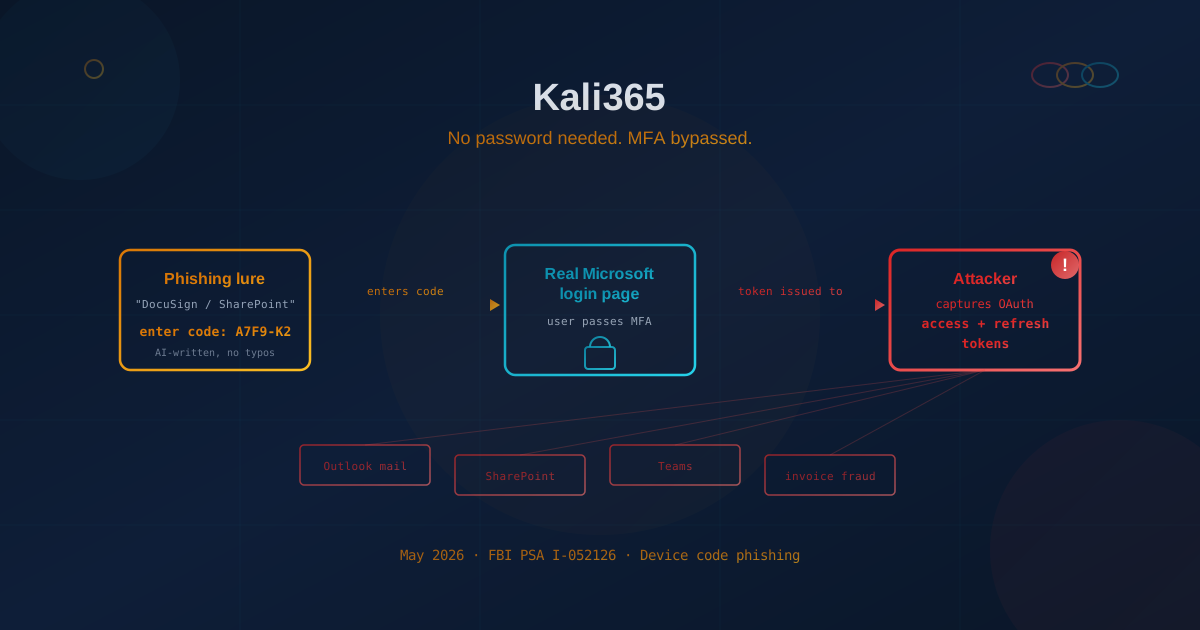
On May 21, 2026, the FBI issued a public service announcement (PSA number I-052126) warning businesses about a new phishing kit called Kali365 that breaks into Microsoft 365 accounts — and does it without ever stealing a password or tripping the multi-factor authentication (MFA) prompt you rely on to keep attackers out.
If your company runs on Microsoft 365 — email in Outlook, files in SharePoint, chats in Teams — this warning is about a tool built specifically to get inside accounts like yours. According to the FBI and multiple security firms, Kali365 has already been used to target hundreds of organizations since it first appeared in April 2026.
The uncomfortable headline for business owners: turning on MFA, the security step most companies treat as "good enough," no longer guarantees the door is locked. Here is what Kali365 actually does, why it works even against MFA, and the specific steps that still keep attackers out.
What is Kali365, and why did the FBI warn about it?
Kali365 is a "phishing-as-a-service" (PhaaS) platform — essentially a crime kit sold by subscription. Instead of building their own scam tools, criminals rent Kali365 over the messaging app Telegram for as little as $250 for 30 days, point it at a list of targets, and let the software do the technical work. The FBI flagged it because it lowers the skill bar: someone with almost no hacking ability can now run attacks that used to require an expert.
What you get for that subscription, according to the FBI's PSA and reporting from Infosecurity Magazine and Malwarebytes, includes:
- AI-generated phishing emails that are clean, convincing, and free of the typos that used to give scams away.
- Ready-made templates that impersonate trusted services like SharePoint, DocuSign, Adobe Acrobat Sign, and Microsoft itself.
- A live dashboard that tracks which targets have taken the bait in real time.
- Automatic token capture — the part that quietly defeats MFA, explained below.
This is the same business-in-a-box model we covered in our piece on phishing-as-a-service credential-theft platforms. Kali365 is a sharper, Microsoft-365-specific version of that growing threat.
How does Kali365 bypass MFA without stealing your password?
Kali365 doesn't try to guess or steal your password at all. Instead it abuses a legitimate Microsoft login feature called the device code flow to trick you into handing over a digital "access token" — a behind-the-scenes pass that proves you've already logged in and passed MFA. With that token, the attacker walks straight in. Here is the trick in plain English.
The device code flow exists for a good reason: it lets you sign in to devices that are awkward to type on, like a smart TV or a conference-room display. The device shows a short code, and you approve it from your phone or laptop by entering that code on a genuine Microsoft page. Kali365 hijacks this legitimate process:
- The lure. You get an email that looks like a SharePoint document, a DocuSign request, or a Microsoft security notice. It tells you to verify your identity and gives you a short code to enter.
- The real page. The link sends you to the genuine Microsoft login page — not a fake one. This is what makes it so convincing: the website is real, the address bar checks out, and your password manager fills in your credentials normally.
- The handoff. Behind the scenes, the attacker generated that code seconds earlier. When you enter it and approve with your MFA prompt, you are not approving your own login — you are approving the attacker's.
- The token. Microsoft issues an access token and a longer-lived refresh token to the attacker's session. Because you already passed MFA, the attacker never has to. The refresh token can keep their access alive for weeks, even after you change your password.
That last point is the sting in the tail. Resetting the compromised user's password does not automatically kick the attacker out — the stolen token has to be revoked separately. Many businesses learn this the hard way, assuming a password change ended the breach when it didn't.
Who is actually at risk?
Any organization that uses Microsoft 365 or Microsoft Entra (the identity system behind it) is a potential target — and small and mid-sized businesses are squarely in the crosshairs. Because Kali365 is cheap, automated, and template-driven, attackers don't need a reason to single you out. They cast wide and let the dashboard tell them who bit.
Small and mid-sized companies tend to be more exposed for three practical reasons:
- MFA is often the whole strategy. Many SMBs switched on basic MFA, checked the box, and moved on. Kali365 is built specifically to get past exactly that level of protection.
- Trust is higher and verification is lower. In a smaller team, a "please review this document" email from a familiar name rarely gets a second look — there's no formal process forcing someone to pause.
- The device code flow is usually left wide open. Most businesses have never adjusted this setting because they didn't know it existed, which leaves the exact door Kali365 walks through unlocked by default.
A single compromised mailbox is rarely the end goal. From inside one account, attackers read email to learn your billing relationships, then launch invoice-fraud and business email compromise schemes against your customers and suppliers — using your real, trusted account.
Why this matters: MFA isn't bulletproof anymore
Kali365 is not a one-off. It is the latest example of a fast-growing trend: attackers have stopped trying to beat MFA head-on and instead steal the "session token" your computer gets after you've logged in. Microsoft's 2025 Digital Defense Report found that identity-based attacks rose 32% in the first half of 2025, and noted that while modern MFA still blocks more than 99% of routine account-takeover attempts, attackers have pivoted to exactly the methods Kali365 uses — session-token theft, OAuth consent abuse, adversary-in-the-middle phishing, and device-code abuse.
Kali365 sits inside a whole marketplace of similar kits. Security firm Sekoia has cataloged roughly a dozen commercial "adversary-in-the-middle" phishing platforms in active use — with names like Tycoon 2FA, EvilProxy, Evilginx, and Sneaky 2FA — built for one purpose: to slip past MFA. Email-security firm Proofpoint documented a sharp jump in device-code phishing specifically starting in September 2025, first among state-aligned groups (including a Russia-linked actor it tracks as UNK_AcademicFlare) and then, beginning in October 2025, among financially motivated criminals (an actor it tracks as TA2723).
The lesson is not "MFA is useless." MFA still blocks the overwhelming majority of routine attacks, and turning it off would be reckless. The lesson is that not all MFA is created equal, and the common kinds — a text message code, a six-digit app code, or a "tap to approve" push notification — can all be defeated by these techniques. We unpacked this shift in detail in our guide to phishing-resistant authentication, hardware keys, and passkeys, and in our look at the different levels of MFA.
What should businesses do to prevent a Kali365 attack?
The good news is that the FBI's recommendations are concrete and most can be done inside settings your business already pays for. The single most effective move is to close the device code flow and upgrade to phishing-resistant MFA. Here are the priority actions, drawn from the FBI's PSA and standard identity-hardening guidance.
1. Block or restrict the device code flow
In Microsoft Entra, your IT team can create a Conditional Access policy that blocks the device code authentication flow for everyone, then carves out narrow exceptions only where a real business need exists (such as shared meeting-room hardware). The FBI advises reviewing your sign-in logs first to spot any legitimate use, and excluding tightly controlled emergency "break-glass" admin accounts so a misconfiguration can't lock you out. This one change closes the specific door Kali365 uses.
2. Move to phishing-resistant MFA
Replace text-message codes, app codes, and push approvals with phishing-resistant MFA — passkeys, FIDO2 hardware security keys, or certificate-based sign-in. These methods are tied to the genuine website and the physical device, so even a perfect-looking lure on the real Microsoft page can't trick them into approving an attacker's session. Both the U.S. Cybersecurity and Infrastructure Security Agency (CISA) and the Canadian Centre for Cyber Security (CCCS) point to these as the gold standard.
3. Turn on the other identity guardrails
- Review your Conditional Access policies so logins from unusual countries, unmanaged devices, or risky sign-ins are challenged or blocked.
- Block authentication-session transfer from a computer to a mobile device, which closes a related trick some kits use.
- Enable advanced email filtering to catch more of the lures before they reach an inbox.
- Shorten token lifetimes where practical, so a stolen token expires sooner.
4. Train people for the new playbook
Update your security-awareness training to reflect that the warning signs have changed. The old advice — "look for typos and a suspicious web address" — fails here, because Kali365 uses AI-clean writing and the real Microsoft page. The new rule of thumb: be suspicious of any email that asks you to enter a code somewhere, especially a code you didn't request. As we explained in why employees can't spot AI-powered phishing anymore, the goal is a "verify first" culture, not a typo hunt.
5. Have a token-revocation plan ready
Decide in advance what happens if an account is compromised. Because changing a password does not evict an attacker holding a stolen token, your response plan must include revoking all active sessions and refresh tokens for the affected user, not just a password reset. Knowing who can do this — and how quickly — turns a potential disaster into a contained incident.
Questions to ask your IT team or managed provider this week
You don't need to understand the technical plumbing to hold the right conversation. If you run a Microsoft 365 environment, put these five questions to whoever manages your IT:
- Have we blocked or restricted the device code authentication flow in Microsoft Entra?
- What type of MFA are we using today, and can we move to passkeys or FIDO2 hardware keys for admins and high-risk staff?
- Do our Conditional Access policies flag logins from unexpected locations or devices?
- If an account is compromised, what is our process to revoke active sessions and tokens, and how long does it take?
- Are we monitoring sign-in logs for device-code activity we don't recognize?
If those questions draw blank looks, that gap is exactly where the risk lives. A short review now is far cheaper than a compromised-account cleanup later. Our Microsoft 365 security checklist lists the other tenant settings to check in the same review. If you'd like an outside read on where your defenses stand, our free cybersecurity assessment takes about five minutes and covers identity, email, and account-protection basics.
Common questions about Kali365 and MFA bypass
Does Kali365 mean MFA is pointless?
No. MFA still stops the vast majority of automated attacks and remains essential. Kali365 specifically defeats the weaker, common forms of MFA — SMS codes, app codes, and push approvals. Phishing-resistant MFA such as passkeys and FIDO2 keys is designed to resist exactly this attack.
Will changing my password stop a Kali365 attacker?
Not on its own. The attack steals access and refresh tokens that survive a password change. To fully evict an intruder, your IT team must revoke the account's active sessions and tokens in addition to resetting the password.
How do I know if I was targeted?
Watch for emails asking you to enter a verification code you didn't request, especially ones impersonating SharePoint, DocuSign, Adobe Acrobat Sign, or Microsoft. On the IT side, unexpected device-code sign-in events and logins from unusual locations in the Microsoft Entra logs are key indicators.
The durable lesson
Kali365 marks the moment the "we have MFA, we're fine" assumption stopped being true for a lot of businesses. The fix isn't to abandon MFA — it's to recognize that attackers have moved on to stealing the token instead of the password, and to upgrade the locks accordingly: close the device code flow, adopt phishing-resistant MFA, and make sure you can revoke a stolen session in minutes. Those three moves turn the threat Kali365 represents from an open door back into a wall. The businesses that act on the FBI's warning now will look back on this as a cheap, quiet win — and the ones that don't may not get that luxury.
This article is intended for general informational purposes only and does not constitute professional security, legal, or compliance advice. Details about Kali365 are based on the FBI's public service announcement (PSA I-052126, May 21, 2026) and public reporting from security vendors as of the date of publication, and may evolve as the investigation continues. Organizations should consult qualified cybersecurity professionals before making configuration or operational changes based on this article.