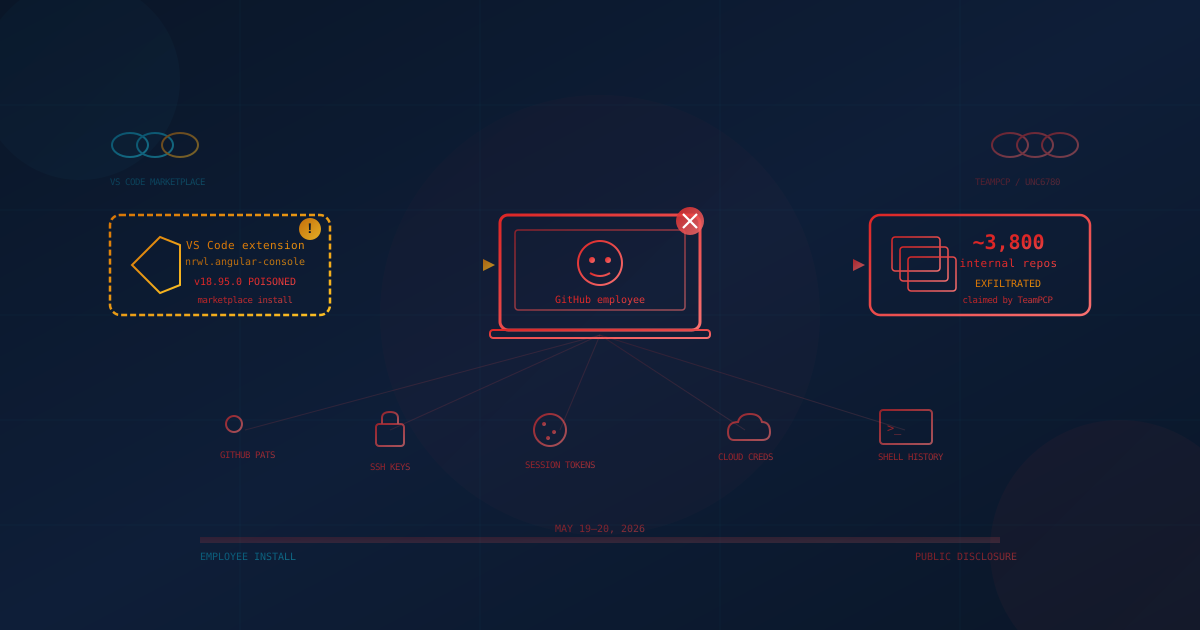
On May 20, 2026, GitHub publicly confirmed that attackers had gained access to its internal source-code repositories after one of its own employees installed a poisoned Visual Studio Code extension. The threat group TeamPCP — tracked by Google Threat Intelligence as UNC6780 — has claimed responsibility and is reportedly seeking at least USD $50,000 on underground forums for the stolen material. GitHub's investigation places the volume at roughly 3,800 internal repositories, a figure that is directionally consistent with what TeamPCP itself has been posting.
GitHub said it detected and contained the intrusion the day before its public statement, removed the trojanized extension from the VS Code Marketplace, isolated the compromised endpoint, rotated high-impact internal secrets, and opened an internal incident response investigation. The company's most important sentence for everyone reading this is the one about customer impact: "There is no evidence of impact to customer information stored outside of GitHub's internal repositories, including enterprise, organization, and customer repositories." That assessment may change as the investigation continues, but as of the date of this post, the customer-facing surface of GitHub is not believed to have been touched.
The more interesting question for a Canadian or US small or mid-sized business (SMB) is the one underneath the headline: if a malicious editor extension can quietly compromise GitHub itself, what does that mean for the way our developers, contractors, and managed service providers use the same tools every day?
What Actually Happened to GitHub
The attack did not exploit a flaw in GitHub.com, in Git itself, in GitHub Actions, or in GitHub Enterprise. It exploited the developer workstation — specifically, the Visual Studio Code editor on a single GitHub employee's machine. A trojanized extension, downloaded from the official VS Code Marketplace, executed on install and stole the credentials and session material that the employee used to access GitHub's internal source-code environment. From there the attackers pivoted into internal repositories and pulled approximately 3,800 of them.
GitHub has not formally named the specific extension as of this writing. Based on timing, attribution, and behaviour, the strongest publicly identified candidate — reported by Wiz, StepSecurity, and others, and covered by a GitHub Security Advisory on the upstream project — is a trojanized version of Nx Console (nrwl.angular-console) v18.95.0, published to the VS Code Marketplace on May 18, 2026 and live for roughly 11 minutes before being pulled. The payload was a multi-stage credential stealer that harvested GitHub, npm, AWS, and 1Password material from any workspace the developer opened, and TeamPCP claimed both the Nx Console compromise and the GitHub intrusion under the same handle. Nx Console has more than 2.2 million installs across all versions, so the broader Nx Console population — not only GitHub employees — should treat May 18, 2026 as the relevant exposure window.
The mechanics are straightforward and worth understanding in plain English:
- A VS Code extension is just code. When you install it, it runs with the same privileges as your editor — which usually means full access to your home folder, your shell environment, your SSH keys, your cloud CLI configuration, and any tokens cached by tools like
gh,git,aws,az, andgcloud. - A malicious extension does not need to ask for permission, pop a dialog, or display anything. It can quietly read those files, grab tokens, and exfiltrate them to an attacker-controlled server in the background, while the legitimate features of the extension keep working.
- Once the attacker holds a developer's GitHub token, SSH key, or active session cookie, they can read whatever repositories and organizations that developer has access to. If the developer works for the platform itself, that surface is large.
This is the modern face of an attack technique that Wiz Research quantified in October 2025, well before the GitHub incident: more than 100 valid VS Code Marketplace personal access tokens (PATs) and 30+ Open VSX access tokens were found leaked inside published extension packages, sitting across more than 500 extensions from hundreds of distinct publishers. Any one of those leaked tokens would have allowed an attacker to push a malicious update to the entire installed base of the affected extension. The editor surface has been an active credential-theft target for months, and the May 2026 TeamPCP campaign — culminating in GitHub itself — is the consequence, not the warning.
Who Was Actually At Risk
This is the first thing leadership needs to internalize, because the news coverage is going to blur it: the people in immediate danger were GitHub's own engineers and internal systems, not the average GitHub customer. According to GitHub's confirmation:
- Customer repositories were not accessed. Personal accounts, organization accounts, and GitHub Enterprise accounts are reported clean as of publication.
- Customer information stored outside GitHub's internal repos was not affected, based on GitHub's current evidence.
- The exfiltration is described as limited to internal source code that GitHub uses to build and operate its own product.
That is genuinely good news, and it is the right baseline. But there are two follow-on risks Canadian and US business leaders should understand. First, internal source code can contain references to internal endpoints, secrets, and security mechanisms; if any of those leaked, downstream effects on the platform are possible over the coming weeks. Second, the technique that worked at GitHub — a malicious editor extension on a developer endpoint — is exactly the technique that will land on SMB developers, contractors, and outsourced agencies who do not have GitHub's detection capabilities. Your business does not need to be a GitHub customer to be exposed to the pattern.
Why This Breach Is Different From Earlier 2026 Incidents
2026 has not been a quiet year for the developer supply chain. The axios npm attack in March slipped a malicious transitive dependency into one of the world's most depended-on packages. The Notepad++ update channel compromise hijacked a popular open-source editor's update infrastructure. The Bitwarden npm supply chain attack in April turned a password manager's own developer CLI into a credential thief for 90 minutes. Last week, the Private-CISA GitHub leak showed how a single misconfigured personal repository can expose six months of plaintext credentials, AWS GovCloud keys, and SAML certificates from a federal cyber agency.
What makes the TeamPCP incident different is the identity of the victim. GitHub is the platform that the rest of the supply chain runs on — the place where more than 150 million developers store source code, where most modern CI/CD pipelines authenticate, and where security folklore tells SMB leaders to trust by default. When the platform that hosts the world's code says "we got phished through an editor extension," the lesson is no longer abstract: the developer workstation is the perimeter, and the editor's plugin ecosystem is part of that perimeter.
It also reinforces a pattern we have been writing about all year: the most expensive 2026 breaches are not breaking through firewalls or exploiting unpatched servers. They are using legitimate developer tools — npm packages, GitHub Actions, OAuth grants, VS Code extensions — as the initial access vector, then riding existing trust into the heart of the business. That pattern shows up in our coverage of browser extension risk for business, third-party vendor risk for SMBs, and coding agent security.
GitHub Repository and Token Best Practices for SMBs
Because the TeamPCP incident lands on top of three other token-related GitHub stories from May 2026 alone — the CISA leak, the Grafana Labs internal-codebase access incident, and the Composer/GitHub Actions token format issue — it is worth restating the controls every SMB that uses GitHub (or whose contractors do) should have in place this quarter. None of these are exotic. Most of them are free.
Tokens, Authentication, and Sessions
- Stop using long-lived personal access tokens (PATs). Where GitHub supports them, use fine-grained PATs scoped to specific repositories and a short expiration (30–90 days), or move to GitHub Apps with installation tokens. Classic PATs that "never expire" are the single most common credential-leak source we see in SMBs.
- Enforce phishing-resistant multi-factor authentication on every GitHub account in your organization — ideally hardware keys or passkeys, not SMS codes. GitHub already requires 2FA for accounts that contribute code to npm; treat that as a floor, not a ceiling.
- Enable secret scanning and push protection on every repository, public and private. GitHub provides this at no extra cost for public repos and for organizations on GitHub Advanced Security. The CISA leak last week was preventable by exactly this control.
- Rotate any tokens that may have touched a compromised endpoint — including PATs, SSH keys, OAuth app tokens, GitHub Actions secrets, and any cloud credentials reachable from the same workstation. Treat rotation as the default response to "we are not sure," not the response to "we know we are exposed."
- Audit OAuth apps and GitHub Apps approved in your organization quarterly. Revoke anything that is unused, unrecognized, or excessively scoped. The same advice applies to OAuth tokens for SaaS and AI tools.
Repositories, Branches, and CI/CD
- Default repositories to private. Public is a deliberate choice, not a default state. A "Private-" prefix in the name is not a security control.
- Protect your main branch with required reviews, required status checks, and signed commits where feasible. This is the single cheapest way to slow an attacker who steals one developer's token.
- Pin third-party GitHub Actions by full commit SHA, not by tag (
@v1) or branch (@main). The Bitwarden CLI incident in April happened because of a hijacked third-party action; pinning by SHA neutralizes that vector. - Store secrets in GitHub Actions secrets or your cloud key vault, never in repository files, never in
.envfiles committed to history, and never in personal sync repos. Use GitHub's OpenID Connect (OIDC) federation to issue short-lived cloud credentials to CI jobs instead of long-lived keys. - Use branch and repository rulesets to block large-file commits, secret patterns, and force-pushes to protected branches.
Developer Endpoints and Extensions
- Treat the developer laptop as a Tier-0 asset. Endpoint detection and response (EDR), full-disk encryption, OS auto-update, and screen-lock are minimums. A developer endpoint typically holds keys to more business value than most servers.
- Limit which VS Code, Cursor, and JetBrains extensions developers can install. Maintain an internal allowlist of vetted publishers and review additions. The TeamPCP incident is the strongest argument yet for editor allow-listing in regulated SMBs.
- Disable extension auto-update on shared build infrastructure, and pin extension versions in any developer container or codespace template.
- Audit installed extensions during onboarding and offboarding, and after any laptop returns from travel. A compromised endpoint is an incident, not an inconvenience.
What Canadian and US Business Leaders Should Take From This
The TeamPCP incident is a clean opportunity for non-technical leadership to put precise questions to their IT lead or managed service provider. The right answers should come back in plain English, in writing, this week.
- Do we have a current inventory of every GitHub account, organization, and repository associated with our business? Include contractor and agency accounts. If the answer is "we think so," that is the gap.
- Are personal access tokens in use anywhere — by humans, by scripts, by CI, by integrations? When was each one last rotated, and what is its scope? Anything older than 90 days or marked "no expiration" needs justification.
- Which VS Code, JetBrains, or browser extensions are installed on our developer endpoints — including contractors? If you cannot produce that list inside a day, your endpoint visibility is the real finding.
- If a developer's GitHub token, SSH key, or cloud key were stolen tomorrow, how would we know — and how fast could we revoke it? The right answer is measured in minutes, not "we would notice eventually."
- Are our GitHub Actions pinned by commit SHA, and are we using OIDC to issue short-lived cloud credentials in CI? Floating dependencies are how a 90-minute exposure window becomes a months-long compromise.
These questions map directly onto the controls every modern framework expects — Account Management, Secure Configuration, Access Control, Vulnerability Management, and Incident Response — whether you are benchmarking against the Canadian Centre for Cyber Security's Baseline Cyber Security Controls for SMOs, the US NIST SP 800-171, the CIS Critical Security Controls v8, or the FTC's Safeguards Rule if you are a financial-sector small business.
What You Should Do Now
If you do nothing else this week, ask your IT lead or managed service provider for written confirmation of the following six actions:
- Rotate all GitHub PATs older than 90 days and any token used on a workstation that has installed VS Code extensions outside an internal allowlist in the last 30 days.
- Enable secret scanning, push protection, and branch protection on every repository in every organization your business owns. This is a one-time configuration with permanent benefit.
- Audit third-party OAuth apps and GitHub Apps in your organizations and revoke anything unused, unknown, or over-scoped.
- Inventory installed editor extensions on all developer and admin endpoints, and uninstall anything that is not actively used or from a trusted publisher.
- Confirm phishing-resistant MFA is enforced on every account with write access to a repository — including contractors and break-glass admin accounts.
- Pin GitHub Actions to commit SHA in all production workflows and migrate any long-lived cloud keys in CI to OIDC-issued short-lived credentials.
None of these require new tooling or budget. They require a half day from your IT lead and a willingness to treat the editor and the developer endpoint as part of your security perimeter. SMBs that act this week will absorb the next supply-chain incident the way GitHub absorbed this one: with a contained, single-endpoint story and no customer impact. SMBs that defer will find themselves writing a longer notification letter the next time the same technique lands.
The Bigger Insight
The single most useful frame for incidents like this is to stop thinking about your business's security as a property of your vendors, and start thinking about it as a property of your developer trust surface. Your business does not just use GitHub. It uses GitHub, which is accessed through editors, which load extensions, which run with the privileges of the user, which holds the tokens, which control the cloud accounts, which hold the customer data. Every link in that chain is a place where trust can be borrowed and abused — and every link is now a documented attack vector somewhere in the public reporting of 2026.
The TeamPCP attack happened to GitHub. The technique will land on small businesses in Toronto, Calgary, Ottawa, Vancouver, Chicago, Dallas, Denver, Miami, Phoenix, and Seattle next. The companies that come through it with their customer trust intact will be the ones that already treat their developer endpoints, their tokens, and their repositories as the high-value assets they are — not the ones that try to figure it out during the incident. We have written about the same lesson from the angle of why cybercriminals target small businesses in 2026, the 2026 threat landscape for US small businesses, and incident response planning before something happens — each one points at the same handful of unsexy controls.
If you are not sure where your business stands today, our free cybersecurity assessment walks you through 20 critical security areas — including the controls that are most directly relevant to a developer-endpoint and supply-chain incident like this one. It takes under five minutes, your answers never leave your browser, and it gives you a concrete starting point for the conversation with your IT lead or MSP this week.
GitHub's incident lasted hours. The pattern it confirmed will be with us for the rest of 2026. Treat your developer endpoints and your GitHub tokens accordingly.
This article is intended for general informational purposes only and does not constitute professional security, legal, or compliance advice. Details about the GitHub internal repository breach attributed to TeamPCP / UNC6780 are based on public reporting and GitHub's own disclosures as of May 20, 2026, and may evolve as the investigation continues. Organizations should consult qualified cybersecurity professionals before acting on any specific indicator of compromise or making operational changes based on this article.