
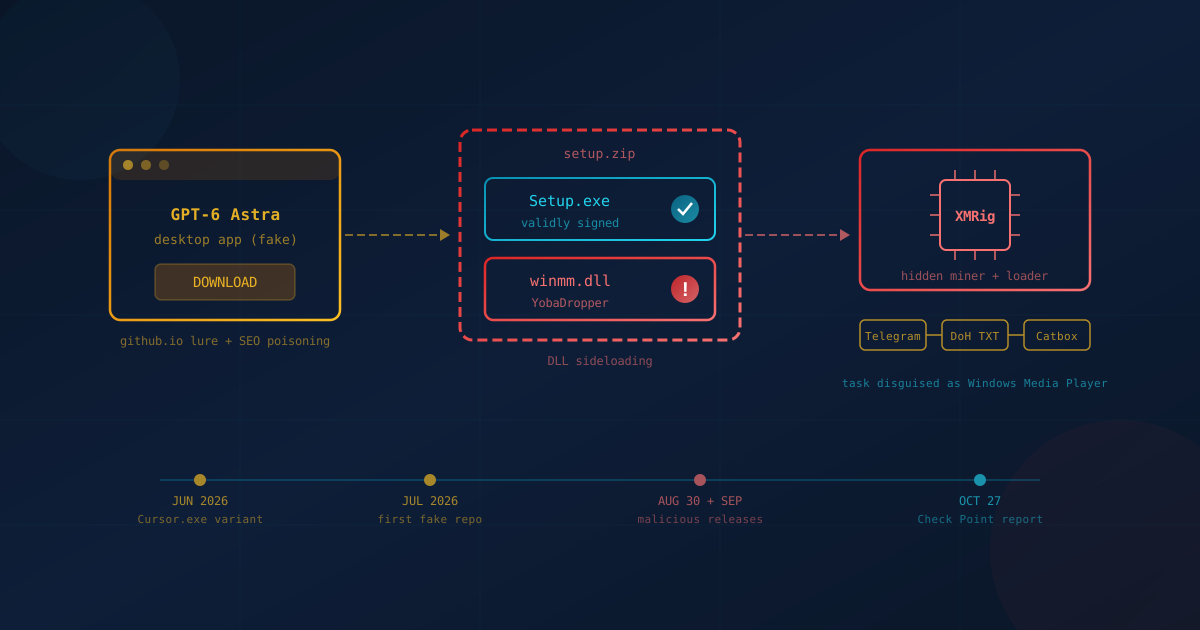
Fake ChatGPT and Claude apps hosted on GitHub have been infecting Windows computers with a malware family called Yoba, according to research published by Check Point Research in late October 2026. The fake downloads promised desktop versions of "GPT-5.6 Sol," "GPT-6 Astra," and "Claude Opus." What they actually installed was a hidden cryptocurrency miner and a loader that can deliver other malware later.
The clever part is that each package contained a real, digitally signed OpenAI or Anthropic program. That signed file did the work of loading the malware. For business owners in Canada and the US, the lesson is less about this one campaign and more about where employees get their AI tools.
What happened with the fake ChatGPT and Claude apps?
Attackers created GitHub repositories and GitHub Pages sites advertising supposed desktop apps for new AI models. Neither OpenAI nor Anthropic published them. Download links pointed to ZIP files hosted as GitHub releases. Each ZIP held a legitimate, signed OpenAI or Anthropic executable plus a malicious file named winmm.dll. Running the signed program quietly loaded the malicious file, a technique called DLL sideloading.
In Check Point's summary of the research, the company says the malicious projects "appeared prominently in Google Search," with activity it assesses as consistent with SEO poisoning (manipulating search results so malicious pages rank near the top). The repositories did not use fake stars or forks to look popular. They relied on search visibility instead.
Once running, the malware worked through several steps:
- It checked its surroundings. The first stage, which Check Point calls YobaDropper, verified it was launched by the expected installer, checked the computer's keyboard languages, and required administrator rights. If it lacked them, it asked the user to rerun it as Administrator.
- It set up persistence. It copied a legitimate Windows Media Player program into a new folder under ProgramData and created a scheduled task, disguised as a Microsoft Windows Media Player task, that runs as Local System three minutes after startup.
- It fetched instructions through normal services. The second stage, YobaLoader, read a Telegram channel's profile image, used it to generate a domain name, looked up that domain through Google's DNS-over-HTTPS service, and then downloaded an encrypted payload from the file host Catbox.
- It installed a miner. The final payload was XMRig 6.26.0, a cryptocurrency miner. According to Check Point, it communicated through Tor and paused mining while the victim was actively using the computer.
According to Check Point's report, the first repository was created around July 2026, but the first malicious releases were not uploaded until the end of August, with a third following about five days later. An earlier version of the dropper appeared in early June 2026 posing as a Cursor.exe program. Coverage from The Hacker News and Help Net Security reports the same chain.
Who was actually at risk?
The people at risk were Windows users who searched for a desktop version of a new ChatGPT or Claude model, landed on one of the fake GitHub pages, downloaded the ZIP, and ran the installer with administrator rights. Anyone who installed ChatGPT or Claude from OpenAI or Anthropic directly was not affected. Neither company's service was breached.
Check Point states its research "does not indicate that ChatGPT, Claude, OpenAI or Anthropic were compromised." The researchers have not published a count of infected computers, and no public reporting identifies victims by country. That makes this a question of exposure rather than a known breach: if someone on your team went looking for an early or free AI desktop app this fall, it is worth checking.
Check Point also found that the dropper skipped computers with keyboard layouts for Russia and several neighbouring countries, and it reported indicators suggesting Russian origins. Treat that attribution as Check Point's assessment, not a confirmed identity.
Why do people fall for fake AI downloads?
People fall for fake AI downloads because demand for new AI tools moves faster than company rules about where to get them. An employee hears about a new model, searches for it, and clicks the top result. In this campaign, the top result was a convincing GitHub page, and the installer carried a valid signature from a well-known AI company.
Three things made the lure believable:
- Plausible product names. "GPT-6 Astra" and "Claude Opus" sound like real releases. Staff rarely check a vendor's announcements before downloading.
- A trusted platform. GitHub hosts a great deal of legitimate software, so a GitHub link does not trigger the same caution as an unknown website.
- A real signature. As Check Point puts it, "a valid signature can establish the legitimacy of an individual executable, but not of every component packaged alongside it."
This is a shadow AI problem as much as a malware problem: employees using AI tools without organizational approval or oversight. Businesses adopting AI safely should name one person to own the rollout and give staff an easy way to request new tools. Our sister AI automation company, Avekko, has a practical guide on how small businesses can bring unapproved AI tools under control, including why one person should maintain the tool inventory and review new requests.
Why this campaign is different from typical malware
Yoba stands out because it hides behind trusted names at every step. The download sat on GitHub, the program was signed by OpenAI or Anthropic, the persistence posed as Windows Media Player, and the instructions came through Telegram, Google, and Catbox. Blocking one bad server does little, because the attacker can change the destination by swapping a Telegram profile picture.
The miner is also not the end of the story. Check Point describes YobaLoader as a generic loader that can deliver other Windows programs or PowerShell scripts. The same infected computer could receive something more damaging in a later wave. That is why Check Point says organizations "should therefore treat the infection as a broader compromise rather than focusing solely on detecting or removing XMRig."
For defenders, signature checks and antivirus alone are not enough. Detection has to notice when a trusted program loads an unexpected file or a scheduled task appears under a familiar name. That is the job of endpoint detection and response (EDR), software that records activity on each device, flags suspicious behaviour, and lets someone isolate the machine.
What Canadian and US business leaders should take from this
Business leaders should treat AI software like any other software: it comes from approved sources, it is installed by someone accountable, and its behaviour is monitored. The risk in Yoba is not the AI itself. It is the gap between how fast staff want new tools and how clearly the business has said where those tools come from.
A written AI usage policy closes much of that gap. It should list approved tools and explain how employees request new ones, with a process simple enough that people use it instead of working around it.
One question to ask your IT lead or managed service provider: "If an employee ran a fake AI installer as administrator last month, would we know, and could we see which programs it scheduled to run at startup?"
Practical steps to protect your business
The most effective steps against fake AI apps are about source, privilege, and visibility: control where software comes from, limit who can install it, and watch what it does once it runs. None of these steps requires a large budget, and most can be handled by an existing IT provider or managed service provider:
- Download AI apps only from the vendor. OpenAI offers ChatGPT for desktop at chatgpt.com/download, and Anthropic offers Claude's desktop apps at claude.com/download. Tell staff that a GitHub page or search result offering an unannounced model is a red flag.
- Remove everyday administrator rights. Yoba's dropper stopped if it could not run as Administrator. Staff accounts without admin rights would stall this chain at that step, unless someone with admin credentials approves the prompt.
- Restrict what software can run. Application control (allowing only approved programs) makes an unknown installer much harder to launch.
- Make sure EDR is on every Windows device. Ask whether it alerts on DLL sideloading and new scheduled tasks, not only on known malware files.
- Hunt for the indicators. Have your IT provider check for a C:\ProgramData\WMProcess folder, a wmpdui.dll file, the mutex Local\WindowsSecurity, and connections to t[.]me/yoba_fanclub, *.dedyn[.]io lookups, files.catbox[.]moe/z5zpy9.dat, or Tor bridges 51.89.231[.]85:24526 and 51.89.228[.]250:21668. The fake sites included gpt-5-6[.]github[.]io, gpt-6-astra[.]github[.]io, and opus-5-0[.]github[.]io. Check Point's report lists the full set of file hashes.
- Treat a hit as a full compromise. Isolate the machine, reset credentials used on it, and investigate before reconnecting. If you are not sure who would do that work, our guide to incident response planning covers the questions to settle in advance, including whether your IT provider has incident response capabilities.
If you are not sure how your business handles software installs, admin rights, and endpoint monitoring today, our free cybersecurity assessment is a quick way to find the gaps. It takes under 5 minutes, covers 22 security areas, and requires no signup.
How Cyber Unit helps you control shadow AI
Cyber Unit offers Workforce AI Security, a Check Point platform that shows which AI tools employees actually use, including the ones nobody approved. It builds a live inventory of sanctioned and shadow AI across web apps, desktop AI apps, browser extensions, coding agents, and MCP connections, then lets you set policies per application and redact sensitive data before it reaches an outside model. The Essentials package covers web AI only; desktop apps, MCP, and coding agents are covered in Enterprise.
It does not replace EDR, which is still the control that catches a malicious file like Yoba's. What it adds is the inventory, so unapproved AI tools can be reviewed or blocked. Our guide to how Workforce AI Security maps your AI exposure explains the coverage and both packages in more detail.
The lasting lesson: trust the source, not the signature
Yoba shows that attackers no longer need to break into an AI company to exploit AI. They only need to stand between employees and the tools those employees want. A signed file, a GitHub link, and a familiar brand name are signals, not proof. The businesses that stay safe are the ones that decide in advance where AI tools come from and who approves them.
This article is intended for general informational purposes only and does not constitute professional security, legal, or compliance advice. Details about the Yoba campaign, including its techniques and indicators of compromise, are based on Check Point Research's published analysis and public reporting as of the date of publication and may change as the investigation continues. Organizations should consult qualified cybersecurity professionals before acting on any specific indicator of compromise or making operational changes based on this article.