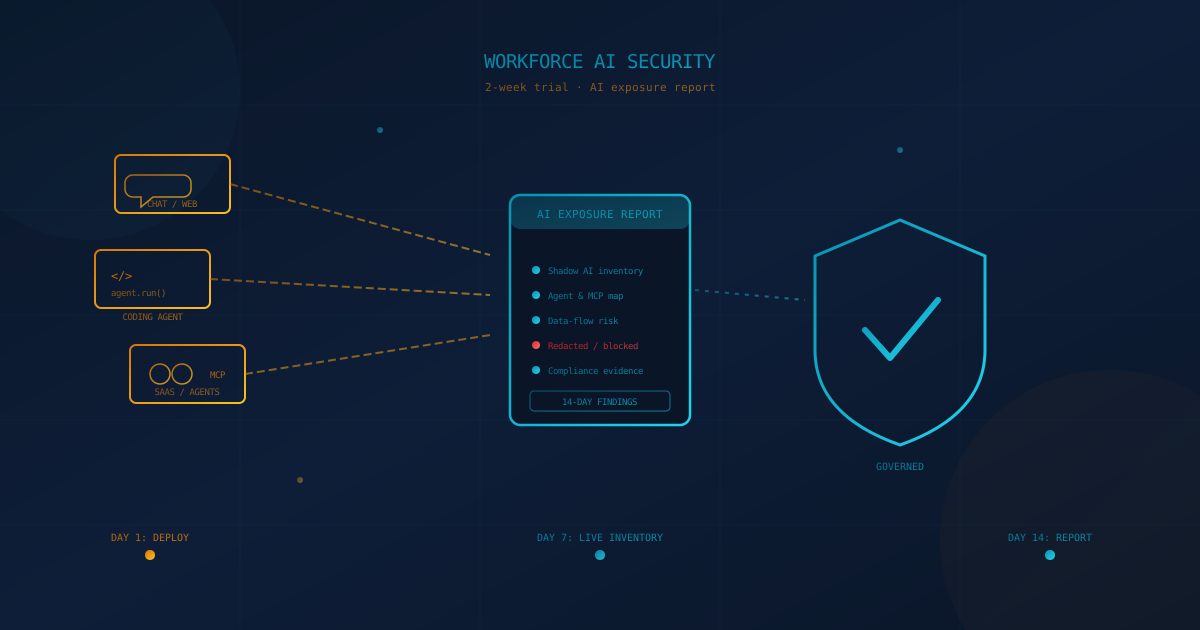
Cyber Unit is now offering a 2-week trial of Workforce AI Security, the Check Point platform we deploy to give clients continuous visibility into employee AI use. At the end of the two weeks you receive a written report: every sanctioned and shadow AI tool in use, every browser extension, coding agent, and Model Context Protocol (MCP) connection touching company data, and what sensitive information is moving through each one.
Most leadership teams cannot answer that question today. They can name the AI tools they bought. They cannot name the ones their employees found on their own — and in almost every environment we deploy this in, that second list is longer than the first. This article explains what the trial covers, what the report contains, and how to start one.
What is "AI exposure," and why can't most IT teams see it?
AI exposure is the full set of places where employee work reaches an AI model your organization does not fully control — sanctioned tools, unapproved chatbots, browser extensions, SaaS features turned on by a vendor, and AI agents connected through MCP — and most of it sits outside the logs a standard security stack collects. A firewall or endpoint agent built before 2023 was not designed to distinguish "an employee typed into a search box" from "an employee pasted a client contract into a language model." The traffic looks the same at the network layer even though the outcome is completely different.
This is not a hypothetical gap. An AI usage policy tells employees what not to do; it does not tell you whether they did it anyway. We covered that distinction in our piece on what businesses need in an AI usage policy — the policy is necessary, but on its own it is a document, not a control. Workforce AI Security is built to close that specific gap: it turns "we have a policy" into "we have a report showing the policy is working, and where it isn't."
What does the platform actually watch?
Workforce AI Security covers six surfaces where employees touch AI: web applications, desktop AI apps, MCP and agentic workflows, SaaS AI platforms, coding agents and extensions, and AI traffic at the network layer. Coverage across all six is what separates this from a browser-only monitoring tool, which is the category most businesses assume "AI security" means.
- Web AI. A browser extension governs AI use in the browser — visibility, access rules, and sensitive-data controls at the point of typing or pasting.
- Desktop AI. An endpoint component extends the same visibility and policy enforcement to AI applications running locally on Windows and macOS devices, deployed through your existing endpoint management tools.
- MCP and agentic workflows. The platform discovers MCP servers and the tools connected to them, tracks agent activity, and controls risky tool use and operations — the layer we detailed in our earlier piece on proactive shadow AI and MCP detection.
- SaaS AI platforms. Native integrations extend visibility, and where supported, runtime enforcement, directly into enterprise AI services rather than only what passes through a browser.
- Coding agents and extensions. AI-assisted development is discovered and protected across IDE and browser-based coding environments — relevant background is in coding agents and the security risks businesses need to know.
- Network-layer AI traffic. An AI Network Firewall enforces controls directly at the network layer, catching AI traffic that never touches a managed browser or endpoint.
Deployment does not require new per-user configuration. The browser extension and endpoint components apply organizational policy on their own, and identity or device-management systems already in place are used to scope policy and map activity back to specific users and devices.
What's actually in the report at the end of two weeks?
The report is built from two things the platform tracks continuously: your AI security posture and runtime protection activity, both broken out by application, agent, user, and data class. It is not a survey or a set of estimates — it is a record of what the platform observed on your own endpoints over the trial period.
- AI inventory and risk posture. A continuously updated view of sanctioned and shadow AI applications, agents, tools, and skills in use, with framework-aligned risk context, exposure tied to supply-chain dependencies, and prioritization so you know which findings to act on first.
- Who is using what, and for what. Activity is classified into use cases — the platform understands whether a prompt is marketing copy, a code review, a legal question, or a customer email — so you can weigh risk against how the tool is actually being used, not just that it was used.
- Data flow and agent behavior. Visibility into what data moved through each interaction, and how connected agents behaved when given access to tools and external systems.
- Policy and protection events. A log of what runtime protection caught during the trial — sensitive data blocked or redacted before it left your environment, risky agent actions stopped, prompt-attack attempts flagged through Tool Definition scanning and Prompt Attack Detection on agentic traffic.
- Compliance-ready evidence. Generated reports and preserved evidence built for governance, audit, and security operations use, with events forwarded into the security workflows you already run.
The trial runs the governance and runtime-protection controls live, not in a passive read-only mode — so the report also shows what got stopped, not only what was found.
Essentials or Enterprise: which coverage should you trial?
Workforce AI Security ships in two packages, so you can match the trial to the breadth of AI use you actually need to see: Essentials for web-only coverage, and Enterprise for everything, including desktop, MCP, IDEs, and coding agents. Picking the right one before the trial starts keeps the two weeks focused on the surfaces that matter to your business.
Essentials — web-focused AI security
- Coverage: web applications only, through a browser extension.
- Protection: discovery, governance, and protection for web-based AI usage.
- Best fit: organizations whose AI exposure is mostly chatbots and web apps, with no in-house developers using coding agents or MCP connections.
Enterprise — comprehensive AI security across all environments
- Coverage: web, desktop, MCP, IDEs, coding agents, and extensions.
- Posture: full AI inventory and risk posture across every surface.
- Protection: discovery, governance, and protection deployed via browser extension plus a desktop agent.
- Best fit: organizations with developers, agentic workflows, regulated data, or any AI usage beyond the browser — see our AI security checklist for small businesses for a quick way to self-score which tier you likely need.
See it in action
The short walkthrough below (opens on YouTube) shows the platform discovering shadow AI, redacting sensitive data from a pasted file in real time, and mapping an agent's tools and permissions — the same categories of findings that show up in a trial report.
Is this becoming a must-have, or is it still optional?
AI adoption inside businesses has moved faster than the controls most organizations have in place to govern it, which is why AI exposure is moving from an IT question to a board-level one — though the specific urgency still depends on the data your business handles and who is asking. A company with no regulated data and no developers has a smaller problem than a healthcare practice or a financial services firm whose staff paste client records into whatever tool is fastest. Both should know the answer; not both face the same consequences for not knowing it.
What has changed in 2026 is who is asking the question. Customers, boards, and cyber insurance carriers have started including AI governance in due diligence and renewal conversations, alongside the access-control and encryption questions they already asked. "We don't allow that" is not a verifiable answer without a monitoring layer behind it. A trial report is a verifiable one. For the broader executive framing, see what business leaders should know about shadow AI.
Questions to ask before your two weeks start
A short set of questions, asked internally before the trial begins, makes the report more useful once it arrives. Bring these to your IT lead or managed service provider:
- Do we already have an AI usage policy, and has anyone verified employees follow it?
- Do our developers use AI coding assistants, agents, or MCP connections near source code or production systems?
- Have we told our cyber insurer or major customers how we govern employee AI use — and would our answer hold up against a trial report?
- Are we relying on a firewall or managed browser alone, and do we know whether AI traffic is routing around it?
- Which departments handle the data we would least want inside a model we don't control — legal, HR, finance, client records?
How to start your 2-week trial
Email sales@cyberunit.com to start a 2-week trial of Workforce AI Security; a short scoping conversation is all that's needed before deployment begins. A typical trial runs in three steps:
- Scope the deployment. We confirm whether Essentials or Enterprise coverage fits your environment and roll the browser extension, and desktop agent if applicable, out to a representative set of users.
- Let it run for two weeks. The platform builds a live inventory of AI tools, agents, and MCP connections in use, and applies baseline governance and data-loss protection while it does.
- Review the report together. We walk through the findings — what was discovered, what was blocked or redacted, and what a permanent deployment would look like for your organization.
There is no obligation to continue past the trial. The report is yours either way, and it is a reasonable input into a broader free quick security assessment if you have not run one recently.
The bottom line: you cannot govern what you cannot see
A policy without a control behind it is a hope, not a defense — and AI is the one category of business tool where the gap between the two has widened the fastest. Two weeks is a short enough commitment that "we don't know yet" stops being an acceptable answer for very long. The report you get back either confirms your AI usage is under control or tells you exactly where it isn't, and either outcome is more useful than the guess it replaces.
To start a 2-week trial of Workforce AI Security and get a detailed report of AI usage across your environment, contact sales@cyberunit.com.
This article is intended for general informational purposes only and does not constitute professional security, legal, or compliance advice. Product capabilities described here, including coverage, packaging, and reporting features of Workforce AI Security, reflect the offering as of the date of publication and may change. Organizations should consult qualified cybersecurity, privacy, and legal professionals before making operational or contractual changes based on this article.