
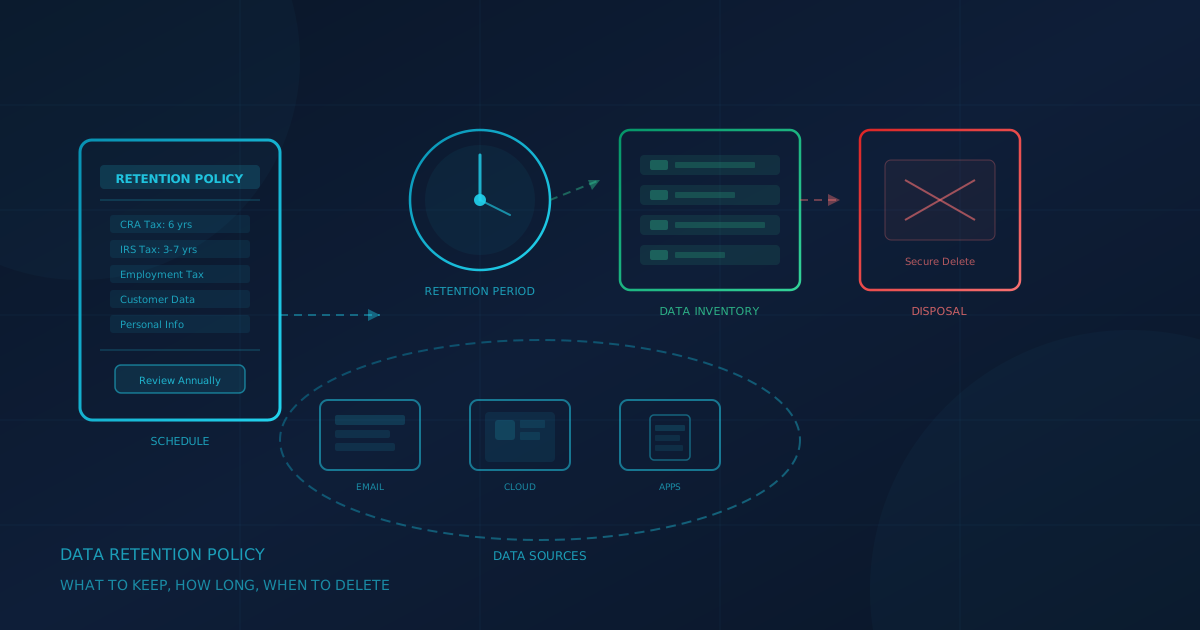
A data retention policy for small business defines what data your organization keeps, how long you keep it, and when it must be deleted. According to the Office of the Privacy Commissioner of Canada, PIPEDA Principle 5 requires that "personal information must only be kept as long as required to serve those purposes." Keeping everything forever is not just disorganized; it creates security and compliance risk.
This guide explains why SMBs in Canada and the United States need a retention policy, how to build a simple retention schedule, what official sources say about specific retention periods, and how to configure retention in Microsoft 365 and Google Workspace.
What is a data retention policy?
A data retention policy is a written document that defines what data your organization collects, where it is stored, how long it is kept, and when and how it should be deleted. The policy covers all formats: email, files in cloud storage and on-premises servers, databases, backups, paper records, and data on employee devices.
A clear retention policy serves several purposes:
- Compliance. Tax authorities, privacy laws, and industry regulations set minimum and maximum retention periods. A policy helps you meet both.
- Security. Data you no longer need is data that can still be exposed in a breach. Reducing the volume of stored data reduces your attack surface.
- Efficiency. Employees waste time searching through years of outdated files. Defined retention periods keep systems manageable.
- Legal holds. When litigation arises, you need to preserve relevant data. A policy defines how holds override normal deletion.
Why is keeping everything forever a security risk?
Many small businesses default to keeping all data indefinitely because storage is cheap and deletion feels risky. This approach creates problems that outweigh the perceived safety of hoarding data.
Breach scope expands. If an attacker gains access to your systems, they can exfiltrate everything you have stored. A business with ten years of customer records exposes far more than one that deletes records after the legally required period. Breach notification laws in both Canada and the United States can require notifying affected individuals when a breach meets the applicable legal threshold. More stored data means more individuals to notify, higher remediation costs, and greater reputational damage.
Compliance expectations. Privacy regulators do not expect businesses to keep personal information indefinitely. The OPC's guidance on PIPEDA Principle 5 is clear: personal information should only be kept "as long as required to serve those purposes." Keeping customer data years after the relationship ended, with no business or legal justification, could be viewed as a compliance failure.
Discovery costs. If your business faces litigation, you may be required to search through all stored data for relevant documents. More data means higher legal costs and longer timelines.
How do you build a simple data retention schedule?
A retention schedule is the operational document that implements your policy. It lists data categories, where they are stored, how long they are kept, and who is responsible. Building one does not require specialized software; a spreadsheet works for most small businesses.
Inventory where data lives
Before you can set retention periods, you need to know what data you have and where it is stored. Common locations include:
- Email. Microsoft 365 or Google Workspace mailboxes contain years of correspondence, attachments, and sensitive information.
- Cloud storage. SharePoint, OneDrive, Google Drive, Dropbox, and similar services hold documents, spreadsheets, and project files.
- Line-of-business applications. Accounting software, CRM systems, HR platforms, and industry-specific tools store customer and employee data in their own databases.
- Backups. Backup systems retain copies of everything, often for longer than the source data. Your Microsoft 365 backup strategy should align with your retention policy.
- Employee devices. Laptops, phones, and tablets may contain local copies of files and email. An acceptable use policy should define how employees may use company devices, email, internet access, cloud services, and data.
- Paper records. Physical files in filing cabinets still exist in many businesses, especially for contracts, tax documents, and HR files.
Categorize data by type and sensitivity
Group data into categories that share similar retention requirements. Common categories include:
- Tax and financial records
- Customer data and contracts
- Employee and HR records
- Legal and compliance documents
- Operational data (internal communications, project files)
- Marketing materials
For each category, note the sensitivity level and whether it contains personal information subject to privacy laws. An AI usage policy should also address data classification to prevent sensitive data from being entered into AI tools.
Set retention periods
For each category, define how long data should be kept. Base this on legal requirements (see the next section), business needs, and contractual obligations. When multiple requirements apply, the longest one governs.
Assign data owners
Each category should have an owner responsible for ensuring retention rules are followed. This is typically a department head: finance owns tax records, HR owns employee records, sales owns customer contracts.
Define secure deletion procedures
Deleting a file from a folder is not the same as secure disposal. Your policy should specify how data is permanently removed: emptying recycle bins, clearing backups, and using secure erase tools for physical media. For paper records, shredding is standard.
Document legal hold procedures
A legal hold suspends normal deletion when litigation is anticipated or underway. Your policy should define who can initiate a hold, how affected data is identified, and how holds are lifted when no longer needed.
What do official sources say about retention periods?
Specific retention periods depend on the type of data, the applicable laws, and your industry. The following are examples from authoritative sources. Always confirm requirements with your accountant or legal counsel for your specific situation.
Tax records in the United States (IRS)
The IRS provides guidance on how long to keep records. Key points include:
- Keep records for 3 years if situations (4), (5), and (6) below do not apply to you.
- Keep records for 3 years from the date you filed your original return or 2 years from the date you paid the tax, whichever is later, if you file a claim for credit or refund after you file your return.
- Keep records for 7 years if you file a claim for a loss from worthless securities or bad debt deduction.
- Keep records for 6 years if you do not report income that you should report, and it is more than 25% of the gross income shown on your return.
- Keep records indefinitely if you do not file a return.
- Keep records indefinitely if you file a fraudulent return.
- Keep employment tax records for at least 4 years after the date that the tax becomes due or is paid, whichever is later.
Tax records in Canada (CRA)
The Canada Revenue Agency requires businesses to keep records for six years from the end of the last tax year to which they relate. According to the CRA's guidance on keeping records: "Keep your records for six years from the end of the last tax year they relate to, unless you have permission from the CRA to destroy them earlier."
Personal information in Canada (PIPEDA)
PIPEDA does not prescribe specific retention periods. Instead, Principle 5 states that "personal information must only be kept as long as required to serve those purposes." This means businesses should define their own retention periods based on the purpose for which the information was collected, then delete it when that purpose is fulfilled. Provincial privacy laws may have additional requirements.
FTC Safeguards Rule (US financial institutions)
The FTC Safeguards Rule (16 CFR Part 314) applies to financial institutions under FTC jurisdiction, including mortgage brokers, tax preparation firms, payday lenders, and non-bank financial companies. Section 314.4(c)(6) requires covered institutions to "develop, implement, and maintain procedures for the secure disposal of customer information in any format no later than two years after the last date the information is used in connection with the provision of a product or service to the customer to which it relates, unless such information is necessary for business operations or for other legitimate business purposes, is otherwise required to be retained by law or regulation, or where targeted disposal is not reasonably feasible due to the manner in which the information is maintained." The rule also requires periodic review of your data retention policy.
How do Microsoft 365 and Google Workspace handle retention?
Cloud productivity platforms include built-in retention features. These are not replacements for a written policy, but they are how you enforce retention rules in your primary data stores.
Microsoft 365: Microsoft Purview retention policies
According to Microsoft's documentation on retention policies and labels, Microsoft Purview lets you configure retention settings for Exchange mailboxes, SharePoint sites, OneDrive accounts, Teams messages, and other workloads. You can:
- Retain content for a specified period, preventing permanent deletion even if users delete it.
- Delete content automatically after a specified period.
- Retain and then delete content after a specified retention period.
Retention policies apply at the container level (mailbox, site, account). Retention labels can be applied to individual items, either manually by users or automatically based on conditions. Microsoft states that, by default, "retention always takes precedence over permanent deletion, and the longest retention period wins," unless the content is subject to priority cleanup.
For small businesses, a simple approach is to create organization-wide retention policies for Exchange and SharePoint that match your default retention period, then use labels for exceptions (such as longer retention for legal or compliance documents).
Google Workspace: Google Vault
According to Google's documentation on Google Vault, Vault is "an information governance and eDiscovery tool for Google Workspace" that covers Gmail, Drive, Calendar, Chat (when conversation history is turned on), Meet recordings, Groups, Voice (Voice add-on subscriptions only), Sites, and Gemini conversations. Vault provides:
- Retention rules to keep data for a defined period. Google states: "Keep data for as long as you need it. If your organization is required to preserve data for a set time, you can configure Vault to retain it."
- Deletion rules to remove data when no longer needed. "Remove data when you no longer need it. If your organization is required to delete sensitive data after a set time, you can configure Vault to remove it from user accounts and start purging it from all Google systems."
- Legal holds to preserve data indefinitely for litigation or compliance.
Google notes that "Vault doesn't retain data until you set up retention rules. Until you do, users can delete data and services can purge it according to that service's protocol." A Vault license is required; starting November 1, 2025, Google Workspace admins must have a Vault license to use Vault features.
A short data retention checklist
Use this checklist as a starting point for your retention policy:
- Inventory data locations: email, cloud storage, line-of-business apps, backups, devices, paper files.
- Categorize data by type and sensitivity.
- Research applicable requirements: tax law (IRS, CRA), privacy law (PIPEDA, state laws), industry regulations, contracts, insurance.
- Set retention periods for each category. When in doubt, consult your accountant or lawyer.
- Assign owners for each data category.
- Configure platform retention: Microsoft Purview, Google Vault, or equivalent.
- Define secure deletion procedures for all formats.
- Document legal hold procedures.
- Review the policy annually and whenever your technology or business changes.
One step you can take today
A data retention policy does not need to be perfect on day one. Start with an inventory of where your data lives and what categories you have. Then work with your accountant, lawyer, or IT provider to define retention periods that meet your legal obligations without keeping data longer than necessary.
Cyber Unit's managed IT services include Microsoft 365 and Google Workspace administration, and backup monitoring and testing. We handle user provisioning, license management, security configuration, and ongoing support.
If you are unsure where your business stands on data management and other security areas, our free cybersecurity assessment takes about five minutes and covers 22 security areas. It runs entirely in your browser with no signup required.
This article is intended for general informational purposes only and does not constitute professional legal, tax, or compliance advice. Retention requirements vary by jurisdiction, industry, and the specific facts of your situation. Organizations should consult qualified legal and accounting professionals to determine the retention periods applicable to their business. The IRS, CRA, OPC, and FTC guidance referenced in this article are publicly available as of the date of publication and may change.