
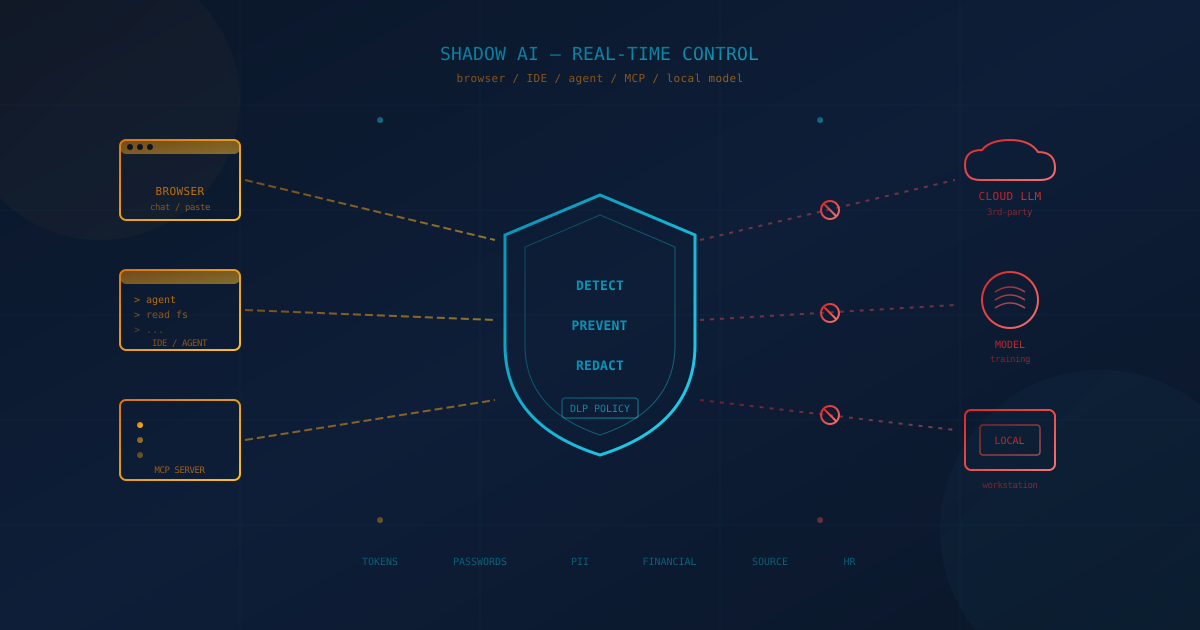
Four months ago we wrote about shadow AI as a business-leadership problem — the gap between how fast employees adopt AI tools and how slowly organizations notice. Since then the problem has changed shape. The conversation in early 2026 was largely about ChatGPT tabs in the browser. The conversation in May 2026 has to include Model Context Protocol (MCP) servers running on a developer's laptop, desktop AI agents with file-system and shell access, local LLM runtimes, AI features quietly turned on inside SaaS tools, and AI coding assistants reading source code that never belonged to them.
For Canadian and US small and mid-sized businesses (SMBs), the practical question is no longer "should we have an AI policy?" — most leadership teams know they should. The question is: do you have a way to know, in real time, when company data is leaving your environment through an AI tool, and can you stop or redact it before it does? If the answer is "we trust our employees," that is not a control. It is a hope. And hope is not on the list of approved safeguards in the FTC Safeguards Rule, NIST SP 800-171, CCCS Baseline Cyber Security Controls, or Canada's PIPEDA.
This article is for the SMB executive who already accepts that AI is in their environment and now needs to answer three concrete questions: where is your data, what has been fed into AI, and who owns the tools your team is using. We will also look at why browser-only visibility is no longer sufficient and what real-time detection, prevention, and policy-based redaction look like in practice.
What Shadow AI Actually Means in May 2026
Shadow AI is any AI tool, model, or agent that processes company data without the organization's explicit approval, inventory, or monitoring. In 2024 and most of 2025, that mostly meant employees pasting customer information into a personal ChatGPT account in a browser tab. In 2026 it includes at least five distinct categories, and each one has a different data path out of the business:
- Browser-based AI services — ChatGPT, Claude.ai, Gemini, Copilot Chat, Perplexity, and the long tail of niche assistants accessed through a logged-in web session.
- Embedded AI features inside SaaS tools — meeting recorders, "ask your data" panels in CRMs, AI summaries in Slack and Microsoft 365, AI features that were off last quarter and on this quarter without a config change on your side. We covered one variant of this in our note on AI meeting recorders and privacy.
- Desktop AI agents and AI coding assistants — Claude Code, Cursor, Windsurf, Codex CLI, GitHub Copilot in the IDE, and similar agentic tools that read and write files, run shell commands, and reach into source control. We catalogued the risks in coding agents and what businesses need to know and the cowork-style dynamics in Claude Code in cowork environments.
- MCP servers and AI integrations on user machines — Model Context Protocol servers that connect an AI assistant to Slack, GitHub, a local database, a customer support inbox, or a filesystem. MCP is a deliberate design choice for power users; it is also a deliberate hole punched through the perimeter on a per-laptop basis.
- Locally hosted models — Ollama, LM Studio, llama.cpp builds, and the small but growing set of employees running Llama-class or Qwen-class models on a personal workstation. Locally hosted does not mean low-risk: the data still has to reach the model, and outputs still have to reach somewhere.
The unifying problem is that each of these paths terminates somewhere your IT lead cannot see unless they have purpose-built visibility for it. A browser-only DLP tool can catch the first category. It cannot reliably catch the other four.
The Three Questions Every Canadian and US Executive Should Be Able to Answer
If a regulator, a major customer, or your cyber insurance carrier asked the following three questions tomorrow, the time to find out you cannot answer them is not in the email reply. Run each one past your IT lead, your managed IT provider, or your security partner today.
1. Where Is Your Data Right Now?
Not where you intended for it to live — where it actually lives. The honest answer for most SMBs is some combination of Microsoft 365 or Google Workspace, a CRM, an accounting platform, a file-share or two, employee laptops, an MSP-managed backup, and a long tail of approved and unapproved cloud services. Once AI is in the picture, you have to add: any vendor whose AI features process your data, any AI account an employee logged into with a work email, and any local model an employee has installed.
The right baseline is a written data inventory that names the system, the data classes it holds (customer PII, payment data, source code, contracts, HR records), and the legal basis for processing under PIPEDA in Canada or the relevant US state privacy laws (CCPA/CPRA, VCDPA, CPA, CTDPA, UCPA, and the growing list of follow-ons). We unpacked this for Canadian businesses specifically in Canada's privacy landscape for small businesses.
2. What Data Has Been Fed Into AI?
This is the question most SMBs cannot answer at all. Three sub-questions inside it:
- Which prompts and uploads went to which AI service, from which user, on which device? Without telemetry at the egress point, this is unrecoverable after the fact.
- Did any of those uploads include regulated data? Health information under PHIPA or HIPAA, payment data under PCI DSS, employee records under provincial or state privacy law, controlled unclassified information under NIST SP 800-171 for businesses serving US defence supply chains.
- Were any of those inputs used to train a third-party model? Most consumer-tier AI services default to training on user content unless you turn it off; most users do not.
If you cannot reconstruct what was sent, you also cannot tell a regulator, a board, or a customer what was exposed. That is the heart of why an AI usage policy on its own is not enough: a policy without telemetry is documentation of an aspiration.
3. Who Owns the AI Tools Your Team Is Using?
Ownership is more than "who pays for it." It is also: who controls the account, who controls the data retention settings, who can revoke access when an employee leaves, and who is on the contract that says training is off and data is segregated. A free personal ChatGPT account used for work checks none of those boxes. A Claude Team or ChatGPT Enterprise seat assigned to a corporate identity does. An MCP server installed on a contractor's personal laptop, pointed at your GitHub organization, is a category of its own — the tool is "yours" only in the sense that it can reach your data, not in any sense that gives you control over it.
The Clawdbot situation we covered in Clawdbot AI agent security considerations is a reminder that "open-source AI agent on someone's laptop" can quietly become "open-source AI agent with credentials to your environment" without anyone deciding it should.
Why Browser-Only Visibility Misses the Real Risk in 2026
Most SMBs that have done anything about shadow AI have done it at the browser. They have rolled out a managed browser, blocked some AI domains at the firewall, or deployed a browser extension that flags risky pastes. Those controls are useful and they should stay on. They also miss the categories of shadow AI that are growing the fastest:
- A developer running Claude Code or Cursor with a local MCP server connected to your internal Postgres database does not pass through the corporate web proxy in any way you can see. The data path is process → MCP server → AI provider's API, and nothing in that chain looks like an HTTP request to
chatgpt.com. - A marketing manager whose Zoom or Otter-equivalent recorder uploads meeting audio to an AI summarisation service is moving regulated conversations off-network from a SaaS-to-SaaS API call. The employee's browser never touches it.
- A salesperson who installs a "smart inbox" Chrome extension that reads every email through a third-party AI provider has effectively published your customer correspondence to an outside service — and we wrote specifically about that risk category in browser extension security risks for businesses.
- An employee running Ollama with a 70-billion-parameter model on their workstation processes inputs locally — but the model, the prompts, and any uploaded files now live on a machine that is also synced to a personal cloud drive, a personal GitHub, or a USB stick.
The lesson is the same one the Private-CISA GitHub leak made painfully concrete earlier this month: a control only works if it sees the data path that is actually in use. In 2026, that path is no longer a browser tab.
Real-Time Detection, Prevention, and Policy-Based Redaction
Catching shadow AI after the fact is auditing. Catching it before regulated data leaves the environment is prevention. The difference matters because most regulators — and most cyber insurance carriers — care about whether you stopped an exposure, not whether you noticed it three weeks later. Three capabilities, ranked roughly in order of maturity:
- Endpoint and network telemetry that covers AI traffic specifically. Not just "outbound HTTPS to OpenAI" — that is too coarse. The useful signal is which process, on which device, from which user, sent how many tokens to which AI endpoint, with which categories of content. That telemetry has to cover browser, native app, MCP server, and IDE-integrated traffic in one view.
- Real-time prevention with inline DLP policy. When a user attempts to send something that matches a category your business has defined as sensitive — API tokens and access keys, passwords and other credentials, customer PII, payment card or banking data, payroll and HR records, source code from a flagged repository, contract language, anything inside a defined data class — the action is blocked, the user gets a short explanation, and the event is logged. The point is not to be punitive; it is to make the safe path the default path.
- Redaction driven by the same DLP policy. When the goal is to keep the employee productive without leaking the parts that matter, full block is too blunt. The mature behaviour is to redact the matched fields in place — strip the tokens, mask the account numbers, replace the PII, drop the credentials — and let the rest of the prompt through. The categories should be the ones your organization already uses for DLP elsewhere: credentials, PII, financial data, customer records, source code, contracts, HR. Larger organizations that share threat intelligence with CSIRTs or ISACs can layer Traffic Light Protocol markings on top as an additional class, but for most SMBs the categories that actually leak are credentials, PII, and financial data — not TLP-marked documents.
This is the layer Cyber Unit's team has been quietly building toward over the past several months, and it is now in a place where we are showing it to customers across our footprint in Toronto, Calgary, Vancouver, Ottawa, Edmonton, Winnipeg, Chicago, Dallas, Denver, Miami, Phoenix, Portland, and Seattle. If you would like to see what shadow AI looks like on a real endpoint — including MCP traffic and agent activity — we are happy to walk through a short demo on your environment or a representative one. The conversation usually starts with our free 5-minute security assessment and a short follow-up call to map what is already in place.
Practical Next Steps for Canadian and US SMBs
None of the following requires a procurement cycle, a new framework, or a six-month project. All of it is work a competent IT lead or managed IT services provider can move on this quarter:
- Inventory every AI surface your team touches. Browser logins, paid subscriptions, embedded SaaS AI features, IDE assistants, MCP servers, local models. Tie each one to a named owner, an account type (personal vs. corporate), and a data class.
- Get an answer to the three questions in this article — in writing. "Where is the data, what has been fed into AI, who owns the tools." If any answer is "we are not sure," that is a finding to track, not a reason to stop.
- Extend visibility past the browser. Make sure your endpoint and network monitoring sees outbound AI traffic from native apps, IDEs, and MCP servers, not only from web tabs. Your MSP should be able to tell you, for any given endpoint, what AI services it talked to in the last 30 days.
- Decide what you will block, what you will allow, and what you will redact. A "block everything" stance fails because employees route around it; a "trust everyone" stance fails because it never met an audit. The realistic middle is: approved tools for approved use cases, real-time block on the data classes that map to regulated content (credentials, PII, payment data, source code, HR), and in-place redaction for everything that is allowed but contains sensitive fields.
- Run the free quick security assessment. If you want a starting snapshot without a sales call, our free cybersecurity assessment covers the most common SMB gaps in identity, endpoint, data, and now AI usage, and gives you a written result you can take to your board or your insurer.
Proactive Beats Reactive — Especially Here
The pattern we keep seeing across breach post-mortems is the same one shadow AI is now setting up for the next twelve months: the control existed, somewhere; the visibility did not. AI is unusual among security topics because the velocity of adoption is faster than almost any prior category, and the data exposure is built into how the tools deliver value. You cannot run a "shadow AI clean-up" project the way you might run a password manager rollout, because the surface keeps expanding while you work.
The organizations that will look composed in twelve months are the ones that decided, now, that AI usage is a data-flow question rather than a tool-purchasing question — and instrumented for it. The ones that wait will spend a much harder quarter explaining to a customer, a regulator, or a carrier why a model they do not own learned something they were responsible for protecting.
If you would like to see what proactive shadow AI detection, prevention, and DLP-driven redaction look like running on a real endpoint — including MCP and agent traffic, and with the data classes your business actually cares about — we are happy to show it. Start with the free quick security assessment and we will take it from there.
This article is intended for general informational purposes only and does not constitute professional security, legal, or compliance advice. References to specific regulations (PIPEDA, the FTC Safeguards Rule, NIST SP 800-171, CCCS Baseline Cyber Security Controls, state privacy laws) reflect public guidance as of the date of publication and may evolve. Organizations should consult qualified cybersecurity, privacy, and legal professionals before making operational or contractual changes based on this article.