
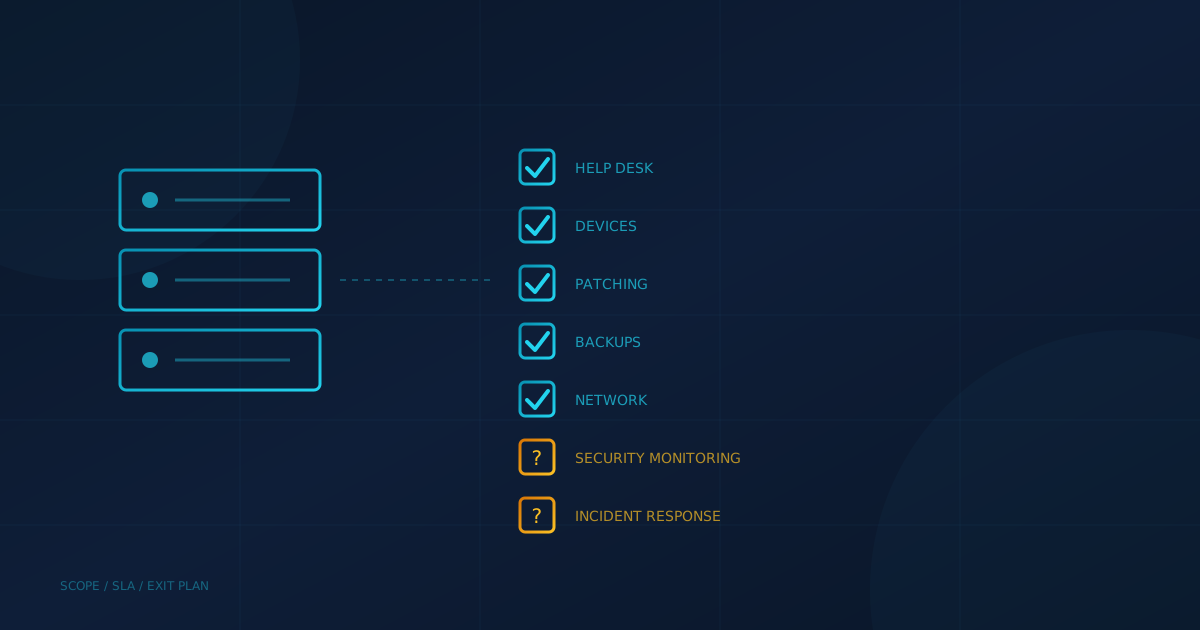
Managed IT services are an arrangement where an outside provider runs your day-to-day technology for a recurring fee: answering help desk calls, keeping computers patched, managing backups, and looking after the network and firewall. The Canadian Centre for Cyber Security's guidance for consumers of managed services describes a managed service provider (MSP) as "a company that remotely manages IT infrastructure and user end systems on behalf of a client."
The model is common on both sides of the border. The US Cybersecurity and Infrastructure Security Agency (CISA) notes that many small and medium-sized businesses use MSPs to remotely manage IT systems, data and applications. What the label covers, though, varies a lot from one agreement to the next. This guide sets out what managed IT services usually include, what is often left out, and what to confirm before you sign.
What do managed IT services include?
A typical managed IT agreement covers the routine work of keeping systems running. The Canadian Centre for Cyber Security's guide ITSM.10.023 describes MSPs as focused on "baseline IT operations such as Help desk, endpoint management, backup management, networks, and firewalls management," and says they monitor networks and IT infrastructure to make sure they are running smoothly.
In practice, most agreements include some version of:
- Help desk support for staff, by phone, email or ticket.
- Device management for laptops, desktops and servers, including setup for new hires and cleanup when people leave.
- Patching and updates for operating systems and common business software.
- Backup management, ideally with regular restore tests.
- Network and firewall management, including Wi-Fi and remote access.
- Monitoring of systems so problems like a failing drive or full disk are caught early.
The Cyber Centre's managed services guidance, citing the MSP Alliance, also lists "some form of predictable billing model" as a typical MSP trait. That predictability is a big part of why the model appeals to small businesses that would otherwise pay for IT one emergency at a time.
What is often not included?
Security monitoring is the gap that matters most. ITSM.10.023 draws the line plainly: "An MSP offers information technology (IT) administration, whereas the MSSP takes care of cyber security." It adds that an MSP may run its own network operations centre but "may not provide security related monitoring as part of that service." Some MSPs do offer endpoint, network and cloud security services, so the answer depends on the contract in front of you.
Other items worth asking about directly, because agreements differ on them:
- Incident response: who investigates and recovers if ransomware or a compromised account hits, and whether that is billed separately.
- After-hours coverage: whether evenings and weekends are covered, and at what response time.
- Projects: office moves, migrations and new systems are often quoted separately from the monthly fee.
- Cloud accounts: whether Microsoft 365 or Google Workspace settings are managed, or only the devices.
Our guide to choosing a managed IT and cybersecurity provider warns that some providers quote a low monthly rate but charge extra for onboarding, after-hours support, project work or security tools that should be standard.
Are you still responsible when IT is managed?
Yes. Outsourcing the work does not outsource the accountability. CISA says that using an MSP "does not absolve an organization from risk management responsibilities associated with the IT enterprise." The Canadian Centre for Cyber Security makes the same point in its managed services guidance: "Your organization is the data owner and is legally responsible for data security."
The provider also becomes part of your attack surface. The same Canadian guidance warns that MSPs "are attractive targets for cyber criminals because they have access to numerous client systems and a lot of data." Our article on third-party vendor risk explains why a vendor's security posture becomes relevant to yours when you share data or grant access. Ask how the provider protects its own remote access tools and staff accounts.
What should a managed IT agreement spell out?
Get the scope and the response commitments in writing. The Canadian Centre for Cyber Security recommends that a service level agreement specify "the expected turnaround times, communication media, escalation processes, metrics for assessing performance, and penalties for not meeting turnaround times." It also advises that you "consider an exit strategy" when entering a service contract, so your data can move if you change providers.
- Covered systems and users: every device, server, cloud account and location in scope.
- Response and resolution times: by priority, including after hours.
- Security responsibilities: who reviews alerts, who responds to incidents, and what is extra.
- Backups: what is backed up, how often, and how often restores are tested.
- Data ownership and exit: how you get your data, passwords and documentation back at the end.
Backups deserve a specific line. Our post on backup and recovery assumptions that fail explains why having backups is not the same as being able to recover, and why restores need to be tested.
How do managed IT services compare with in-house IT?
Managed IT trades a dedicated employee for a shared team with broader skills. Our managed IT vs in-house cost comparison describes an MSP as an external company that serves multiple clients, sharing expertise and resources across its customer base, while in-house IT offers maximum control and dedicated resources. Many smaller firms in Canada already lean on outside help: in Statistics Canada's 2023 survey of Canadian businesses, the most common reason for not having cyber security employees was using consultants or contractors to monitor cyber security (47%).
For a sense of what a full set of protections looks like, whichever model you choose, our small business cybersecurity checklist walks through endpoint protection, email security, backups, training and the rest.
What should business owners ask next?
Whether you are in Canada or the US, the most useful question to put to a current or prospective provider is: "Which of our systems are you responsible for, and who looks at a security alert at 2 a.m. on a Sunday?" If the answer is vague, treat that as the starting point for the conversation. To see where your own gaps are before comparing proposals, our free cybersecurity assessment covers 22 security areas in under five minutes. Businesses in BC can learn more about outsourced IT for Vancouver businesses on our local service page.
This article is intended for general informational purposes only and does not constitute professional IT, security, legal, or contractual advice. Descriptions of managed services are based on public government guidance available as of the date of publication, and provider offerings vary. Organizations should review any service agreement carefully and consult qualified professionals before making decisions based on this article.