
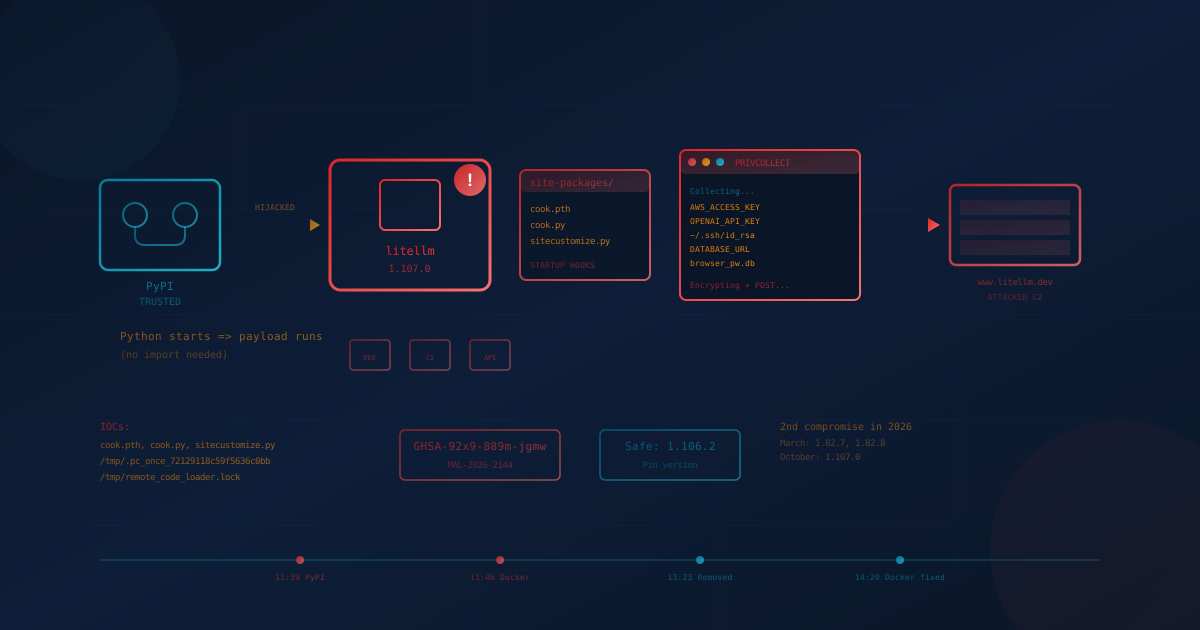
A LiteLLM supply chain attack on October 21, 2026 compromised the popular Python AI gateway with credential-stealing malware. According to LiteLLM's incident report, attackers hijacked the release pipeline and published malicious version 1.107.0 to PyPI and official Docker images. The malware runs whenever Python starts in an affected environment, even if the application never imports LiteLLM. It collects cloud credentials, AI API keys, SSH keys, browser passwords, and provider keys stored in the LiteLLM proxy database, encrypts them, and sends them to attacker infrastructure. The release was live for approximately two hours before removal, and Wiz reported that stolen credentials were already being used within hours. If your organization runs LiteLLM or any container image built during that window, act now.
What happened in the LiteLLM supply chain attack?
Attackers compromised LiteLLM's release pipeline. According to LiteLLM's incident report, a GitHub organization owner's token was used to disable branch protections, and Microsoft's technical analysis says stolen developer GitHub credentials were used to alter the release workflow so it built from a lookalike repository. The resulting 1.107.0 release shipped three extra files (cook.pth, cook.py, and sitecustomize.py) that Python executes during normal interpreter startup. The official v1.107.0 git tag is clean; the malware was injected at build time.
The timeline, according to LiteLLM and StepSecurity:
- 11:39 to 13:23 UTC: Malicious PyPI wheels live (all seven platform builds)
- 11:46 to 14:20 UTC: Docker images v1.107.0, latest, main-latest, and main-stable pointed to compromised images on Docker Hub and GHCR
- By 13:51 UTC: GHCR tags made unavailable
- By 14:20 UTC: All affected Docker Hub tags removed or repointed to clean images
This is the second LiteLLM supply chain compromise in 2026. According to PyPI's incident report, versions 1.82.7 and 1.82.8 were compromised in March after an API token was exposed through an exploited Trivy dependency.
Which LiteLLM versions are affected?
Only version 1.107.0 is affected by this October incident. The safe version is 1.106.2. LiteLLM says all previous versions are safe, and StepSecurity inspected the 1.107.0rc1 and rc2 release candidates and the 1.103.x to 1.106.x releases and found them clean.
Affected artifacts according to LiteLLM's advisory:
- PyPI: litellm==1.107.0 (all seven wheel files: Windows, macOS x86 and ARM, Linux glibc and musl for x86 and ARM)
- Docker Hub: litellm/litellm tags v1.107.0, latest, main-latest, main-stable during the window
- GHCR: ghcr.io/berriai/litellm, litellm-database, and litellm-non_root with the same tags during the window
LiteLLM states that enterprise customers running the private enterprise registry were not affected.
Why should SMBs care about a Python AI library?
LiteLLM sits in front of LLM provider APIs (OpenAI, Anthropic, Azure, Bedrock, Vertex) and provides a unified interface. Organizations use it in AI gateways, developer tools, and CI pipelines. According to Datadog Security Labs, the package has approximately 23 million weekly downloads, and Wiz, citing ClickPy data, reported roughly 49,000 downloads of the malicious version.
This matters for SMBs for three reasons:
- AI tools often run without IT oversight. Developers and teams adopt AI integrations to move faster. LiteLLM might be in a contractor's project, a proof-of-concept, or a tool installed without formal procurement. This is the shadow AI problem: AI tools used without explicit organizational approval or oversight.
- The payload steals everything. According to Microsoft and StepSecurity, the credential stealer targets browser passwords, SSH keys, cloud credentials, Kubernetes tokens, AI tool configs (Claude Code, Cursor, GitHub Copilot, and others), Git credentials, shell history, and process environments. On LiteLLM proxy deployments, it also queries the proxy database for stored provider API keys.
- Python startup hooks are invisible. The malicious .pth file executes on any Python start, including running pip. A developer checking whether LiteLLM is installed would trigger the payload. StepSecurity notes that the March compromise used the same .pth technique, with a file named litellm_init.pth.
How do I find LiteLLM in my environment?
LiteLLM may exist in places you do not expect. Here is where to look:
Developer machines and Python environments
Check from the shell without starting Python (running pip or python in an infected environment triggers the payload):
find / -type d -name 'litellm-*.dist-info' -path '*site-packages*' 2>/dev/nullto find installed versions (the folder name includes the version)- Search project files:
grep -r "litellm" requirements.txt pyproject.toml poetry.lock Pipfile.lock - Check virtual environments: look in each
site-packagesdirectory for litellm folders
Container images and CI pipelines
Check Dockerfiles, docker-compose.yml, and Helm values for LiteLLM base images or pip install commands. Review CI pipeline logs for any pip install that could have pulled 1.107.0 during the exposure window. Check image digests against the compromised hashes in the LiteLLM advisory.
AI gateways and proxy deployments
If you run LiteLLM as an AI gateway (in front of OpenAI, Anthropic, or other providers), check the deployment's image tag and pull time. Any pull of latest, main-latest, or main-stable between 11:46 and 14:20 UTC on October 21 may have received the compromised image.
Ask your IT provider
If you work with a managed IT provider or MSP, ask: "Do any of our systems, containers, or internal tools use LiteLLM, and if so, which version?" This is the same vendor risk question that applies to any software your organization depends on.
How do I check for the startup hook persistence?
The malware installs three files into the Python site-packages root directory, outside the normal litellm folder. According to Microsoft and StepSecurity, these files are:
- cook.pth: A 12-byte file containing only
import cook. Python's site module executes .pth import lines during interpreter startup. - cook.py: A single obfuscated line that decodes and runs the credential stealer (named PRIVCOLLECT internally).
- sitecustomize.py: Python imports this module automatically after processing .pth files. The malicious version forks a background daemon that checks a GitHub dead drop every hour and can execute arbitrary Python code.
What a legitimate .pth file looks like
Legitimate .pth files typically contain directory paths to add to sys.path, not import statements. A line starting with import is unusual and warrants investigation. Examples of legitimate .pth files: distutils-precedence.pth (from setuptools), easy-install.pth. A file containing only import cook is a clear indicator of compromise.
Detection commands (shell only, do not start Python)
On Linux or macOS:
find / -name cook.pth -path "*site-packages*" 2>/dev/null
ls -la /tmp/.pc_once_72129118c59f5636c0bb /tmp/remote_code_loader.lock 2>/dev/null
lsof /tmp/remote_code_loader.lock 2>/dev/null
The marker file /tmp/.pc_once_72129118c59f5636c0bb is written after successful exfiltration. The lock file /tmp/remote_code_loader.lock is held by the hourly remote loader daemon. If either exists, the host was compromised. If they do not exist, that does not prove safety: container restarts and tmp cleanup remove them.
What credentials should I rotate if LiteLLM 1.107.0 was installed?
According to Microsoft, the credential stealer targets a broad set of authentication material. If 1.107.0 was ever installed on a host with outbound internet access, assume the exfiltration succeeded. Wiz reported that stolen AWS instance role credentials from CI runners and Kubernetes nodes were being validated approximately 4.5 hours after exfiltration, with STS GetCallerIdentity calls followed by bedrock:ListFoundationModels.
Rotate the following from a known-clean machine:
- Cloud credentials: AWS access keys and session tokens, Azure CLI tokens, GCP service account keys, instance role credentials
- AI provider API keys: OpenAI, Anthropic, Cohere, Azure OpenAI, Bedrock, Vertex, and any other keys stored in environment variables or config files
- SSH and GPG keys: All private keys in ~/.ssh/, GPG private keys in ~/.gnupg/
- Browser passwords and sessions: Chrome, Firefox, Edge, Safari stored passwords and cookies (particularly for admin consoles)
- Developer credentials: GitHub CLI tokens, .npmrc, .pypirc, .git-credentials, Vault tokens, CI/CD secrets
- Kubernetes: Service account tokens, kubeconfig credentials
- LiteLLM proxy secrets: DATABASE_URL password, LiteLLM master key and virtual keys, every provider credential stored in LiteLLM_CredentialsTable and LiteLLM_ProxyModelTable
Revoke sessions rather than assuming password rotation immediately invalidates active tokens. For cloud accounts, check audit logs (AWS CloudTrail, Azure Activity Log, GCP Audit Logs) for GetCallerIdentity or similar identity-check calls from unexpected sources around the install time.
How do I remove the malware?
Do not start with pip install or pip uninstall. Any Python start in the affected environment runs the payload again, according to StepSecurity.
- Kill the remote loader. Find and terminate the process holding
/tmp/remote_code_loader.lockusing lsof or fuser. Its parent is PID 1 and its working directory is /. - Remove the payload files from the shell. Delete cook.pth, cook.py, and sitecustomize.py from every affected site-packages directory, plus their compiled versions under __pycache__.
- Rebuild rather than repair. Recreating the virtual environment or container image from scratch is safer than cleaning in place. Pin to litellm==1.106.2 or specify the image by digest rather than a floating tag.
- Block attacker infrastructure. Block litellm.dev and www.litellm.dev at your DNS resolver or egress firewall.
- Purge mirrors and caches. If you run a PyPI mirror or caching proxy, delete any cached 1.107.0 artifacts.
What is the shadow AI and supply chain lesson here?
This incident illustrates two governance gaps that SMBs should address:
Shadow AI inventory
LiteLLM is often installed as a convenience layer for AI development. It may appear in a contractor's code, a side project, or a proof-of-concept that grew into production use. If you do not have visibility into which AI tools and libraries your organization uses, you cannot respond when one is compromised. An AI usage policy that keeps a current list of evaluated and approved AI tools, and covers unsanctioned tools too, is a starting point.
Software supply chain controls
Like the axios npm supply chain attack, where a compromised release of a widely used package delivered malware to everyone who installed it, the LiteLLM compromise turned a trusted dependency into the delivery mechanism. Defenses include:
- Pin versions. Use exact version pins (litellm==1.106.2) rather than open-ended constraints (litellm>=1.x).
- Hash-check dependencies. Use lock files with hashes (pip-tools, poetry, uv) so that a changed artifact fails verification.
- Verify container digests. Reference images by digest rather than mutable tags like latest.
- Least-privilege API keys. AI provider keys should have the minimum permissions needed. Separate keys per application limit blast radius.
- Monitor egress. Developer machines and CI runners should not have unrestricted outbound internet access. Egress monitoring can detect unexpected destinations.
One question to ask your IT provider or team
"Do any of our Python environments, containers, or AI integrations use LiteLLM, and if so, have we verified the installed version is not 1.107.0?"
If the answer is unclear, that gap in inventory is the first thing to address. If you are unsure how well your organization manages software supply chain risk or AI tool governance, our free cybersecurity assessment covers 22 security areas in under five minutes and can help identify where to focus.
This article is intended for general informational purposes only and does not constitute professional security, legal, or compliance advice. Details about the LiteLLM 1.107.0 compromise are based on public disclosures from LiteLLM, Microsoft Security, Wiz, StepSecurity, Datadog Security Labs, and PyPI as of October 24, 2026. The investigation is ongoing and details may evolve. Organizations should consult qualified cybersecurity professionals before making operational changes based on this article.