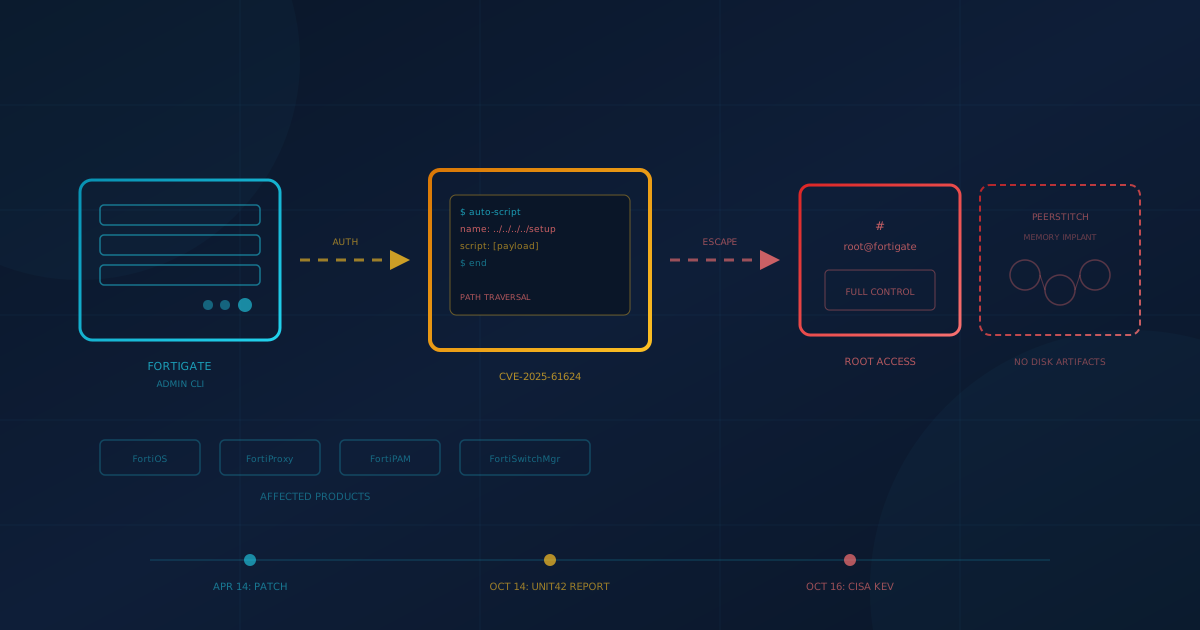
CISA added CVE-2025-61624, a path traversal vulnerability in Fortinet FortiOS and related products, to its Known Exploited Vulnerabilities catalog on October 16, 2026. The flaw lets an authenticated administrator escape the management CLI and write or delete arbitrary files on the underlying operating system, effectively gaining root access. Fortinet confirms the vulnerability is being exploited in the wild. If your organization or IT provider manages a FortiGate firewall, FortiProxy, FortiPAM, or FortiSwitchManager, this post explains which versions are affected, what attackers are doing with the flaw, and how to confirm your device is patched.
This matters to small and mid-sized businesses in the US and Canada because Fortinet firewalls are among the most widely deployed edge devices in corporate networks. When attackers can turn a firewall administrator login into full operating system control, the device that guards your network becomes the entry point for everything behind it.
Which Fortinet Products Are Affected by CVE-2025-61624?
According to Fortinet's PSIRT advisory FG-IR-26-122, the vulnerability affects the CLI (command line interpreter) of four product families: FortiOS, FortiPAM, FortiProxy, and FortiSwitchManager. The following versions are vulnerable:
- FortiOS: 7.6.0 through 7.6.4, 7.4.0 through 7.4.9, and all versions of 7.2, 7.0, and 6.4.
- FortiPAM: 1.7.0 and all versions of 1.6, 1.5, 1.4, 1.3, 1.2, 1.1, and 1.0.
- FortiProxy: 7.6.0 through 7.6.4, 7.4.0 through 7.4.11, and all versions of 7.2 and 7.0.
- FortiSwitchManager: 7.2.0 through 7.2.7 and 7.0.0 through 7.0.6.
Fortinet rates the flaw Medium severity (CVSSv3 6.0) because an attacker needs an administrator login first. NVD scores it 6.5. A later section on admin credentials explains why that bar is lower than it looks.
Fortinet published the advisory on April 14, 2026, with fixed releases available the same day. Exploitation is older than the fix: Unit 42 documented attackers using CVE-2025-61624 in an intrusion that occurred in September 2024, before the advisory existed. CISA added the flaw to its KEV catalog on October 16, 2026, two days after that research was published.
What Fixed Versions Should You Upgrade To?
Fortinet's advisory specifies the minimum patched release for each branch. If your device runs an older branch (FortiOS 7.2, 7.0, or 6.4; FortiPAM 1.6 or earlier; FortiProxy 7.2 or 7.0), you must migrate to a supported branch because no fix is available for those versions:
- FortiOS: Upgrade to 7.6.5 or later (for 7.6.x), or 7.4.10 or later (for 7.4.x). Migrate from 7.2, 7.0, or 6.4.
- FortiPAM: Upgrade to 1.7.1 or later. Version 1.8 is not affected. Migrate from 1.6 or earlier.
- FortiProxy: Upgrade to 7.6.5 or later (for 7.6.x), or 7.4.12 or later (for 7.4.x). Migrate from 7.2 or 7.0.
- FortiSwitchManager: Upgrade to 7.2.8 or later (for 7.2.x), or 7.0.7 or later (for 7.0.x).
Fortinet also published a virtual patch (FG-VD-59270.0day) in its FortiGuard Malware and Web Protection database update 25.120 for organizations that cannot upgrade immediately.
How Are Attackers Using This Vulnerability?
Palo Alto Networks Unit 42 published detailed research on October 14, 2026, documenting how attackers exploited CVE-2025-61624 in a real intrusion. The intrusion targeted a telecommunications managed service provider. Unit 42 tracks the activity as cluster CL-STA-0954 (also known as UNC5820) and says aspects of it overlap with intrusions attributed to suspected nation-state actors; it does not name a country or group.
The attack chain worked like this:
- Initial access: The attackers first exploited a separate vulnerability (CVE-2024-47575, known as FortiJump) against a centralized FortiManager appliance to gain a foothold.
- Configuration theft: From the FortiManager, they exfiltrated configuration archives containing credentials, certificates, and network maps for more than 500 managed FortiGate firewalls.
- Privilege escalation (CVE-2025-61624): Using stolen admin credentials, the attackers exploited the path traversal flaw to escape the FortiOS management shell and gain root access on the firewall's underlying Linux operating system.
- Malware deployment: They deployed PEERSTITCH, a novel memory-resident implant that leaves no persistent files on disk, opens no listening ports, and initiates no outbound connections. It communicates by hijacking traffic from legitimate FortiOS processes.
Unit 42 observed the attackers creating auto-script objects with names like ../../../../setup to write files outside the intended directory. The auto-script engine in FortiOS does not sanitize these object names, so a path traversal sequence lets the attacker place a script anywhere on the filesystem and execute it with root privileges.
Why Does an Admin Credential Matter If the Attacker Already Needs Access?
The vulnerability requires an authenticated administrator account with at least read-write privileges. That sounds like a high bar, but it is lower than it appears. In the intrusion Unit 42 documented, the attackers obtained admin credentials by compromising the FortiManager first. Once they had those credentials, they could target any downstream FortiGate the manager controlled.
For small businesses, admin credentials can leak through:
- Credential reuse: An admin password that was also used on a breached service and now circulates in criminal databases.
- Infostealer malware: An employee or contractor's device infected with malware that captures typed passwords. We covered this pattern in the FortiBleed credential campaign.
- Phishing: An attacker tricks someone with admin access into entering their credentials on a fake login page.
- Compromised MSP: If your managed service provider's tools are breached, the attacker inherits whatever credentials your provider uses to manage your firewall.
The credential requirement does not make this a low-risk vulnerability. It means the risk depends on whether you treat admin credentials as secrets that could already be compromised.
How Can You Tell If Your FortiGate Is Vulnerable?
Check the firmware version running on each FortiGate, FortiProxy, FortiPAM, or FortiSwitchManager in your environment. On a FortiGate, run get system status from the CLI or check System > Dashboard in the web interface. Compare the reported version against the affected ranges above.
If your device has run one of the vulnerable versions at any point, treat it as potentially compromised until you can rule out exploitation. Unit 42 documented exploitation in an intrusion that occurred in September 2024, well before Fortinet's April 2026 patch, so the exposure window is not limited to recent months. Signs to look for:
- Unexpected auto-script objects: Check the configuration for
system.auto-scriptentries, especially any with path traversal characters (../) in the name. - Unusual file changes: If you have forensic access, look for unexpected files in
/data2/template/or modifications to system startup scripts. - Logging gaps: Attackers in the Unit 42 case killed logging daemons (miglogd, syslogd) and cleared crash logs to hide their tracks. Missing logs during a period when the device was online can indicate tampering.
Because the PEERSTITCH malware runs entirely in memory, conventional file-based scanning will not detect it. If you suspect compromise, the safest approach is to rebuild the device from a known-good state after upgrading to a patched version.
One Question to Ask Your IT Provider Before End of Day
If someone else manages your Fortinet devices, call or email them today with this question: "We run FortiGate (or FortiProxy/FortiPAM/FortiSwitchManager). What version is installed, and has the patch for CVE-2025-61624 (FG-IR-26-122) been applied?"
The answer should include a specific version number. Compare it to the fixed versions listed above. If your provider cannot confirm a patched version is running, escalate. CISA set a required action date of October 19, 2026, for federal agencies because the flaw is already being exploited.
A follow-up question if the device was vulnerable before patching: "Have you reviewed the device for indicators of compromise, including unauthorized auto-script objects and missing logs?"
The Pattern: Edge Devices Become the Entry Point
CVE-2025-61624 is one of several edge and remote-access flaws CISA added to the KEV catalog in October 2026. On October 13, CISA added an Ivanti Connect Secure zero-day (CVE-2026-104935). On October 16, alongside CVE-2025-61624, it added a BeyondTrust Remote Support authentication bypass (CVE-2026-102764). Different vendors, same lesson: the devices that guard your network perimeter are also the devices attackers probe first.
For Fortinet specifically, 2026 has been a challenging year. We covered the FortiBleed credential campaign in June, which exposed logins for tens of thousands of Fortinet firewalls and VPNs. That campaign exploited credentials leaked from earlier breaches and infostealers, not a software flaw. CVE-2025-61624 is a software flaw, but the Unit 42 research shows attackers chaining it with credential theft to maximize impact.
The takeaway for SMBs: patching alone is not enough. You also need to rotate admin credentials, restrict who can reach the management interface, and monitor for signs of compromise from before the patch was applied.
Practical Steps for This Week
- Verify the running version on every FortiGate, FortiProxy, FortiPAM, and FortiSwitchManager in your environment. If it falls in the affected range, patch or migrate immediately.
- Restrict administrative access to trusted IP addresses or an internal network. The management interface should not be reachable from the open internet unless absolutely necessary.
- Rotate admin credentials on the device and any accounts that share the same password elsewhere.
- Review configuration for suspicious auto-script objects or other artifacts mentioned above.
- Enable MFA for administrative logins if your Fortinet firmware supports it and you have not already done so.
If you are unsure where your organization stands on patching, perimeter controls, or credential hygiene, start with our free quick security assessment. It takes under 5 minutes and covers 22 security areas relevant to small and mid-sized businesses.
This article is intended for general informational purposes only and does not constitute professional security, legal, or compliance advice. Details about CVE-2025-61624 are based on public disclosures from Fortinet PSIRT (FG-IR-26-122), CISA, NVD, and Palo Alto Networks Unit 42 as of October 18, 2026. Information about exploitation tactics and patching may evolve as investigations continue. Organizations should consult qualified cybersecurity professionals before acting on specific indicators of compromise or making operational changes to firewall configuration based on this article.