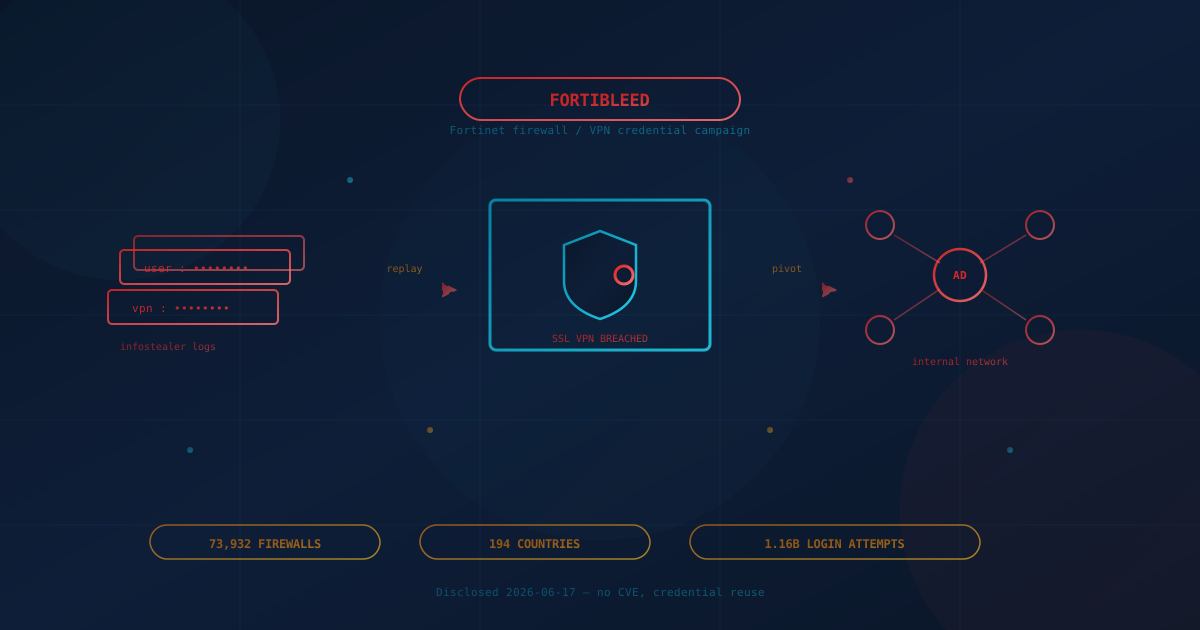
On June 17, 2026, security researcher Volodymyr "Bob" Diachenko and the threat-intelligence firm Hudson Rock disclosed a campaign they named FortiBleed: a dataset of login credentials tied to 73,932 Fortinet firewall and SSL VPN URLs spanning 194 countries. The exposed records include usernames, email addresses, and — in many cases — plaintext passwords for the devices that sit at the edge of corporate networks.
The name borrows from "Heartbleed," but FortiBleed is not itself a software flaw — there is no new CVE, no zero-day, and no single patch that makes it go away. It is something arguably harder for a small or mid-sized business to fix: passwords that were stolen elsewhere, never changed, and then replayed at industrial scale against the gateways that guard the network.
According to public reporting from BleepingComputer and TechCrunch, the affected list reaches some of the largest organizations in the world — Foxconn, Samsung, and Siemens among them — and, most seriously, a Turkish defense contractor connected to NATO from which classified documents were reportedly stolen.
What Is FortiBleed?
FortiBleed is an active credential-harvesting campaign, attributed by Hudson Rock to a multi-operator, Russian-speaking cybercriminal group, built around a dataset covering 73,932 internet-facing Fortinet firewall and SSL VPN URLs across 194 countries. It is not an exploit of a Fortinet vulnerability. The operators built their access from credentials leaked in earlier breaches and harvested by infostealer malware, then validated those credentials against live devices on a massive scale.
The figures reported by researchers describe an operation closer to a factory than a hack:
- 1.16 billion credential-based login attempts against more than 320,000 internet-exposed FortiGate devices.
- A parallel 2.1 billion brute-force attempts against more than 163,000 Microsoft SQL Server (MSSQL) databases.
- 21,632 unique affected domains tied to the exposed credentials.
- SSL VPN authentication hashes intercepted and cracked offline using a dedicated 45-GPU cluster managed with the password-cracking framework Hashtopolis.
It is worth being precise about the headline number, because sources differ. The 73,932 figure is the count of unique firewall and VPN URLs that appear in the dataset Hudson Rock analyzed. Other researchers, including SOCRadar, put the number of devices with confirmed, verified working credentials closer to 30,800. In other words, the exposed footprint is roughly 74,000 gateways; the subset with credentials confirmed to still work is smaller but still very large. Either number describes an exposure that no SMB should assume excludes them.
One detail matters more than the raw scale. Researchers noted that even highly complex, 20-character passwords were compromised — not because the attackers cracked them, but because those exact passwords already sat in plaintext inside infostealer log dumps circulating in criminal markets. A password is only as strong as the weakest place it has ever been typed.
How a stolen credential becomes a full network breach
The campaign follows a repeatable pattern that turns one valid login into deep access:
- Collect: Pull credentials from old breach dumps and infostealer logs that capture whatever an infected employee typed — including VPN logins.
- Validate: Test those credentials at scale against the internet's exposed Fortinet gateways to find the ones that still work.
- Pivot: Use a working VPN login to step inside the network and move toward Active Directory — the directory that controls who can access what across the whole organization.
- Persist and exfiltrate: Establish lasting access and copy out sensitive data. In the NATO-contractor case, that reportedly meant classified defense documents.
Is This a Fortinet Vulnerability You Need to Patch?
No. As of publication there is no CVE and no patch associated with FortiBleed, and Fortinet had not issued a detailed public statement. As one security analyst told reporters, "despite the name, this isn't a vulnerability but a pile of credentials leaked in earlier Fortinet breaches, fired back at organizations that never bothered to change them." That distinction is the whole point of this article.
It is an uncomfortable framing for business owners because it removes the usual reassurance. There is no "apply update KB-whatever and you're safe." The exposure comes from credentials that may have leaked months or years ago and were never rotated. If your team reused a password, or an employee's laptop was ever infected with an infostealer, the door may already be unlocked — regardless of how current your Fortinet firmware is.
That said, keeping Fortinet devices fully patched still matters — and the patch story here is more tangled than "no CVE" suggests. Researchers have linked the original mass theft of FortiGate configuration files to a string of older, already-patched Fortinet vulnerabilities, including CVE-2022-40684, CVE-2023-27997 (nicknamed "XORtigate"), and CVE-2024-55591. Devices that were never updated, or were updated but never had their credentials rotated afterward, leaked the configuration files and password hashes that fed this campaign. Patching and credential hygiene are two separate controls, and FortiBleed is a reminder that you need both.
Why even patched firewalls were caught up in it
Up-to-date firmware was not always enough, and the reason is a subtle one worth flagging to your IT team. Fortinet strengthened how it stores administrator passwords by moving from a faster-to-crack SHA-256 format to PBKDF2 (introduced in FortiOS 7.2.11, 7.4.8, and 7.6.1). But per Fortinet's own documentation, that upgrade does not re-hash an existing password automatically. The stronger hashing only takes effect the next time each administrator actually logs in after the update. Until then, the old, weaker hash stays in the configuration — exactly the kind of hash this campaign cracked offline on its GPU cluster. A firewall could be fully patched and still be sitting on a crackable password.
Who Is Actually at Risk?
The headline names are global giants, but the realistic risk population is much broader and includes ordinary small and mid-sized businesses. Any organization that exposes a Fortinet SSL VPN or firewall management interface to the internet and has not enforced multi-factor authentication and a clean password reset is in scope — and that describes a large share of SMBs in Canada and the US.
- Most exposed: Businesses running a FortiGate SSL VPN for remote staff, where logins depend on a username and password alone with no second factor.
- Quietly exposed: Organizations that suffered an infostealer infection on any employee or contractor device — including personal machines used for work — that captured VPN credentials.
- Compounded risk: Companies that reuse the same password across the VPN, email, and admin accounts, so one leaked credential opens several doors.
- Lower risk: Organizations that enforce MFA on the VPN, do not expose the management interface publicly, and rotated credentials after any known breach.
For a Toronto accounting firm with staff connecting over a FortiGate VPN, a Calgary logistics company with a remote dispatch team, a Chicago clinic, or a Seattle agency, the question is not whether you are as big as Samsung. It is whether your perimeter login could be opened with a password that already lives in a criminal database.
Why This One Is Different
Most of the threats we cover have a clean fix: patch the software, block the sender, update the browser. FortiBleed breaks that pattern in three ways that make it a more durable problem for SMBs.
- The weakness is reused credentials, not code. You cannot patch a password that was leaked elsewhere. The fix is operational — rotate, enforce MFA, monitor — not a one-time update.
- It targets the perimeter, then goes for the keys. A VPN gateway is supposed to be the strong front door. When attackers walk through it with a valid login and pivot to Active Directory, your internal "trusted" network is no longer trustworthy. This is exactly the assumption a zero-trust approach is designed to remove.
- Infostealers turned password strength into a partial defense. A 20-character password is excellent against brute force and useless if it was captured in plaintext by malware. That shifts the priority from "make passwords longer" to "add a second factor and assume the first one may already be known."
The bigger pattern is one we have written about before: stolen credentials have become a commodity. Infostealer logs and breach dumps are bought, sold, and recombined, and campaigns like FortiBleed simply automate the work of matching old credentials to live targets. The perimeter device is no longer breached by cleverness; it is breached by paperwork the criminals already had.
What Canadian and US Business Leaders Should Take From This
You do not need to understand SSL VPN hashes to ask the right questions. If your business uses a Fortinet firewall or VPN, put these to your IT lead or managed-services provider this week:
- Is multi-factor authentication enforced on our VPN and firewall logins — for every account, with no exceptions? This is the single control that neutralizes a leaked password.
- Is our Fortinet management interface reachable from the public internet? If it does not need to be, it should be restricted to trusted IP addresses or a private connection.
- When did we last force a password reset on VPN and admin accounts, and are we checking those credentials against known breach data?
- Do we monitor VPN logins for anomalies — logins from unusual countries, at unusual hours, or many failed attempts followed by a success?
- If an attacker got in through the VPN, how far could they go before hitting a second barrier? Flat networks let one login reach everything.
Canadian businesses can map this work to the CCCS Baseline Cyber Security Controls, which call for multi-factor authentication and strong remote-access protections. US-based readers can map the same actions to CISA's Cyber Essentials, the CIS Controls, or the FTC Safeguards Rule's access-control requirements. The frameworks differ across the border; the operational answer — MFA, least privilege, and credential hygiene — does not.
Practical Next Steps for This Week
- Enforce MFA on every Fortinet VPN and firewall account. If you do only one thing from this list, do this. Multi-factor authentication is the control that makes a stolen password far less useful on its own.
- Rotate VPN, firewall admin, and any reused credentials — and treat anything that was ever shared across accounts as already exposed.
- Force the stronger password hashing to take effect. If your FortiGate runs a PBKDF2-capable FortiOS (7.2.11, 7.4.8, 7.6.1, or later), have every administrator log in at least once — or simply reset each admin password — so the stored credential is re-hashed in the stronger format instead of the older, more crackable one. Upgrading the firmware alone does not do this.
- Restrict the management interface. Limit firewall and VPN administration to trusted IP addresses or an internal network, not the open internet.
- Adopt a password manager and stop reuse. Unique, generated passwords per service contain the blast radius when one leaks. Our note on how password managers protect your data covers the trade-offs.
- Hunt for infostealer infections. Ask your provider to review endpoints for malware that may have captured credentials, and remember that a personal device used for work counts. Understanding what a VPN does and does not protect helps frame this honestly.
- Review your breach playbook. If you confirm a compromise, you need a workflow to revoke sessions, reset credentials, and assess what was reached. Our guides on incident response planning and what to do if your systems get breached walk through the steps.
- If you are unsure where you stand, start with a free quick security assessment. Twenty questions, about five minutes, and a written read on whether your remote-access and credential posture is realistic for the threats you actually face.
The Durable Lesson
FortiBleed is not a warning about a single broken device; it is a snapshot of how perimeter security fails in 2026. The firewalls worked as designed. The passwords were the problem — leaked somewhere else, reused, and never changed, then handed back to the network by criminals who simply kept a tidy database. Complexity rules and expensive hardware did not stop it, because the credential was already known.
The businesses that come through this calmly are the ones that treat a password as something that can leak at any time, and build a second layer — MFA, restricted access, and monitoring — that holds even when the first one fails. The ones that get hurt are the ones still assuming that a strong password on a current firewall is enough.
This article is intended for general informational purposes only and does not constitute professional security, legal, or compliance advice. Details about the FortiBleed campaign are based on public reporting and security-research disclosures as of June 17, 2026, and may evolve as Fortinet, affected organizations, and independent researchers continue their investigations. Organizations should consult qualified cybersecurity professionals before acting on any specific indicator of compromise or making operational changes to firewall, VPN, or identity configuration based on this article.