
Bell Canada says an unknown party gained unauthorized access to an internal Bell system on November 17, 2026, and has posted a customer notice about it. In statements to reporters, Bell called the attacker an "agentic threat actor." The notice says data possibly involved included names, mailing addresses, phone numbers, email addresses, account numbers, product information, business names (where applicable), and the date and amount of the last payment. No credit card or bank account information was affected. Bell engaged the RCMP's cybercrime unit.
Bell gave no detail on what made the incident agentic. The Globe and Mail reported that a spokesperson did not explain the term, but that the word "suggests that artificial intelligence was involved." BleepingComputer wrote that it "suggests that AI-powered tools were used during the breach." Bell spokesperson Ellen Murphy told The Globe and Mail on November 23: "At this stage no one has contacted us claiming responsibility and to our knowledge, no one has publicly claimed responsibility."
Whatever the technical details of this incident, the term "agentic" points to a broader shift. The Canadian Centre for Cyber Security recently warned that agentic AI is accelerating cyber attacks. For small and mid-sized businesses, this is not a time to panic, but it is a time to check that the basics are in place.
What does agentic mean in cyber security?
The Canadian Centre for Cyber Security's threat bulletin on agentic AI defines the term: "Agentic AI refers to AI systems that can plan and carry out a series of tasks with limited human direction." The bulletin explains that AI has already made it easier to find weaknesses, develop malicious code, and attack many organizations at once. Agentic AI goes further by linking separate stages of an attack and carrying them out with less human oversight.
Humans still choose the targets, set the objectives, and oversee the operation. However, more of the work between those decisions can now be delegated to machines. This gives defenders less time to detect and stop an attack.
How fast can agentic attacks move?
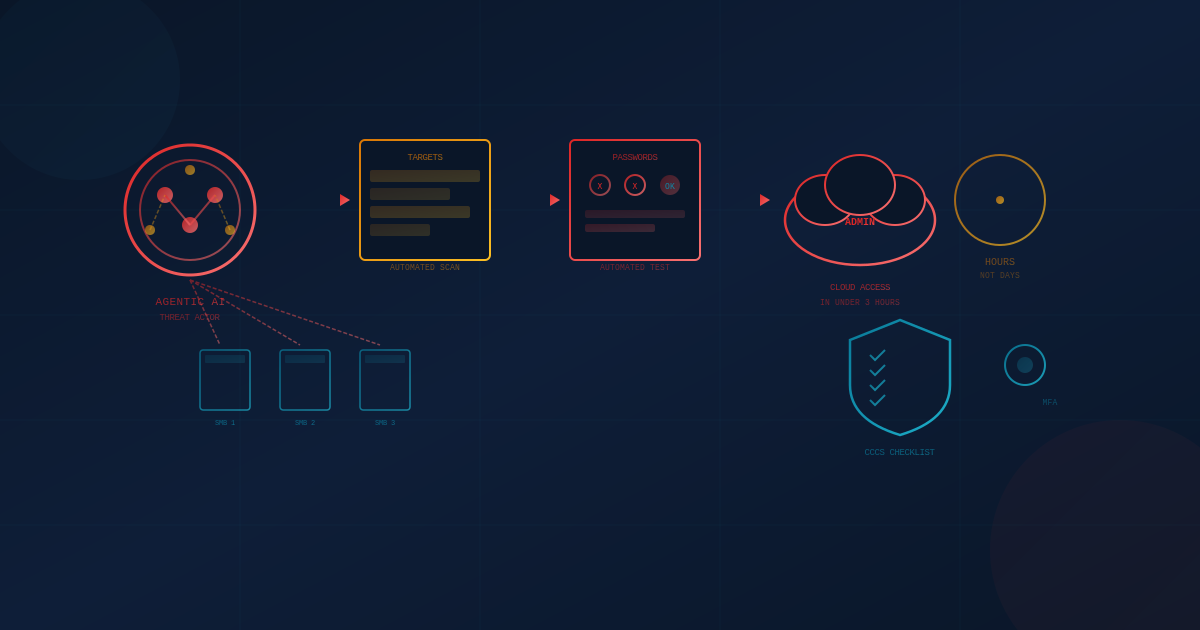
The Cyber Centre bulletin describes an example: a threat actor known as Storm-0940 used an agentic AI framework called ARTEX against hundreds of organizations. In some cases, activity moved from selecting a target to gaining privileged access to cloud systems in under three hours. The framework helped identify targets, test passwords, and explore compromised systems. None of those techniques are new on their own. What is new is the ability to link them together, automate them, and repeat them across many targets at once.
This example is not linked to the Bell incident by any official source. The Cyber Centre bulletin does not mention Bell. But it illustrates what security teams mean when they warn that attack timelines are compressing. If a threat actor can move from initial access to privileged cloud access in hours, defenders cannot rely on response processes designed around days.
Why does this matter for small businesses?
Agentic AI does not change the fundamentals of what attackers want: credentials, money, data, and access. It changes how quickly and how widely they can get it. The Cyber Centre bulletin puts it plainly: "AI increases the consequences of weak controls and slow decisions, but the fundamentals of good cyber security remain effective."
Small businesses often assume they are too small to be targeted. That assumption was always risky, as we covered in our piece on why being "too small to target" is a costly myth. With automation, the size of the target matters less. If an AI agent can probe thousands of organizations at once, yours can be among them.
The Bell breach also shows that your own systems are not the only risk. When a carrier, provider, or vendor is breached, the data that leaves their systems (account numbers, last payment amounts, product details) can be used to craft convincing scams targeting you. The more accurate the detail, the more believable the call.
What should small business leaders check?
The Cyber Centre bulletin includes an eight-point checklist for organizations. Here it is translated into questions a business owner or operations leader can ask this week:
- Is MFA phishing-resistant? Standard text-message codes can be intercepted or socially engineered. The Cyber Centre says to require phishing-resistant multi-factor authentication for administrators, remote access, and other important accounts. Hardware security keys or passkeys, as covered in our guide to phishing-resistant authentication, are the stronger options.
- Who has more access than they need? Review the access given to users, applications, and service accounts. Least privilege means people and systems get only the access their job requires, nothing more.
- Which third-party apps connect to your systems? Review access granted to shared or third-party cloud applications. If a marketing tool or calendar integration has access to your Microsoft 365 tenant, ask why and whether it still needs it.
- Are internet-facing systems patched? Patch them promptly and remove services that are no longer needed. If a remote desktop port or old VPN is still open because "it always has been," close it.
- How long are logs kept, and who reviews them? The Cyber Centre says to retain security logs and monitor for unusual sign-ins, new credentials, and unexpected changes in access. Our security logging guide covers what to keep and how long.
- Who can isolate an account or system in an emergency? Decide in advance who has the authority to disable an account, disconnect a service, or isolate a network segment without waiting for a committee.
- Have you practiced responding in hours, not days? The Cyber Centre advises practicing responses to incidents that unfold within hours rather than days. If your incident response plan assumes you have a weekend to figure things out, it may be too slow. See our guide on incident response planning before something happens.
- Are backups separate and tested? Maintain tested offline or protected backups. Automated attacks can target backup systems just as quickly as production ones.
What about supplier and carrier risks?
The Bell breach is a reminder that your telecom provider, your IT vendor, and your SaaS suppliers all hold data about your business. When they are breached, that data can be used against you.
Three practical steps:
- Add a PIN or passcode to your carrier accounts. This protects against SIM hijacking attempts, where an attacker ports your number to their device. We covered this in our post on the simple PIN that could save your mobile data.
- Establish a call-back rule for payment and account changes. If someone calls claiming to be from Bell, your bank, or your IT company and asks to change payment details or verify your account, hang up and call back using a number you already had on file. The Cyber Centre's guidance on vishing says to never use a number provided by the caller or the phone's callback button. The Cybersecurity Canada post on the Bell breach includes a sample call-back rule you can adapt.
- Keep a vendor contact list. Record the legal name, account number, and known-good phone number for every critical supplier. When something goes wrong, you do not want to be searching for a contact number in an email that might itself be fraudulent.
Not sure where to start? Our free assessment takes under 5 minutes and covers MFA, access controls, logging and other common risk areas. It is a quick way to see which of these boxes your business already checks.
What about the AI-powered phishing that follows?
When attackers have your name, account number, product details, and last payment amount, they can craft calls and emails that sound informed. A message that opens with "I see your last Bell payment was on November 3, for the amount on your bill" sounds like it comes from someone with legitimate access.
The same AI tools that can automate reconnaissance can also generate polished, personalized phishing messages at scale. We covered this trend in our piece on AI-powered phishing and why employees can't spot it. The takeaway: do not rely on employees catching every bad email. Combine training with technical controls, verification procedures, and a culture where checking feels normal, not paranoid.
Bell's own guidance on its notice page says the company will never contact you to ask for bank account information, passwords, or PINs. Any message that does is not from Bell.
The durable lesson
The word "agentic" may be new, but the defenses are not. Phishing-resistant MFA, least privilege, prompt patching, log retention, tested backups, and practiced incident response have been recommended for years. What has changed is the cost of not having them. When attacks can move in hours and hit thousands of targets at once, the gap between "we should do that" and "we did it" becomes the gap between a near miss and a breach.
This article is intended for general informational purposes only and does not constitute professional security, legal, or compliance advice. Details about the Bell Canada incident are based on Bell's public notice at bell.ca/cybernotice, reporting from The Globe and Mail and BleepingComputer, and the Canadian Centre for Cyber Security's threat bulletin on agentic AI, all as of November 24, 2026. The incident is ongoing and details may change. Organizations should consult qualified cybersecurity professionals before acting on any specific finding or making operational changes based on this article.