
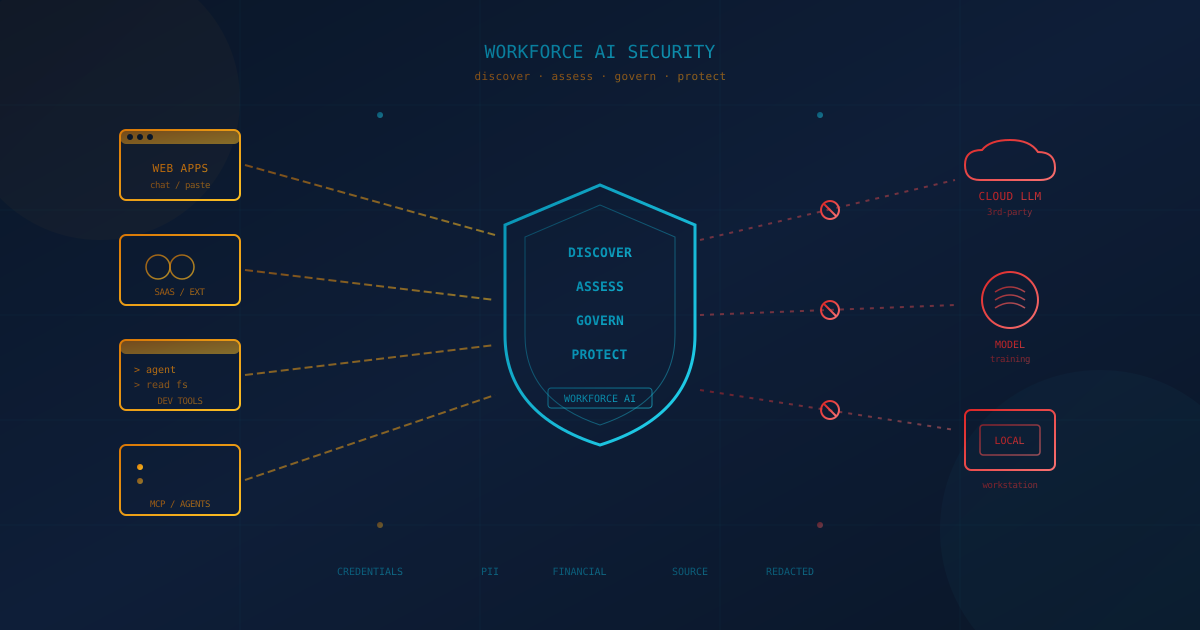
Cyber Unit can now show you, in real time, every AI tool your employees are using — sanctioned or not — and stop sensitive data from leaving your environment before it reaches a model you do not own. The capability is called Workforce AI Security, and we are offering a free trial to businesses that want to see their shadow AI exposure for themselves.
This is the control layer we have been describing in our earlier writing on proactive shadow AI detection. The difference now is that it is something you can run on your own endpoints in minutes — across web apps, SaaS integrations, browser extensions, desktop AI agents, developer tools, and Model Context Protocol (MCP) connections. This article explains what it does, who should try it, and how to start.
What is shadow AI, and why should a business owner care?
Shadow AI is any AI tool, model, or agent that processes company data without the organization's approval, inventory, or monitoring. It matters because the data path is invisible: an employee pastes a customer list into a personal chatbot, a SaaS tool quietly turns on an AI feature, or a developer connects a coding agent to your source code — and none of it passes through the controls you already pay for. The exposure is real, but the record of it is not, which is exactly what makes a later breach or audit so hard to answer.
Most leadership teams already know they need an AI usage policy. The gap is enforcement. A policy that says "do not paste customer data into ChatGPT" with no way to see whether anyone did is documentation of an intention, not a control. Workforce AI Security closes that gap by giving you visibility and enforcement at the point where data actually leaves.
What does Workforce AI Security actually do?
It does four things: discover every AI tool in use, assess the risk of each one, govern who can use what, and protect data in real time with AI-aware data loss prevention (DLP). These four functions run from a single dashboard, so the same policy that flags a risky browser paste also covers a desktop agent reaching into a file system.
- Discover. Build a live inventory of sanctioned and shadow AI tools, MCP servers, browser extensions, and developer assistants in use — down to which application, session, and user, including the files and content in each prompt.
- Assess. Classify what AI is being used for. The tool analyzes conversational prompts and sorts them into use-case categories — marketing, debugging, legal, email and communication, and dozens more — so you can judge risk against your own security and compliance requirements instead of guessing.
- Govern. Set flexible, granular policies per application and use case: block unauthorized apps, apply different rules to managed versus unmanaged tools, restrict copy/paste, and control file-based actions. Approved tools stay available for approved work; risky combinations get stopped.
- Protect. Detect and redact sensitive data before it leaves your environment, in real time. When a prompt contains credentials, personally identifiable information (PII), financial data, or other flagged content, the tool can block the action or replace the sensitive fields with labeled placeholders and let the rest through — keeping the employee productive without leaking the parts that matter.
Where does it see AI — and why isn't a browser tool enough?
Workforce AI Security covers every surface where employees touch AI: web apps, SaaS integrations, browser extensions, desktop agents, and developer tools — not just the browser. That breadth is the point. The fastest-growing shadow AI risks in 2026 do not look like a tab open to a chatbot, and a browser-only control simply cannot see them.
Consider the paths a browser tool misses:
- A developer running a coding agent with a local MCP server pointed at your internal database. The data path is process → MCP server → AI provider's API, and nothing in it looks like a web request. We catalogued these dynamics in coding agents and what businesses need to know.
- A SaaS platform whose AI summarization feature was off last quarter and on this quarter, moving meeting audio or CRM records to an outside model through a server-to-server call the employee's browser never touches.
- A "smart inbox" or grammar extension that reads every email through a third-party AI provider — the kind of risk we covered in browser extension security risks for businesses.
A control only works if it sees the data path that is actually in use. By covering native apps, SaaS-to-SaaS integrations, IDE assistants, and MCP traffic alongside the browser, Workforce AI Security closes the blind spots that a single-surface tool leaves open.
How does real-time redaction work in practice?
When an employee's prompt contains sensitive data, Workforce AI Security can strip or mask the matched fields in place — replacing credentials, PII, and account numbers with labeled placeholders — and let the safe remainder of the prompt through. The goal is not to be punitive. It is to make the safe path the default path, so the work still gets done and the regulated data stays home.
The data classes are the ones your business already cares about: API tokens and access keys, passwords and other credentials, customer PII, payment and banking data, payroll and HR records, source code from flagged repositories, and contract language. An interactive action-validation step gives the user a short, plain explanation when something is blocked or redacted, and every event is logged. The difference between this and catching a leak three weeks later is the difference between prevention and an incident report — and most regulators and cyber insurance carriers care a great deal about which one you can demonstrate.
Will this help with compliance reporting?
Yes — the tool keeps audit trails and produces customizable reports mapped to major frameworks, including GDPR, HIPAA, and the EU AI Act. For Canadian and US businesses, that same evidence supports the obligations you are more likely to face day to day: PIPEDA and provincial privacy law in Canada, and the FTC Safeguards Rule, NIST SP 800-171, HIPAA, and US state privacy laws (CCPA/CPRA and the growing list of follow-ons) south of the border.
The practical value is a written record. When a regulator, a major customer, or your insurer asks what AI tools your team uses and what data has been fed into them, "we are not sure" is the answer that turns a routine question into a finding. A live inventory and an audit trail turn it back into a routine question.
Who should try it?
A free trial is available, because shadow AI is not a problem you can scope without first measuring it. Almost every organization we talk to underestimates how many AI tools are already in use; the trial is designed to replace that guess with a real number from your own environment.
You are a strong candidate for a trial if any of the following are true:
- You handle regulated data — health, financial, payment, or personal information — and employees use AI tools as part of their day.
- You have developers using AI coding assistants, agents, or MCP connections near source code or production systems.
- You have an AI usage policy on paper but no way to confirm it is being followed.
- You rely on a managed browser or firewall blocks alone and suspect AI usage is routing around them.
- A customer, board, or insurer has started asking how you govern employee AI use, and you do not yet have a clean answer.
If you are already a Cyber Unit client, the trial extends the protection you have into a surface most security stacks still miss. It is a low-commitment way to see the risk in your own environment before any broader conversation. For a foundational primer on the executive side of this, see what business leaders should know about shadow AI.
How fast can it be running, and what are the next steps?
Workforce AI Security is built to deploy across browsers and devices in minutes, with no complex setup and no downtime — you gain visibility into employee AI interactions, including shadow apps, and can enforce policy from day one. A typical trial follows three short steps:
- Deploy the trial. We roll out Workforce AI Security to a representative set of endpoints. Within the first day you have a live inventory of the AI tools in use and the data classes flowing to them.
- Review the findings together. We walk through what shadow AI looks like on your real endpoints — including MCP and agent traffic — and which prompts contained sensitive data. Most teams are surprised by at least one tool on the list.
- Decide what to govern. Based on what the trial surfaces, we help you set the block, allow, and redact policies that fit your business. Your IT lead or managed IT services provider can carry these forward.
There is no obligation to continue past the trial, and the findings are yours to keep — a written snapshot of your AI exposure you can take to your board or your insurer regardless of what you decide.
The durable lesson: AI usage is a data-flow question
The organizations that will look composed twelve months from now are the ones that decided, today, that AI usage is a data-flow question rather than a tool-purchasing question — and instrumented for it. AI adoption is moving faster than almost any prior technology, and the data exposure is built into how the tools deliver value, so you cannot wait for a tidy procurement cycle to catch up. The honest first move is simply to measure what is already happening.
If you would like to see what shadow AI detection, prevention, and real-time redaction look like on your own endpoints, reach out to your Cyber Unit account manager or contact us here to set up a free trial of Workforce AI Security. We will take it from there.
This article is intended for general informational purposes only and does not constitute professional security, legal, or compliance advice. Product capabilities described here, including coverage, redaction, and reporting features of Workforce AI Security, reflect the offering as of the date of publication and may change. References to specific regulations (GDPR, HIPAA, the EU AI Act, PIPEDA, the FTC Safeguards Rule, NIST SP 800-171, and US state privacy laws) reflect public guidance as of publication and may evolve. Organizations should consult qualified cybersecurity, privacy, and legal professionals before making operational or contractual changes based on this article.