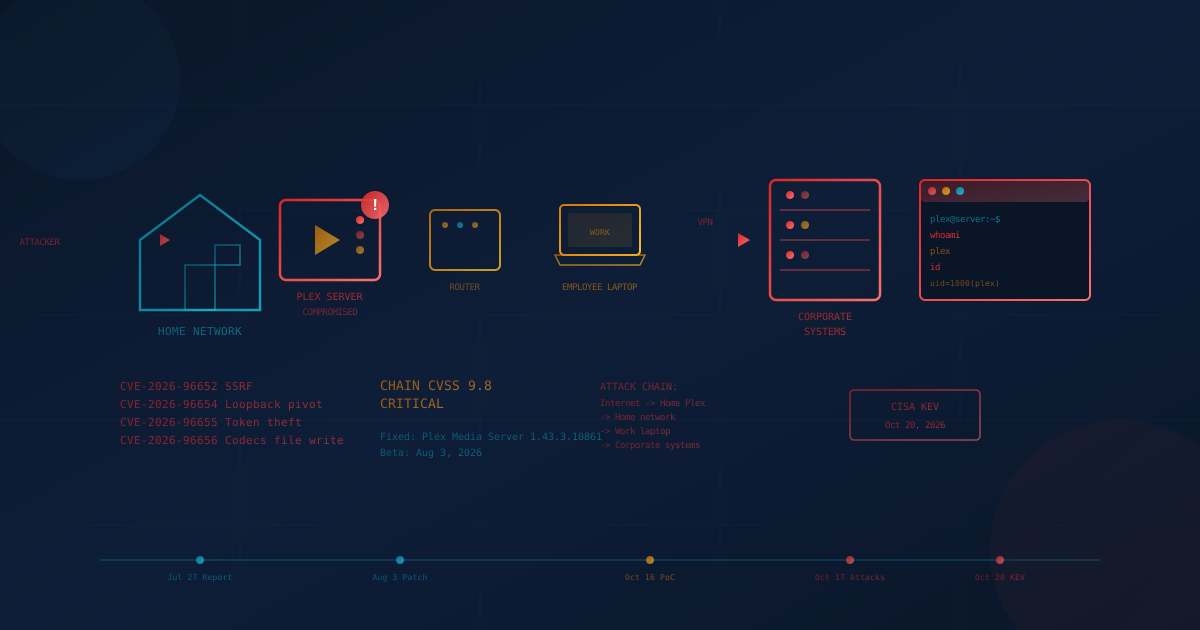
On October 20, 2026, CISA added four Plex Media Server vulnerabilities to its Known Exploited Vulnerabilities catalog. Tracked as CVE-2026-96652, CVE-2026-96654, CVE-2026-96655, and CVE-2026-96656, these flaws can be chained to give an unauthenticated attacker full control of an unpatched Plex server. Plex shipped the fix in version 1.43.3.10861, first to beta users on August 3, 2026, and announced it to all server owners on September 1. Anyone running a Plex Media Server exposed to the internet should update immediately or take it offline. If your employees work from home or connect personal devices to your corporate environment, this vulnerability matters to your business even if you have never heard of Plex.
Plex Media Server is personal entertainment software. People run it on home computers, NAS devices, and small servers to organize and stream their movie, music, and photo collections. SecurityWeek reported that threat actors began exploiting the vulnerability chain (nicknamed Plex2Shell) on October 17, 2026, one day after security researcher Zach Main published technical details and proof-of-concept code. The attackers are deploying cryptocurrency miners and proxy software that routes other people's internet traffic through compromised servers.
For most small and mid-sized businesses, the risk is not Plex itself. The risk is that your employees' home networks host applications you do not control, and those applications can become a path into systems you do control.
What Is Plex2Shell and How Does It Work?
According to security researcher Zach Main's technical write-up, Plex2Shell chains four separate vulnerabilities to achieve unauthenticated remote code execution on affected Plex Media Server installations. Main assigns the chain a CVSS score of 9.8 (critical). Each individual flaw is rated medium to high, but combined, they give an attacker everything needed to run arbitrary code on the server without any credentials.
According to Plex's advisory, the chain works as follows:
- CVE-2026-96652: An unauthenticated server-side request forgery (SSRF) in the player timeline endpoint. An attacker can force the Plex server to make requests to itself on the loopback interface.
- CVE-2026-96654: A flaw that allows access to internal plugin functions that should only be reachable from the loopback interface. The attacker uses the SSRF to pivot to these internal APIs.
- CVE-2026-96655: This flaw lets the attacker steal the server owner's admin token by tricking the server into attaching it to a request sent to an attacker-controlled destination.
- CVE-2026-96656: With the admin token, the attacker can write a malicious shared library to the Plex Codecs directory. When the transcoder next runs, it loads the library and executes the attacker's code.
The end result is that an attacker who can reach the Plex server over the network (typically port 32400) can run commands on the underlying system with the same privileges as the Plex process, usually a standard user account on Linux or Windows.
When Was It Fixed and Is It Being Exploited?
According to Main's disclosure timeline, he reported the vulnerabilities to Plex on July 27, 2026. Plex released version 1.43.3.10861 to beta users on August 3, and BleepingComputer reports it was released on August 4. On September 1, Plex announced the fixes and asked all server owners to update. CVEs were assigned on September 23, 2026. Main published his full technical write-up and proof-of-concept code on October 16, 2026.
SecurityWeek reported that a different researcher set up an internet-facing Plex honeypot and observed the first in-the-wild exploitation attempts on October 17, 2026. The attackers were using the publicly released exploit to deploy XMRig (a cryptocurrency miner) and proxy software called "myawesomeproxy."
On October 19, 2026, Plex published an updated security advisory confirming that "these vulnerabilities are being actively and widely exploited." The advisory warned that compromised servers have been used to run cryptocurrency miners and proxy software that routes other people's traffic through the victim's internet connection. Plex stated: "If your server is older than 1.43.3.10861 and reachable from the internet, assume it may be compromised."
On October 20, 2026, CISA added the four vulnerabilities to the Known Exploited Vulnerabilities catalog.
Why Should Businesses Care About Home Entertainment Software?
Plex Media Server is not business software. It has no place in a corporate data center or office network. But it runs on the home networks of employees who work remotely, connect to VPNs, and access corporate systems from their personal devices. That is where the business risk lives.
When an attacker compromises a Plex server on a home network, they gain a foothold on that network. From there, they can:
- Scan for other devices on the same network, including work laptops
- Capture network traffic, potentially including credentials and session tokens
- Install persistent malware that survives even if Plex is later patched
- Use the compromised machine as a proxy to access corporate VPNs or cloud services
The SecurityWeek report noted that attackers are deploying residential proxy software, which routes traffic through compromised home IP addresses. The researcher observed: "Plex may be hosted on residential IP and I think threat actors would love to have residential IP proxy to access corporate VPNs and emails."
What Happened at LastPass?
The business risk of home media servers is not theoretical. In 2022, password manager LastPass suffered two security breaches that ultimately exposed encrypted vault data for more than 25 million users. Ars Technica reported in February 2023 that the root cause was a vulnerability in media software on a DevOps engineer's personal home computer.
LastPass's own disclosure stated that "the threat actor targeted a senior DevOps engineer by exploiting vulnerable third-party software" and "leveraged the vulnerability to deliver malware, bypass existing controls, and ultimately gain unauthorized access to cloud backups." LastPass did not name the specific software publicly. However, Ars Technica reported that according to a source "briefed on a private report from LastPass," the software was Plex.
The attacker used the initial compromise to install a keylogger, which captured the engineer's master password when they logged into LastPass's corporate vault. With those credentials, the attacker accessed Amazon S3 buckets containing encrypted customer vault backups. The consequences have played out over years: researchers cited by Krebs on Security linked more than $35 million in cryptocurrency theft from more than 150 victims to keys they believe were stored in cracked LastPass vaults.
The lesson is direct. According to Ars Technica's source, a flaw in personal media software on an engineer's home computer opened the door to LastPass's corporate vault. The engineer was doing their job from home, on a machine that also ran software the company did not manage.
Who Is Actually at Risk?
Plex2Shell affects anyone running Plex Media Server versions before 1.43.3.10861. The severity depends on network exposure:
- Internet-exposed Plex servers: Highest risk. Many Plex users enable remote access so they can stream media while away from home. This typically means the server listens on a public IP address or is forwarded through a router. These servers are directly attackable from anywhere on the internet.
- LAN-only Plex servers: Lower but not zero risk. An attacker would need to already be on the local network (through malware, another compromised device, or physical access) to exploit the vulnerability.
- Self-hosted everywhere: Plex Media Server runs on hardware the owner controls, such as a home PC, a NAS, or a rented cloud box, according to Main's write-up. The owner is responsible for updating it.
For businesses, the exposure question is: do any of your employees run Plex at home on the same network they use for work? You probably do not know the answer, and that is the problem.
What Should Business Leaders Do?
You cannot patch your employees' home Plex servers for them. But you can take steps to reduce the risk that a compromised home network becomes a compromised business network.
- Communicate the risk. Send a brief, clear message to employees: if they run Plex Media Server at home, they should update to version 1.43.3.10861 or later immediately. If they cannot update, they should disable remote access or take the server offline. The message does not need to be technical. It needs to be actionable.
- Require device separation. Corporate-issued devices should connect to a separate network segment from personal devices and home servers where possible. As we covered in our article on BYOD risks, mixing personal and work environments on the same network creates paths attackers can exploit.
- Enforce MFA on all remote access. As our article on multi-factor authentication explains, MFA adds a second barrier beyond the username and password, which makes accounts harder to breach. Turn it on for VPNs, cloud services, and sensitive applications so that a password captured by malware on a home network is not enough on its own. Phishing-resistant MFA (hardware keys or passkeys) is stronger than SMS or push notifications.
- Monitor for suspicious access patterns. If your VPN or cloud identity provider can flag logins from unusual locations, devices, or times, enable those alerts. An attacker using a compromised home network as a proxy may trigger location-based anomalies.
- Review remote work security practices. As our article on IT practices for remote work notes, personal devices often lack a VPN, antivirus, and endpoint protection. Make sure work devices have all three, and set clear policies about what employees run on the networks they use for work.
What Should You Ask Your IT Provider?
If you work with a managed IT or security provider, here are questions to raise:
- Do our endpoint protection tools detect the known Plex2Shell indicators of compromise (process names like "myawesomeproxy" or "mylovelyminer," unusual outbound connections)?
- Are our VPN and remote access logs monitored for connections from residential IP addresses that suddenly appear after an employee has been using a different address?
- Do we have any Plex Media Server installations in our corporate environment (unlikely but worth confirming)?
- What guidance are we providing to remote employees about securing their home networks?
The broader question to ask your IT lead or provider: what visibility do we have into threats that originate outside our network but target employees who connect to our systems?
If the answer is "not much," that is a gap worth addressing.
Practical Checklist
For employees who run Plex at home:
- Open Plex Web, go to Settings, then General, and check the version number.
- If the version is below 1.43.3.10861, update immediately. Plex publishes updates for Windows, macOS, Linux, Docker, and NAS platforms.
- If you cannot update, disable remote access in Settings or take the server offline until you can.
- Check for signs of compromise: unexpected processes, high CPU usage when nothing is playing, unfamiliar files in the Plex Codecs folder.
- If you find evidence of compromise, assume the entire machine is affected. Disconnect it from the network, back up important data to a clean device, and rebuild from a fresh installation.
For businesses:
- Communicate the risk to remote employees today.
- Review network segmentation between corporate devices and home networks.
- Verify MFA is enforced on VPNs, cloud services, and sensitive applications.
- Confirm endpoint protection is deployed on all corporate devices, including those used at home.
- Consider whether your remote work policies address the risks of unmanaged software on home networks.
The Bigger Picture
Plex2Shell is a reminder that the boundary between personal and professional computing has blurred. Remote work means corporate data flows through home networks, across personal devices, and alongside applications your IT team has never heard of. An attacker who compromises any part of that environment may find a path to the rest.
This is not a call to ban Plex or any other home software. It is a call to think clearly about where your business data lives, who has access to it, and what else shares those same networks and devices. The second LastPass intrusion reportedly started with home media software. The next breach could start with something equally unexpected.
If you are not sure how well your business is protected against threats that originate outside your direct control, our free cybersecurity assessment covers 22 security areas in under five minutes. It is a starting point for understanding where the gaps are and what questions to ask next.
This article is intended for general informational purposes only and does not constitute professional security, legal, or compliance advice. Details about CVE-2026-96652, CVE-2026-96654, CVE-2026-96655, and CVE-2026-96656 are based on CISA's Known Exploited Vulnerabilities catalog, Plex's security advisories, Zach Main's published research, and reporting from SecurityWeek and Ars Technica as of October 22, 2026. The situation may evolve as researchers publish additional analysis. Organizations should consult qualified cybersecurity professionals before making operational changes based on this article.