
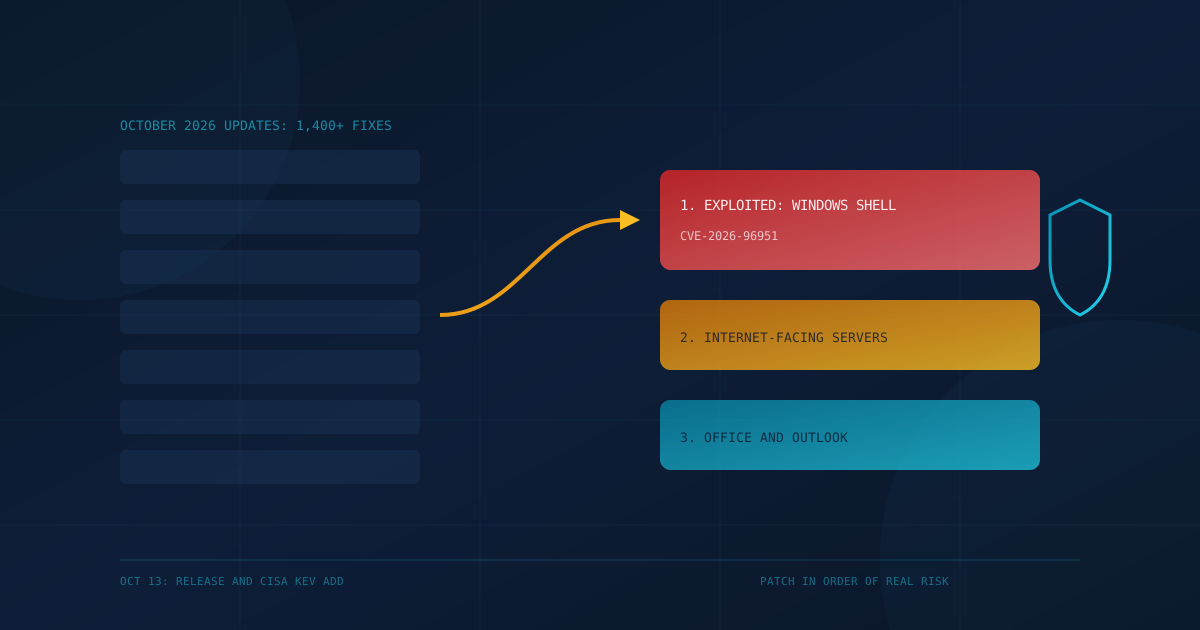
Microsoft's October 2026 Patch Tuesday, released on October 13, 2026, fixes more than 1,400 security flaws, and one of them, a Windows Shell bypass tracked as CVE-2026-96951, is already being used in real attacks. BleepingComputer counted 1,411 flaws, the largest Patch Tuesday on record. For a small business, the size of the list matters less than the order you work through it.
This post is for owners and operations leaders in Canada and the United States who rely on Windows PCs, Microsoft 365 desktop apps, or an on-premises Microsoft server. It covers what is actively exploited, what is most exposed, and a short plan for this week.
What did Microsoft fix in the October 2026 Patch Tuesday?
Microsoft's October 13, 2026 release fixes more than 1,400 vulnerabilities. Counts differ by who is counting: BleepingComputer reports 1,411 flaws, 70 of them rated Critical, while the SANS Internet Storm Center reports 1,417 with 76 Critical. The gap comes from whether cloud fixes and items published earlier in the month are included. Either way, it is the largest monthly release Microsoft has shipped.
Some context helps. BleepingComputer notes that its count excludes 348 flaws fixed earlier in the month, and that seven of the Critical cloud fixes (in services like Azure App Service and Microsoft Bookings) were handled by Microsoft and need no action from customers, according to the Zero Day Initiative. Most of what is left lands on Windows, Office, and Microsoft server products that a business runs itself.
Which October 2026 flaw is actively exploited?
CVE-2026-96951, a Windows Shell security feature bypass, is the one flaw Microsoft lists as exploited in the wild. It lets a malicious file or link skip Mark of the Web, the Windows label that triggers warnings on files from the internet. CISA added it to its Known Exploited Vulnerabilities catalog on October 13, 2026. Microsoft rates it Important, not Critical, with a CVSS score of 8.8.
In plain terms, the attacker still needs someone to open a file sent by email or chat, as SANS describes it. What the flaw removes is the warning that would normally make that person stop and think. That is why a flaw rated "Important" belongs at the top of the list: it is the one attackers are already using, and it targets the most common way small businesses get breached, a staff member opening an attachment.
The Zero Day Initiative notes that attackers have used several ways to dodge Mark of the Web since 2024, so this is a familiar pattern rather than a new idea.
Were there other zero-days this month?
Yes. Beyond the exploited Windows Shell flaw, two vulnerabilities were publicly disclosed before a fix was available, according to BleepingComputer: CVE-2026-108398 in the .NET Framework and CVE-2026-92707 in MessagePack-CSharp. Microsoft did not report either as exploited. Some outlets count all three as zero-days and others count only the exploited one, so headline numbers vary.
- CVE-2026-108398 (.NET Framework): could let an attacker who already has an account on a machine get around Windows Defender Application Control and run unapproved programs. Credited to James Forshaw of Google Project Zero.
- CVE-2026-92707 (MessagePack-CSharp): a denial-of-service flaw rated Moderate. It matters mainly to businesses that build or host their own .NET software.
What should a small business patch first this week?
Patch in order of real risk, not by headline count. Start with the actively exploited Windows Shell flaw on every Windows PC and server, then patch anything reachable from the internet, then Office and Outlook on staff machines. The October cumulative Windows update covers CVE-2026-96951, so the first step is simply getting that update installed and confirmed on every device.
- Every Windows PC and server: install the October 2026 cumulative update. This closes the exploited Windows Shell flaw (CVE-2026-96951). Confirm installation, not just approval, especially on laptops that were offline.
- On-premises Exchange Server: patch now. CVE-2026-70571 is a Critical remote code execution flaw in Exchange Server. The Zero Day Initiative calls it technically wormable but notes Microsoft considers exploitation difficult. If you still run Exchange on site, treat it as a priority anyway.
- Internet-facing servers: check for Windows Message Queuing (CVE-2026-100202, CVSS 9.8, Critical). MSMQ is not turned on by default, so many businesses are not exposed, but any server that has it enabled should be patched quickly. The Zero Day Initiative also flags a SQL Server code execution flaw (CVE-2026-65674) for any SQL Server reachable from the internet.
- Office and Outlook on staff machines: BleepingComputer's list includes several Critical remote code execution fixes in Outlook, Excel, Word, and PowerPoint. Make sure Microsoft 365 Apps are updating automatically and are on a current build.
- Everything else on your normal schedule. The rest of the release can follow your regular patch window, as long as that window is measured in days, not months.
Is anything reaching end of support this month?
Yes. Microsoft said that on October 13, 2026, Windows 11 version 24H2 Home and Pro and Windows 10 Enterprise LTSB 2016 reached end of updates, and that the October 2026 update is the last one those editions will receive, as reported by BleepingComputer. Any business PC still on those editions should be upgraded so it keeps getting fixes like this month's.
Home and Pro editions are common on small-business laptops bought at retail, so this is worth checking even if your company thinks of itself as a "Windows 11 shop."
Why does patch volume keep climbing?
Monthly fix counts have jumped sharply in 2026, and BleepingComputer attributes the trend partly to Microsoft using AI tools to find and fix flaws in its own products. Bigger releases do not mean every business faces more danger; the number of flaws actually used in attacks this month was one. The risk is that teams drown in volume and miss the one that matters.
To help with that, Microsoft introduced experimental "risk cohorts" this month, grouping related flaws (for example, 135 involving Office documents and mail clients). Microsoft says the groups do not by themselves show which flaws are most dangerous, so they support prioritization rather than replace it.
What should business leaders ask their IT provider?
Ask one specific question: "When was the October 2026 Windows update confirmed installed on every one of our devices, and can you show me the report?" A good managed IT provider can answer with a date and a device count within a day. Vague answers like "patches are automatic" are a sign that nobody is checking.
For a framework on how fast patches should land and what proof to expect, see our guide on setting a patch SLA with your IT provider. In Canada, the Canadian Centre for Cyber Security's baseline controls list patching as a core control, and in the US, CISA's KEV catalog is a practical, free list of what to fix first.
Cyber Unit's managed IT services include patching and updates for businesses across Canada and the US. If you are not sure how your patching stacks up, our free cybersecurity assessment takes about five minutes and shows where the gaps are.
This article is intended for general informational purposes only and does not constitute professional security, legal, or compliance advice. Details about Microsoft's October 2026 security updates are based on public reporting and vendor disclosures as of the date of publication and may change as Microsoft revises its advisories. Organizations should consult qualified cybersecurity professionals before making operational changes based on this article.