
If your business website runs WordPress with the Bricksforge plugin, you need to check your version today. A critical Bricksforge vulnerability, tracked as CVE-2026-85097, is being actively exploited. Patchstack reported on October 8, 2026 that attacks began on October 7 at 21:47 UTC. The vulnerability affects sites running Bricksforge 3.1.8.9 or earlier. A fix was available in version 3.1.8.10 and 4.0.0, but exploitation began against sites that had not yet updated.
The fix is available. The question is whether someone on your side has applied it.
Is the Bricksforge vulnerability being exploited?
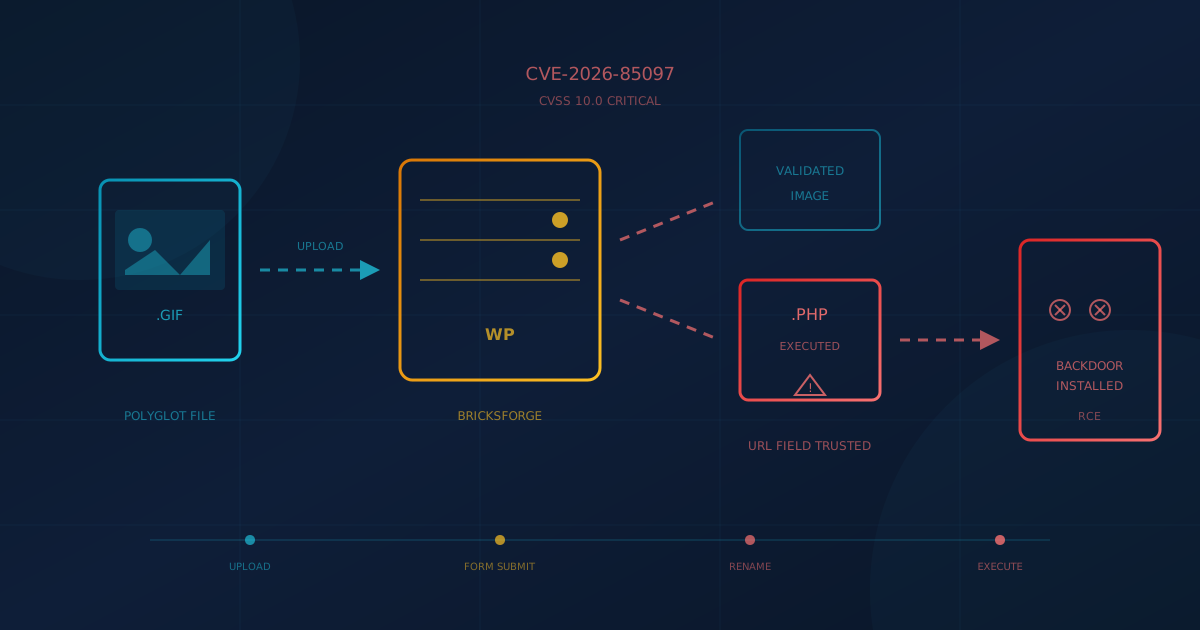
Yes. Patchstack's telemetry recorded exploitation attempts from 63 unique IP addresses starting October 7, 2026. Attackers are targeting the Bricksforge REST API form submission endpoint (/wp-json/bricksforge/v1/form_submit) using crafted payloads. Patchstack observed two clusters of automated, coordinated requests, suggesting this is not opportunistic probing but organized activity.
Patchstack rates the flaw CVSS 10.0; Wordfence lists CVSS 9.8. Either way, it is as serious as WordPress plugin vulnerabilities get: no authentication required, no user interaction needed, and the outcome is arbitrary code execution on your server.
What does the vulnerability allow an attacker to do?
An attacker can upload and execute any PHP code they choose, without logging in. From there, they can install backdoors, modify your site content, steal data, send spam, or enlist your server in attacks on other sites. The technical path involves uploading a file that passes initial checks as an image but contains PHP code, then tricking Bricksforge into treating it as a PHP file when the form is submitted. Patchstack's advisory describes the method in detail for those who need it.
The business impact is straightforward: an attacker who exploits this flaw owns your website. They can read your customer contact forms, redirect your visitors to malicious sites, or use your domain to host phishing pages. Cleaning up after a compromise typically costs far more than the few minutes required to update a plugin.
Which WordPress sites are affected?
Sites running Bricksforge versions 3.1.8.9 and earlier are affected by CVE-2026-85097. The vulnerability was fixed in version 3.1.8.10 on the 3.x line and in version 4.0.0 (released September 17, 2026) on the 4.x line. Separately, the vendor shipped version 4.0.1 on October 8, 2026 with a related Pro Forms upload security fix that, according to the vendor changelog, "affects every site with Pro Forms active, including sites whose forms use no upload fields." The safest guidance is to update to the current release, 4.0.2.
Bricksforge is a premium plugin that extends Bricks Builder, a visual site-building tool. If you are unsure whether your site uses Bricksforge, ask your web developer or agency.
How do I fix the Bricksforge vulnerability?
Update to the current Bricksforge release, 4.0.2. CVE-2026-85097 was fixed in version 3.1.8.10 and 4.0.0, and version 4.0.1 (October 8, 2026) includes a related Pro Forms upload security fix. Version 4.0.2, released October 13, 2026, addresses both. If your site cannot update immediately, the only safe option is to deactivate Bricksforge until you can.
After updating, check for signs that someone already exploited the flaw:
- Look for unexpected PHP files in
/wp-content/uploads/bricksforge/tmp/and the regular uploads directory. Patchstack observed attackers creating files namedlogin_admin_*.php. - Review form submission logs for unusual activity, especially repeated submissions or requests containing
temporaryFileUploadswith mismatched file paths and URLs. - Check HTTP access logs for requests to
/wp-json/bricksforge/v1/form_submitor/wp-admin/admin-ajax.phpwithbricksforge_form_submitactions.
If you find suspicious files or log entries, treat the site as compromised. Restore from a known-good backup taken before October 7, update the plugin, then change all administrative passwords. If your backups do not go back that far, a security professional can help assess the damage.
Who is responsible for patching your WordPress plugins?
This is the question many business owners never ask until after an incident. If you hired a web agency to build your site, does their contract include ongoing security updates? If your IT provider manages your infrastructure, does that extend to WordPress plugins?
The answer varies. Some agencies include plugin maintenance in a monthly retainer. Others hand off the site and move on. Some IT providers patch servers but do not touch the applications running on them. As we covered in our analysis of the FBI's missed-patch breach, the accountability stays with you even when the work moves to someone else.
Three questions to answer this week:
- Who updates our WordPress plugins, and how often? A name, not a vague "our web team handles it."
- How would we know if a critical patch were released today? Are they subscribed to the vendor's changelog or security mailing list?
- What is the expected turnaround for a critical fix? Exploitation of CVE-2026-85097 began October 7 against sites that had not yet applied an available fix. A monthly update cycle is not fast enough for flaws like this.
The broader pattern with WordPress plugins
This is not the first time a WordPress plugin flaw has made urgent news, and it will not be the last. As we covered in our look at WordPress plugin security in 2026, Patchstack reported nearly 8,000 new vulnerabilities in the WordPress ecosystem in 2024, with 96% of them in plugins. The open plugin model that makes WordPress flexible also makes it a persistent target.
Bricksforge is a well-regarded plugin with an active developer. The vendor patched quickly. The issue is the gap between "patch available" and "patch applied," which attackers are increasingly able to exploit. The exploit window has shrunk to hours, not days.
For small and mid-sized businesses, the takeaway is operational. Whoever manages your WordPress site needs a process for critical updates that does not wait for the next scheduled maintenance window. If that process does not exist, the Bricksforge incident is a good reason to create one.
What to do this week
- Confirm your Bricksforge version. If it is 3.1.8.9 or earlier, update immediately or deactivate the plugin.
- Check for signs of compromise. Look for unexpected PHP files in upload directories and review form submission logs.
- Ask who owns plugin updates. Get a name and a turnaround time, in writing if possible.
If you are not sure how your business would handle a critical WordPress vulnerability, our free quick security assessment checks 22 security areas, including patching, in under five minutes. The one question to ask your web provider or IT lead today: "If a critical plugin vulnerability were disclosed tomorrow, how would we know, and how fast would we patch?"
This article is intended for general informational purposes only and does not constitute professional security, legal, or compliance advice. Details about CVE-2026-85097 and the Bricksforge vulnerability are based on public reporting from Patchstack, The Hacker News, and the vendor changelog as of October 13, 2026, and may evolve as the situation develops. Organizations should consult qualified cybersecurity professionals before making operational changes based on this article.