Multi-factor authentication was supposed to be the answer. For years, security professionals—ourselves included—have urged businesses to enable MFA on every account, every system, every login. And that advice was correct. MFA remains one of the most effective security controls available.
But the threat landscape has shifted. Attackers aren't trying to guess your password anymore. They're stealing your entire authenticated session—password, MFA token, and session cookie—in real time, while you watch your login succeed. And the tools to do it are now available as subscription services, priced lower than most business software.
If your organization still hasn't deployed MFA, you're already behind. If you have MFA but rely on SMS codes or authenticator apps, you're vulnerable to the latest generation of attacks. And if you haven't started evaluating hardware security keys or passkeys, it's time.
How Attackers Are Bypassing MFA Right Now
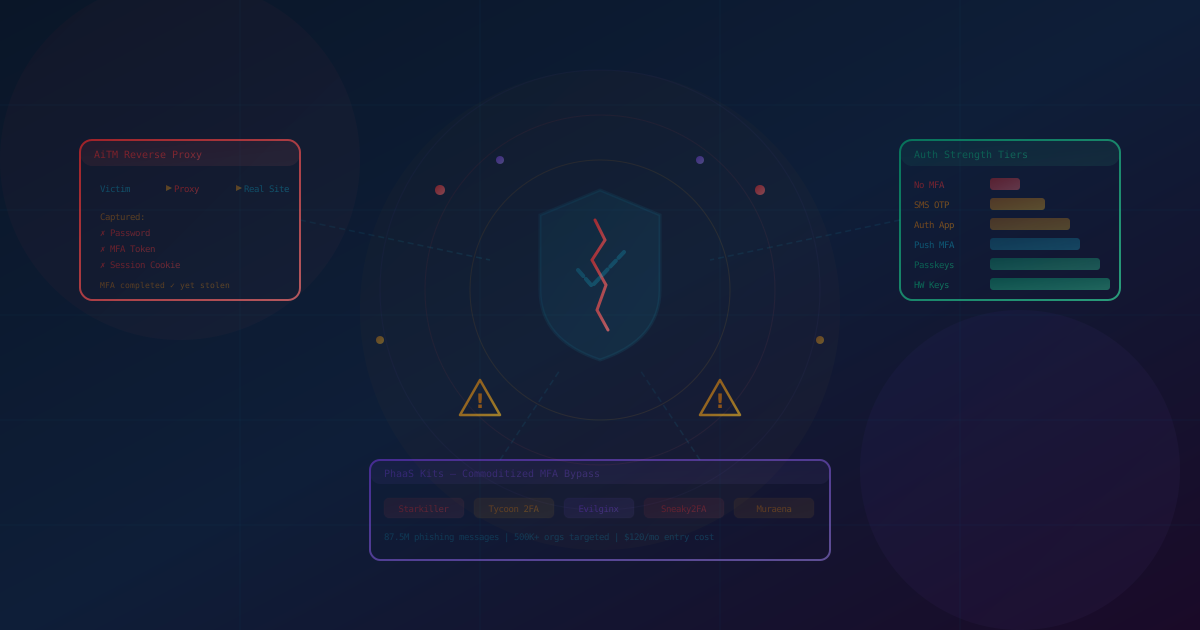
The technique is called Adversary-in-the-Middle, or AiTM. Instead of building a fake login page that captures your password and then replays it—the traditional phishing approach—AiTM attacks place an invisible proxy between you and the real website. You see the actual Microsoft or Google login page. You enter your real password. You approve the real MFA prompt on your phone. Everything works exactly as expected.
Except every interaction is being relayed through attacker-controlled infrastructure. The moment the legitimate site issues a session cookie—the token that proves you've successfully authenticated—the attacker captures it. They can then use that cookie to access your account from anywhere, without needing your password or MFA again. Your MFA worked perfectly. Your account is still compromised.
This isn't theoretical. It's happening at scale, powered by a growing ecosystem of Phishing-as-a-Service platforms that have turned sophisticated credential theft into a point-and-click operation.
The Rise of Phishing-as-a-Service
In February 2026, security researchers at Abnormal AI documented a platform called Starkiller—a Phishing-as-a-Service (PhaaS) kit operated by a threat group known as Jinkusu. What makes Starkiller notable isn't just its effectiveness but its presentation. It is packaged and sold with the polish of a legitimate SaaS product: a dashboard for selecting which brand to impersonate, real-time analytics on victim interactions, URL masking with link shorteners, and a subscription model complete with updates and customer support.
Under the hood, Starkiller runs a headless Chrome browser inside a Docker container that acts as a real-time reverse proxy. Victims interact with the actual login page of whatever service is being targeted—Microsoft 365, Google Workspace, PayPal, Instagram—while every keystroke, form submission, and session token is captured. Because the victim sees the real site with the real code, there are no static phishing templates for email security tools to flag.
Starkiller is far from alone. The PhaaS ecosystem has expanded rapidly over the past two years. Tycoon 2FA, which was partially dismantled by Microsoft and Europol in early 2026, had accounted for an estimated 62 percent of phishing attempts that Microsoft blocked by mid-2025. The platform linked to approximately 96,000 victims and sent an estimated 87.5 million phishing messages targeting over 500,000 organizations globally. Its entry price was roughly $120 per month—less than many legitimate business tools.
Other active kits include Evilginx (an open-source AiTM framework originally built for red teams but widely adopted by attackers), Sneaky2FA, Flowerstorm, and Muraena. The underlying technique—reverse-proxy session theft—is well-documented and increasingly accessible. As we covered in our piece on AI-powered phishing, the barrier to launching sophisticated attacks continues to drop.
The Breaches That Proved MFA Isn't Enough
The evidence isn't limited to theoretical research. Some of the highest-profile breaches of recent years succeeded specifically because they bypassed MFA.
Uber (September 2022): An attacker affiliated with the Lapsus$ group purchased valid VPN credentials from a dark-web marketplace, then bombarded the account holder with over 30 MFA push notifications—a technique known as MFA fatigue or push bombing. When that alone didn't work, the attacker contacted the contractor via WhatsApp, posing as Uber IT support. The contractor approved the prompt, and the attacker gained full access to Uber's internal network.
Cloudflare and Twilio (August 2022): Both companies were targeted in a coordinated SMS phishing campaign known as 0ktapus, which hit over 130 organizations. Twilio was breached after employees entered credentials on a phishing page that mimicked their Okta login. Cloudflare was targeted with the same technique but blocked the attack entirely—because the company had already deployed FIDO2 hardware security keys. The hardware key's cryptographic binding to the legitimate domain prevented authentication through the phishing proxy, even though some employees did click the phishing link and enter credentials.
MGM Resorts and Caesars Entertainment (September 2023): Scattered Spider gained initial access through social engineering, convincing IT help desk staff to reset MFA for privileged accounts. The attackers then used compromised Okta super administrator accounts to move laterally, exfiltrate data, and deploy ransomware. Caesars reportedly paid a $15 million ransom. MGM faced over $100 million in losses.
Okta (October 2023): Attackers accessed Okta's support system using stolen session tokens from HAR files. Because session tokens represent already-authenticated sessions, MFA was bypassed entirely. Okta didn't detect the unauthorized access for 14 days.
Change Healthcare (2024): Congressional testimony confirmed that attackers used stolen credentials against a Citrix portal that lacked MFA entirely. The breach disrupted nationwide healthcare payment processing and cost UnitedHealth over $2.8 billion.
These incidents share a common thread: MFA, when present, was either bypassed through session theft, overcome through social engineering, or simply absent on critical systems. FRSecure's incident response data from 2024–2025 reinforces the pattern—79 percent of the business email compromise incidents they responded to involved victims who had correctly implemented MFA.
Why SMS and Authenticator Apps Fall Short
Not all MFA is created equal. We explored the different levels of MFA in an earlier article, and the hierarchy matters more now than ever.
SMS Codes
SMS-based authentication has been the weakest form of MFA for years. SMS messages are unencrypted, susceptible to SIM swapping (where attackers convince carriers to transfer your number to their device), and trivially intercepted by AiTM proxies. We've written about why SMS security codes aren't secure and the risks of SIM hijacking in detail. In 2025, the USPTO discontinued SMS authentication entirely. FINRA followed months later. The FBI and CISA have both issued formal warnings against using SMS for authentication.
Authenticator Apps (TOTP)
Time-based one-time passwords from apps like Google Authenticator or Microsoft Authenticator are a meaningful step up from SMS. They're not susceptible to SIM swapping and the codes aren't transmitted over cellular networks. But they share a fundamental weakness with SMS: the codes are entered into a browser, which means an AiTM proxy can capture and relay them in real time, just like any other form input. The code you type goes to the attacker's proxy, which forwards it to the real site, which issues a session token, which the attacker steals.
Push Notifications
Push-based MFA (where you approve a login by tapping "Yes" on your phone) eliminates the need to type a code, but introduces its own vulnerability: MFA fatigue. As the Uber breach demonstrated, an attacker with valid credentials can trigger repeated push notifications until the user—frustrated, confused, or simply conditioned to approve—taps accept. Some push implementations now include number matching (where you must enter a displayed number), which mitigates brute-force fatigue attacks but doesn't prevent AiTM session theft.
What Actually Works: Phishing-Resistant Authentication
The common thread in every MFA bypass technique is the ability to intercept or relay a shared secret—whether that's a password, a one-time code, or a push approval. Phishing-resistant authentication eliminates shared secrets entirely.
Hardware Security Keys (FIDO2)
Hardware security keys like YubiKey and Google Titan use the FIDO2/WebAuthn protocol to perform a cryptographic handshake that is bound to the specific domain of the legitimate website. When you authenticate with a hardware key, the key verifies that the domain requesting authentication matches the domain it was registered with. A phishing proxy sitting at a different domain—no matter how convincing the page looks—cannot complete this handshake. The authentication simply fails.
This is why Cloudflare's hardware key deployment stopped the 0ktapus phishing campaign that successfully compromised Twilio and over 130 other organizations. The technology doesn't rely on human judgment to distinguish real from fake. It enforces origin verification at the cryptographic level.
Passkeys
Passkeys extend the same FIDO2/WebAuthn standard to software-based credentials stored on your devices. Like hardware keys, passkeys use public-key cryptography bound to specific domains, making them resistant to phishing and AiTM attacks. Unlike hardware keys, they don't require a separate physical device—they're stored in your phone, laptop, or password manager and authenticated via biometrics or device PIN.
Passkey adoption has accelerated significantly. Over 3 billion passkeys are now in active use globally, and NIST's updated guidelines (SP 800-63-4, finalized in July 2025) now require that multi-factor authentication offer a phishing-resistant option. Apple, Google, and Microsoft all support passkeys across their platforms, and major consumer services including PayPal, Amazon, and eBay have deployed them. PayPal reported that phishing-related losses dropped nearly in half after their passkey deployment.
We noted in our article on the latest NIST password guidelines that the regulatory direction is clear: phishing-resistant authentication is moving from recommendation to requirement.
What This Means for Your Business
The security landscape isn't binary—it's a spectrum. And where your organization sits on that spectrum determines your exposure to the attacks we've described.
If You Don't Have MFA: Deploy It Immediately
The Change Healthcare breach is a reminder that critical systems without MFA remain the lowest-hanging fruit for attackers. Any form of MFA—even SMS—is dramatically better than none. We covered why in our articles on whether you need MFA and why you should be using it. Start here if you haven't already.
If You Have SMS-Based MFA: Upgrade
Move to authenticator apps or push-based MFA as a minimum. SMS should be considered a legacy method appropriate only as a temporary measure or for non-critical accounts. Every regulatory body and standards organization is moving away from it.
If You Have Authenticator Apps or Push MFA: Plan for Phishing Resistance
Your current MFA still provides meaningful protection against credential stuffing, brute force, and basic phishing. But it won't stop AiTM attacks or determined social engineering. Begin planning your migration to phishing-resistant methods:
- Deploy hardware security keys for privileged accounts. Start with domain admins, IT staff, finance personnel, and anyone with access to sensitive systems. YubiKey and Google Titan keys cost between $25 and $75 per key—a fraction of what a single breach costs.
- Enable passkey support where available. Microsoft Entra, Google Workspace, and most major SaaS platforms now support passkeys. Begin enrolling users, starting with high-risk roles.
- Eliminate phishable fallback methods. As Apple noted at the 2025 FIDO Authenticate conference, adding passkeys as an option doesn't make a system phishing-resistant if SMS recovery or password reset flows still exist. True phishing resistance requires removing all phishable paths, not just adding a better one.
Layer Your Defenses Beyond Authentication
Even phishing-resistant MFA shouldn't be your only line of defense. As we discussed in our article on layering your security, defense in depth remains essential:
- Monitor for session anomalies. Watch for session cookies being used from unexpected locations, IP addresses, or device fingerprints. Token replay is detectable if you're looking for it.
- Train employees on social engineering. The MGM and Caesars breaches started with phone calls to help desks. Security awareness training should include vishing scenarios and MFA reset verification procedures, not just email phishing simulations.
- Use conditional access policies. Restrict access based on device compliance, location, and risk signals. A valid session token from an unrecognized device in an unexpected country should trigger additional verification.
- Consider a zero-trust framework. Zero-trust architectures don't assume that a successful authentication means a trusted user. Continuous verification reduces the window of opportunity for stolen sessions.
The Bigger Picture: Security Controls Must Evolve
The story of MFA bypass is really a story about the arms race between attackers and defenders. When passwords alone protected accounts, attackers built tools to steal passwords. When MFA was added, attackers built tools to steal sessions. When static phishing pages were flagged, attackers built real-time proxies. When those proxies required technical skill, someone packaged them into $120-per-month subscription services.
This pattern will continue. The tools attackers use will keep getting cheaper, more polished, and more accessible. That's not a reason for despair—it's a reason to stay ahead. The organizations that treat security as a static checkbox will keep getting caught off guard. The ones that treat it as an evolving practice—regularly reassessing their controls against current threats—will be far better positioned.
Hardware security keys and passkeys aren't the final answer. They're the current best answer for authentication. And right now, they provide something that SMS codes, authenticator apps, and push notifications cannot: cryptographic proof that the user is interacting with the legitimate service, not a proxy.
If your business hasn't started evaluating phishing-resistant authentication, the growing ecosystem of PhaaS platforms like Starkiller, the scale of operations like Tycoon 2FA, and the real-world breaches at Uber, MGM, Okta, and Change Healthcare should make the case clearly: the threat is current, it's accessible to attackers of all skill levels, and traditional MFA is no longer sufficient to stop it.
The question isn't whether to move to phishing-resistant authentication. It's how quickly you can get there.
This article is intended for informational purposes only and does not constitute professional security, legal, or compliance advice. Organizations should consult with qualified cybersecurity professionals to assess their specific authentication needs and develop appropriate security policies.